
What Is Media Asset Management for eLearning

You're trying to prepare a blended lesson, but the lecture recording is buried in a shared drive. Several files have similar names, one version lacks captions, and nobody can tell which clip students should watch. A student's video assignment sits in a separate folder, while feedback is scattered across email and the learning management system. The content exists, but the learning workflow doesn't.
Media asset management, or MAM, provides the structure behind that workflow. It gives an institution a central way to ingest, organise, secure, search, edit, reuse, and distribute video and audio throughout their lifecycle. For universities and corporate training teams, that means treating media as teaching content and learning evidence, not merely as large files waiting in storage.
Understanding Media Asset Management in Modern Education
Ask “what is media asset management?” and the clearest answer is practical: MAM is a system for managing rich, time-based media from creation through reuse and delivery. It supports recordings, lecture captures, interviews, demonstrations, podcasts, student submissions, training sessions, and the different versions created for delivery.
A shared folder answers one question: where is the file? A MAM answers much more:
What does this recording contain?
Who may view, edit, or share it?
Which version is approved?
Where is it being used?
Can a learner find the relevant moment without watching the entire recording?
Can the same clip be reused in another course or training module?
Traditional Digital Asset Management, or DAM, often centres on brand and marketing material such as photographs, brochures, graphics, and approved campaign files. MAM can manage those media types, but its main strength is video and audio, where duration, playback, captions, technical formats, permissions, and version history matter.
That distinction helps explain why a generic file repository becomes frustrating in education. A lecture recording isn't just a video file. It may have a speaker, module, academic year, topic, accessibility status, copyright restriction, transcript, thumbnail, and several delivery versions. A student submission may also need a deadline, assessor access, moderation status, retention rule, and feedback record.
Practical rule: If people need to search inside media, manage permissions around it, reuse sections of it, or deliver it across different learning contexts, storage alone isn't enough.
MAM as learning infrastructure
The British Library's collections show the scale that media and information systems may need to support. It reports around 60 million newspaper issues dating back to the early 1600s, nearly 50,000 television and radio news programmes recorded since May 2010, and more than 4.8 million UK websites archived since 2013. Its collection grows by more than 2,400 news publications each week, including about 1,500 newspapers, 500 news websites, 280 television news programmes, and 140 news radio programmes. These figures come from the LDC Media Sector Report on UK archival institutions.
Education usually operates at a different scale, but the underlying challenge is similar. Staff need to preserve useful content, find it reliably, control access, and make it available to the right audience. A MAM turns that challenge into a repeatable learning-content infrastructure.
The Core Components of a Reliable MAM System
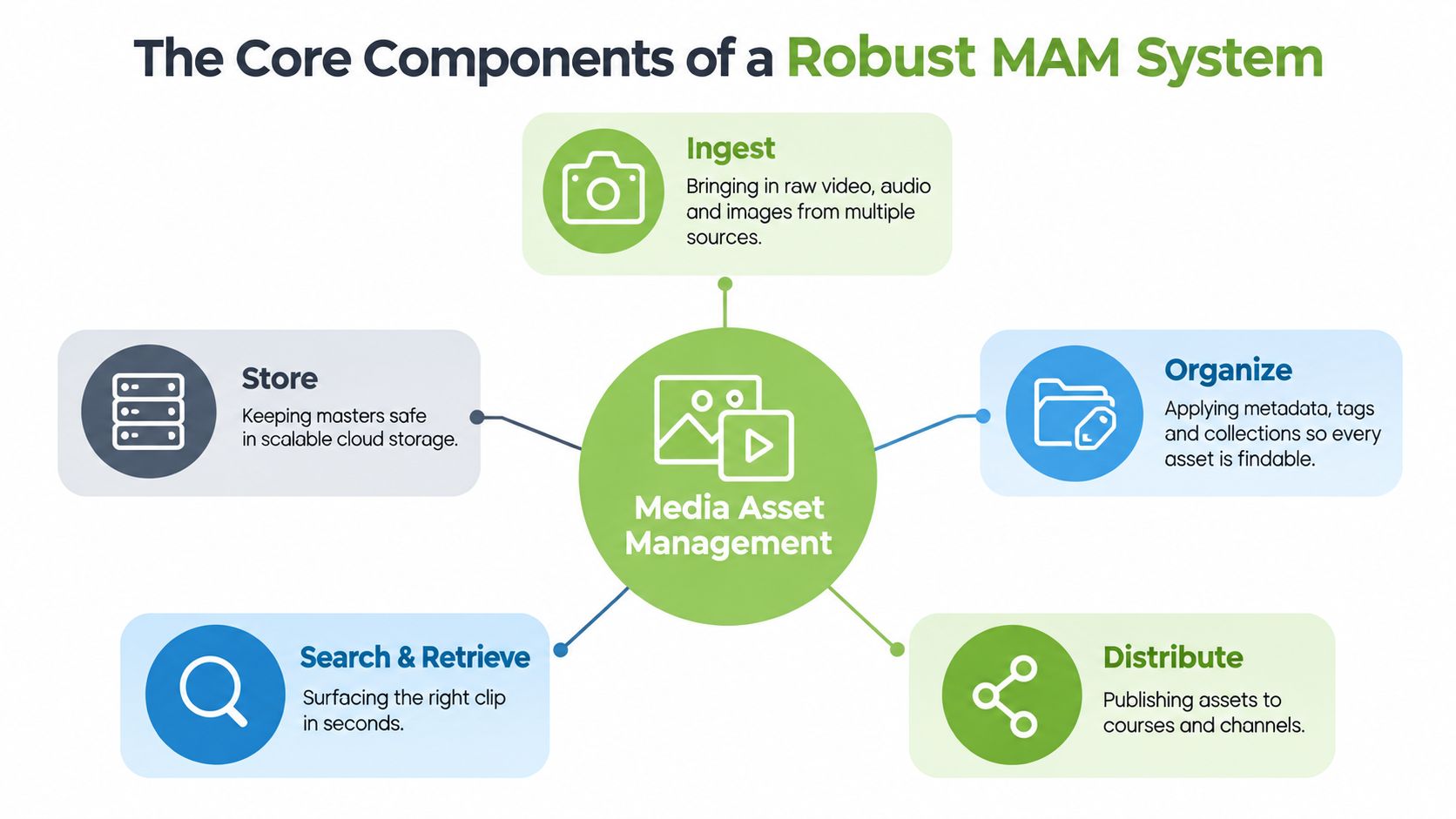
A lecturer records a demonstration for a practical class. The file enters the MAM, receives descriptive information, is converted into suitable playback versions, and reaches the correct course space. Each stage supports the next, so the recording remains usable from capture through teaching and review.
Ingest and store
Ingest brings media into a managed environment. Sources can include lecture-capture systems, cameras, mobile devices, video-conferencing platforms, editing applications, and student uploads. Capturing key information at entry prevents staff from having to reconstruct context later.
The platform stores a protected master and can create working or playback versions. Staff can then edit or stream an appropriate copy while preserving the original recording. That separation matters for lecture archives, assessment evidence, and materials that may need future revision.
The UK Government Digital Marketplace describes OpenText Media Management as a centralised repository for organising, storing, and delivering rich media throughout its lifecycle. Its listing includes workflow automation, collaboration and publishing controls, and rendition management for creating versions suited to different channels. The OpenText Media Management service description provides the capabilities listed in the UK public-sector marketplace.
Organise and describe
Metadata gives an asset meaning beyond its filename. A lecture may need fields for course, lecturer, topic, date, academic level, accessibility status, rights, and review date. A practical assignment may also require the student, cohort, assessment, submission status, and assessor permissions.
The UK government's data asset management policy requires departments and arm's length bodies to identify and manage metadata for in-scope data assets in catalogues and report them centrally. For educational media, the principle is direct: consistent, mandatory metadata makes searching, rights tracking, and lifecycle management dependable.
Search and retrieve
Search needs to reach beyond filenames. A tutor may look for a module, speaker, subject tag, or transcript section. A learner may open a course collection or assigned link instead of searching the entire repository.
A MAM connects the media file with its description, permissions, versions, and delivery locations. This relationship is what separates a managed learning-content system from a collection of folders.
Distribute
Distribution places media in front of its intended audience. A MAM can publish through an LMS, embed a protected player on a webpage, provide a controlled link, or send an approved version to another channel. The same recording can therefore support lecture access, staff training, or a marked assignment without creating uncontrolled copies.
For context on managing technology inventories and other organisational resources, IT asset management explained offers a useful comparison. Media asset management applies that governance approach to rich media, where playback, permissions, versions, and educational use must work together.
Teams choosing where the system should operate can compare cloud and on-premise deployment options, weighing storage, control, maintenance, and access requirements.
Transforming Teaching and Training Through Video Workflows
A media workflow becomes educationally valuable when it supports what people need to do, not just where files sit. Consider a practical assessment in a health sciences course. Students record themselves explaining a procedure, upload the video through the course workflow, and give the tutor a clear submission rather than sending a large attachment. The tutor reviews the recording, adds feedback at relevant moments, and retains the approved submission with the assessment record.
The same pattern works in corporate learning. A new manager might submit a role-play conversation, demonstrate a safety inspection, or explain a process using screen recording. The trainer can review performance, request a revision, and compare the final submission with the original criteria.
From assignment brief to feedback
A MAM supports each step:
Brief the task: The tutor publishes instructions, examples, permitted formats, and access rules.
Capture the response: Students or trainees record using an approved tool or upload an existing file.
Manage the submission: The platform associates the video with the learner, course, assignment, and status.
Review the evidence: The assessor watches, searches, and comments without downloading unnecessary copies.
Reuse the learning: With appropriate permission, strong examples can inform future teaching.
This makes video an active learning medium. Learners demonstrate judgement, communication, technique, and reflection. Tutors can assess more than a written description when the learning outcome involves performance.
A video assignment should have the same clarity of ownership, feedback, and retention as a written assignment. The file format changes, but the teaching responsibility doesn't.
Lecture capture and hybrid participation
Lecture capture presents a different challenge. A recording may serve students attending on campus, distance learners, students revising for assessment, or staff creating a short resource from a longer session. Without organisation, one recording becomes difficult to revisit. With structured metadata, captions, chapters, permissions, and links inside the course, it becomes a reusable learning object.
The University of Edinburgh describes a media system supporting all 35,000 students and 10,000 staff, including distance learners. Its Media Hopper service enables users to create, edit, share, view, reuse, and centrally store media across virtual learning environments, websites, and social media. The university's Media Hopper overview illustrates why MAM in higher education is more than a library. It acts as infrastructure for creation, publishing, learning access, and reuse.
Corporate trainers can apply the same model to onboarding, compliance learning, product demonstrations, and recorded workshops. A central repository keeps the current version visible while allowing trainers to build shorter lessons from longer sessions. Teams planning this work should map the video editing workflow from recording to review, approval, captioning, and publication.
Streamlining Operations with Integrated LMS and Communication Workflows
A lecturer preparing an assignment should be able to find the approved recording without leaving the course platform. If locating a video requires downloading it from the MAM, uploading another copy, and pasting a new link into Moodle, the teaching process becomes fragmented. An effective integration keeps the media asset connected to the activity where learners use it.
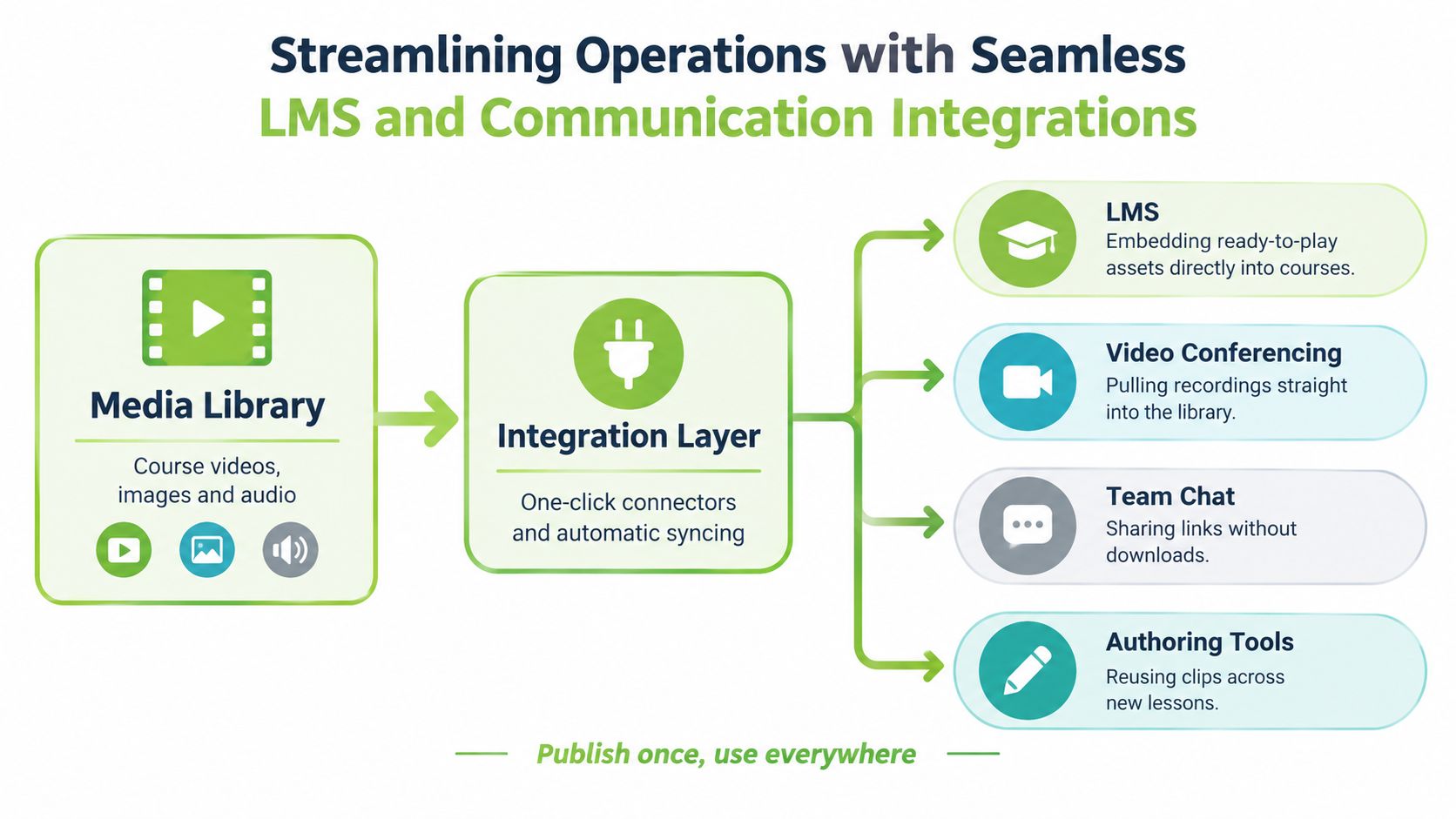
Within Moodle, Canvas, Blackboard, or D2L Brightspace, a tutor can select a managed asset, place it in a lesson, attach it to an assignment, or include it in feedback. Learners then open the authorised version in the course environment they already know. The LMS provides the learning context, while the MAM supplies controlled media delivery.
The integration layer
The integration layer connects the media repository to teaching and communication tools. It can pass identity, permissions, playback instructions, links, and selected metadata without producing unmanaged duplicates. In practice, that connection supports several common activities:
Teaching activity | Connected workflow |
|---|---|
Embed a lecture | Select the managed recording inside the LMS |
Set a video assignment | Direct learners to a controlled submission workflow |
Give feedback | Review the media alongside the learning activity |
Reuse a clip | Insert an approved section into another lesson |
Record a live session | Move the recording into the managed library for review |
Zoom and Microsoft Teams recordings can follow the same route. The platform ingests the file, applies ownership and access rules, and organises it by course, team, or programme. Staff can then work from a shared record instead of maintaining separate personal archives.
Less switching, clearer ownership
A connected setup assigns each system a clear role. The LMS manages lessons, assignments, and assessment. The MAM manages media storage, metadata, versions, permissions, and playback. This arrangement helps tutors work with recordings without turning every course page into a separate media archive.
A meeting recording also needs preparation before it becomes teaching material. Trainers may trim introductions, remove private discussion, add captions, set a useful title, and choose the audience. The integration keeps that prepared version available in the relevant course or training activity.
Teams reviewing learning platforms may also consult this overview of formazione online con Spark for broader LMS context. The practical test is whether the connected tools support the complete workflow around a video, from assignment or lecture capture through review and learner access.
Safeguarding Intellectual Property and Ensuring Compliance
Educational media often contains information that shouldn't be public. A recording may include student contributions, unpublished research, examination guidance, personal data, licensed material, or internal business processes. Uploading such content to a consumer video service can make ownership, access, retention, and onward sharing difficult to control.
A dedicated MAM provides a stronger governance model because it treats every asset as a managed record. Administrators can define who may view, edit, download, publish, or share content. Different permissions can apply to a master file, an edited version, a public embed, and an internal review copy.
Permission is part of the asset
Access control needs to reflect educational roles. A student may submit a video but not see another student's work. A tutor may review and annotate submissions but not alter the master recording. A communications team may publish an approved event highlight without receiving access to private classroom discussion.
The UK Government Digital Marketplace listing for Capture describes ingest, management, and sharing workflows with layered permissions, keywording for metadata enrichment, and modules for licensing, finance, and royalties. Those capabilities show why MAM also supports rights and monetisation governance, not only storage. The Capture service listing provides the relevant public-sector description.
Governance needs evidence
Security controls work best when administrators can see what happened to an asset. Audit trails can help answer who uploaded a recording, who changed its permissions, which version was approved, and whether it was shared outside the intended group. Retention policies can help teams decide when a temporary submission, outdated training recording, or obsolete copy should be removed or archived.
The National Army Museum's tender describes a DAMS as a central hub for ingress, storage, management, discovery, and sharing. It also calls for a structured, secure, accessible repository with a single authoritative version of each asset. The National Army Museum digital asset management requirement captures an important principle for education too: staff should know which copy is authoritative before they publish or assess it.
Read video content security alongside your own institutional policies, especially when deciding how to handle learner data, copyrighted recordings, and confidential training material.
Why MEDIAL is the Purpose-Built MAM for eLearning
Generic video hosting usually begins with playback. An educational MAM begins with the learning workflow around playback. That difference affects how staff create media, how students submit work, how trainers provide feedback, and how institutions control content after publication.
MEDIAL provides a secure environment for managing video and audio, with LMS integrations for Moodle, Canvas, Blackboard, and D2L Brightspace. Its in-browser tools support trimming and exporting, so staff can prepare a useful section without moving the media into a separate editing application. AI-assisted closed-caption generation supports accessibility workflows, while administrators can choose on-premises or cloud deployment according to institutional requirements.
Generic hosting compared with learning-focused management
Requirement | Generic video hosting | Educational MAM approach |
|---|---|---|
Course delivery | Share or embed a video | Connect the asset to LMS activities and permissions |
Editing | Often requires another application | Edit selected media in the browser |
Accessibility | May depend on separate processes | Include caption generation in the media workflow |
Assignments | Usually handled outside the platform | Support recording, submission, review, and response |
Institutional control | Depends on host settings | Manage access, retention, deployment, and publishing |
Live teaching | Store a finished recording | Schedule, record, brand, and manage live sessions |
Live streaming is especially useful for hybrid teaching and distributed training. Institutions can schedule sessions, record them, apply consistent branding, and make the resulting media available for later learning. Zoom and Microsoft Teams integrations can bring recorded meetings into the same managed environment instead of leaving them scattered across individual accounts.
The important comparison isn't “which player looks better?” It's whether the system supports the complete media lifecycle. A platform that connects creation, editing, captioning, assignment activity, live delivery, permissions, and reuse is solving an infrastructure problem, not merely hosting a file.
Taking the Next Steps in Your Media Strategy
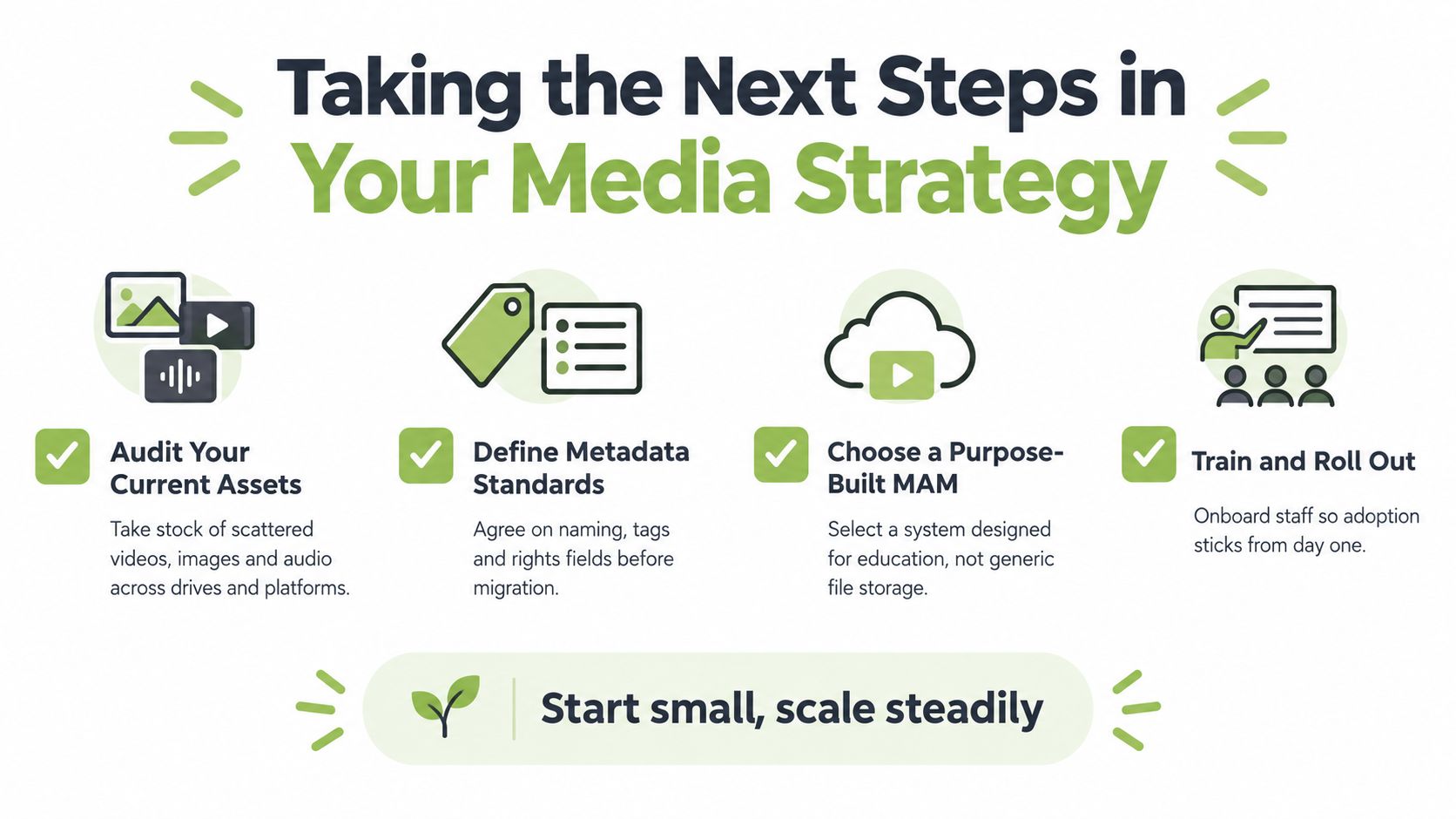
A successful MAM project starts with the learning workflow, not the product catalogue. Before choosing a platform, identify where media currently enters the institution, who handles it, where staff store it, how learners access it, and what happens when the content becomes outdated.
Start with an asset audit
List recordings, student submissions, lecture captures, podcasts, demonstrations, and training videos across shared drives, LMS areas, video platforms, conferencing accounts, and personal workspaces. Mark ownership, sensitivity, educational value, current audience, and whether a reliable master exists.
Set metadata before migration
Agree on the fields people will use. Course, module, topic, speaker, year, rights, accessibility status, review date, and audience are practical starting points. Keep the rules simple enough that busy teaching staff will follow them.
Test the real teaching journey
Ask potential suppliers to demonstrate a complete scenario:
Can a lecturer record or upload a video?
Can the system create captions and allow corrections?
Can a tutor attach media to an LMS assignment?
Can a learner submit a recording without exposing it to the wrong audience?
Can an administrator find the asset later using agreed metadata?
Can staff trim and reuse a section without downloading the master?
Can Zoom or Microsoft Teams recordings enter the managed workflow?
Can the institution choose cloud or on-premises deployment?
Can administrators review permissions, versions, and retention?
Roll out with people, not just technology
Choose a contained pilot, such as one module, programme, or training pathway. Train lecturers, tutors, administrators, and support staff around their actual tasks. Measure adoption qualitatively through workflow reviews, recurring support issues, search success, and feedback from learners.
The aim isn't to move every file on the first day. It's to create a dependable pattern that staff can repeat, then expand as confidence grows. Start with the content that causes the most friction, define the rules clearly, and scale the workflow steadily.
MEDIAL provides an education-focused environment for storing, organising, editing, captioning, streaming, and integrating video and audio with learning workflows. Visit MEDIAL to explore how its LMS connections, assignment tools, live streaming, and deployment options could support your institution's next media strategy.
Comments