
Cloud vs on Premise Pros and Cons: A 2026 Guide

You're in a procurement meeting with three competing priorities on the table. The IT director wants control, the teaching and learning team wants lecture streams and AI captions to work reliably during peak demand, and finance wants to avoid another large capital purchase. Someone asks the apparently simple question: should the video platform run in AWS, Azure, or on a rack in the university data centre?
That question is too narrow. The decision is about who controls risk, cost variability, data location, operational capacity, and integration complexity. Cloud can provide rapid access to capacity and managed services, but it doesn't remove legacy systems or governance work. On-premise can provide direct control, but the institution owns the hardware lifecycle, resilience planning, patching, and scaling problem.
The practical cloud vs on premise pros and cons become clearer when you test them against real workloads, including live lecture streaming, AI captioning, LMS-integrated assignments, examination recordings, and corporate training broadcasts. For most education and L&D teams, a hybrid cut-over is more credible than a forced choice between two extremes.
The Decision Every Video Platform Buyer Faces
The meeting usually starts with infrastructure. The IT director asks whether the university should place its lecture capture environment in a public cloud, use a managed video service, or keep the platform inside the institution's own facilities. Procurement asks for a five-year cost model. The head of teaching and learning asks a more urgent question: will students be able to watch a live lecture when everyone logs in at once?
Those questions expose the pressure points. Lecture attendance spikes, particularly around the start of teaching and examination activity. A platform that handles ordinary playback may still struggle with simultaneous live streams, rapid recording ingest, transcoding queues, caption generation, and thousands of playback requests. An L&D team faces a similar pattern when a company broadcasts an all-hands session or assigns a large training cohort a video submission.
Accessibility adds another layer. Captions must be accurate, available promptly, and integrated into the workflow rather than treated as a manual afterthought. The platform also needs to connect with the organisation's LMS, identity provider, recording tools, and assessment process. For universities, that may mean Moodle, Canvas, Blackboard, or D2L Brightspace. For corporate teams, it may mean an HRIS, Microsoft Teams, Zoom, and a learning experience platform.
Practical rule: Choose the deployment model that makes your most consequential workload safer to operate, not the model that sounds more modern in a vendor presentation.
The UK market has already moved beyond a simple adoption debate. The Office for National Statistics reported that 69% of UK firms used cloud-based computing systems and applications in 2023 in its technology adoption findings. Public-sector adoption remains uneven, however. The UK government's State of Digital Government Review found that around 55% of central government organisations said more than 60% of their estate was on the cloud, while also noting that many migrations were lift-and-shift rather than full refactoring.
That distinction matters for video. Moving a lecture platform to cloud infrastructure doesn't automatically fix old integrations, inefficient storage policies, weak metadata, or unclear ownership of recordings. The buyer needs to decide where elasticity matters most, where control is essential, and which operational burden the organisation can sustain.
What Cloud and On-Premise Really Mean in 2026
Cloud deployment means renting infrastructure and services from a hyperscaler such as AWS or Azure, or consuming a managed video platform that runs on that infrastructure. Compute, storage, transcoding, artificial intelligence processing, and content delivery are supplied as services. The customer usually pays through subscription or usage-based pricing and interacts with the platform through a web interface, integrations, and APIs.
In a video workflow, the cloud provider or platform vendor may operate the control plane, while the customer configures users, permissions, retention, integrations, and content policies. The provider typically manages the physical servers and underlying platform. The customer still has responsibilities for identity, data classification, access rules, application configuration, and contract governance.
On-premise deployment puts the servers, storage, transcoding fleet, and delivery components inside the institution's own data centre or chosen colocation facility. The organisation owns or leases the infrastructure and controls the network path, physical access, software configuration, and data placement. It also owns the operational consequences, including patching, capacity planning, monitoring, backup, disaster recovery, and hardware replacement.
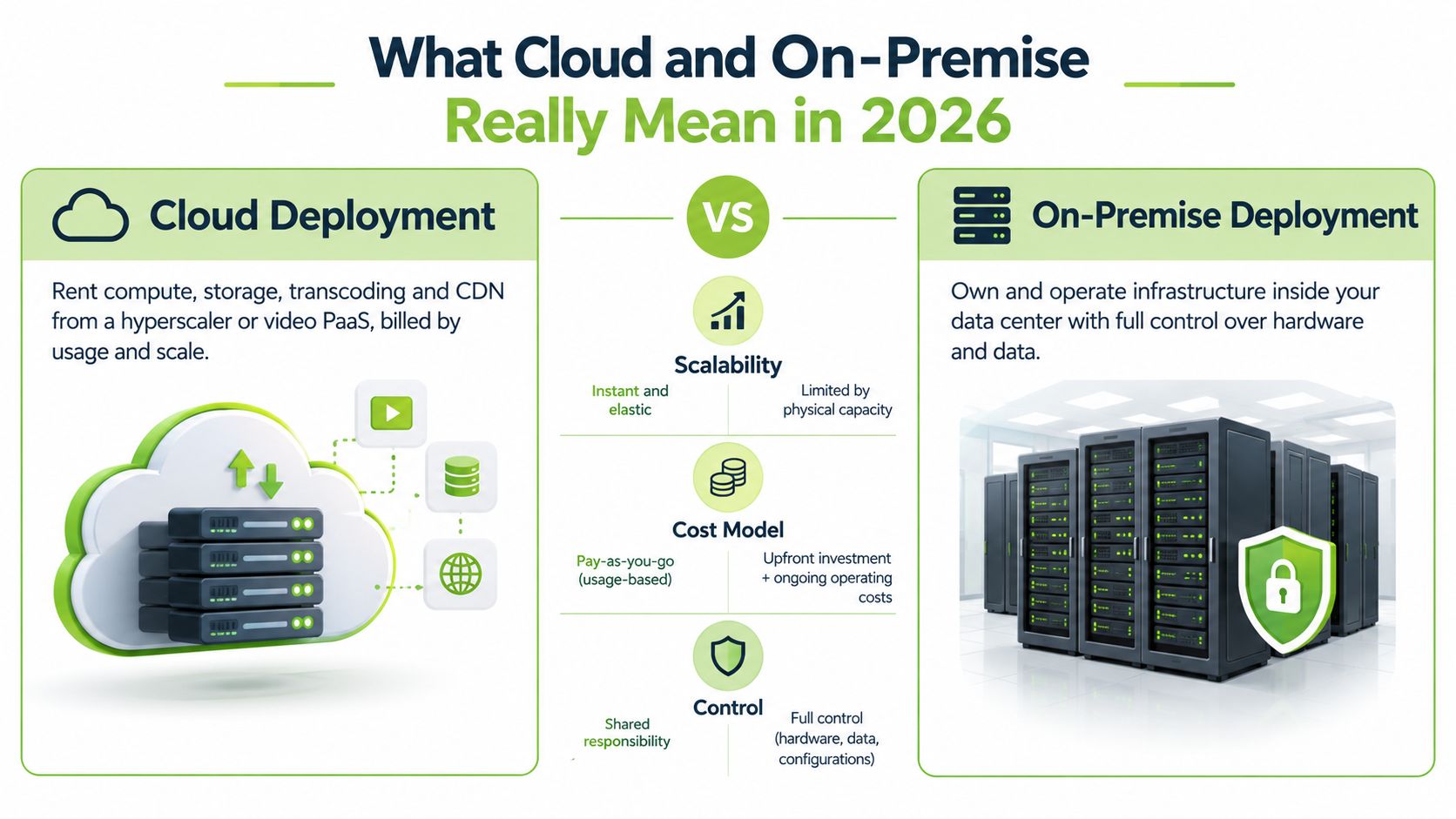
Responsibility follows the video pipeline
The choice becomes concrete when you map ownership across the workflow:
Ingest: Who receives lecture recordings, live feeds, and student submissions?
Transcoding: Who supplies processing capacity when multiple formats and resolutions are created?
AI services: Who runs captioning, translation, indexing, or content analysis?
Storage: Who controls retention, deletion, backup, encryption keys, and location?
Playback: Who manages delivery capacity, network performance, authentication, and availability?
A private cloud built on owned hardware can look technically similar to a public cloud. Kubernetes, virtualisation, automated provisioning, and software-defined storage can blur the visual distinction. They don't erase the responsibility split. The institution still pays for, secures, patches, powers, cools, and replaces the equipment.
The key difference is therefore not where a server sits. It is who supplies the capacity and who carries the operational risk when the workload changes.
Comparing the Two Models Across Cost, Security, Scalability, and Compliance
The strongest procurement comparison starts with the workload rather than the hosting label. A video platform processes large media files, creates derivative formats, invokes AI services, and serves content to users through an authenticated application. Each stage has a different cost and risk profile.
The operational comparison
Cloud is attractive when demand changes quickly. A university can provision capacity for live teaching, captioning, and playback without buying hardware sized for the busiest period. The downside is variable spending. Storage, network egress, transcoding, and AI transcription may all appear as separate charges, so a simple subscription price rarely represents the full operating cost.
On-premise offers a more direct cost model after the initial investment. The institution pays for servers, storage, networking, power, cooling, support, and staff. That can make sense when demand is stable and the organisation already has a capable data-centre operation. It becomes less attractive when the platform must be sized for rare peaks and much of the installed capacity sits idle.
The public-sector evidence illustrates the broader cost shift. The government review recorded £26 billion in public-sector digital and data spend in 2023, with less than 20% on permanent staff and 55% on contractors, managed service providers, and IT consultants. The figures don't prove that cloud is cheaper. They show that transformation often moves spending from owned infrastructure towards external services and specialist support.
Dimension | Cloud | On-Premise |
|---|---|---|
Cost model | Lower infrastructure ownership burden, but usage, storage, egress, and AI charges can vary | Larger infrastructure commitment, with more direct control over installed capacity and ongoing facilities costs |
Security | Strong provider infrastructure with shared customer responsibility for configuration, identity, and data | Direct control over physical access, network segmentation, keys, and platform configuration |
Scalability | Well suited to unpredictable live events, processing queues, and changing user demand | Requires capacity planning and equipment sized ahead of demand |
Compliance | Depends on region selection, contracts, access controls, retention rules, and provider assurances | Offers direct control over location, access, retention, and operational boundaries |
Performance | Adds network dependency and can introduce latency on interactive paths | Can provide locality advantages when users and servers are co-located |
Integration | APIs and managed services can accelerate connections to LMS, SSO, and collaboration tools | May fit legacy systems closely, but integration and maintenance remain internal responsibilities |
Resilience | Requires careful design and contract review, despite provider scale | Requires the institution to build, test, and maintain redundancy and recovery |
Security and compliance need evidence
Cloud doesn't mean insecure, and on-premise doesn't mean secure by default. A misconfigured identity policy, exposed storage location, weak administrator account, or excessive retention period can create risk in either model. In the cloud, the provider secures the underlying infrastructure while the customer remains responsible for many decisions above it.
On-premise gives the institution tighter control over encryption keys, network segmentation, physical access, and data movement. That control helps where research material, protected student information, or sensitive corporate content must remain within a defined environment. It also creates a larger internal security workload. The organisation must maintain patches, monitoring, incident response, backups, and access reviews.
For teams building a governance framework, a practical NIST compliance help resource can support the process of mapping controls to operational responsibilities. It shouldn't replace legal, data-protection, or sector-specific advice, but it can help procurement teams ask clearer questions about control ownership.
GDPR, UK data residency, retention, access logging, and deletion workflows need to appear in the contract and technical design. A university also needs to examine accessibility duties for teaching content. Corporate L&D teams should document who can access recordings, how long they remain available, and whether AI-generated captions or transcripts are transferred to another service.
Performance is workload-specific
The locality advantage is measurable for latency-sensitive traffic. In a UK-relevant latency study, on-premise-to-on-premise evaluation produced a median flow-completion time close to 16 ms, while AWS UK results were around 27 to 30 ms, depending on the access network, as reported in the latency study. Those figures don't decide every video deployment. Most lecture playback and training libraries tolerate cloud overhead, while tightly interactive workloads may benefit from local processing and delivery.
Storage architecture deserves equal attention. The video storage solutions guidance should be considered alongside retention rules, archive growth, backup design, search requirements, and egress behaviour. A platform that stores everything indefinitely can create an avoidable cost and governance problem, regardless of where the storage sits.
Infrastructure economics also matter. A UK data-centre analysis compared annual energy costs of £70k for on-premise with £58k for colocation, and cooling costs of £26k on-premise with £14k in colocation, according to the 2026 infrastructure analysis. The figures reinforce a practical question: can your site supply and cool the required density within a sensible timeframe?
Decision Criteria That Push You Toward Cloud, On-Premise, or Hybrid
Procurement teams often get stuck because they score broad categories such as security and cost without tying them to actual video operations. A better method assigns each criterion to a workload, names the owner, and records what would make the deployment unacceptable.
Criterion | Cloud | On-Premise | Hybrid |
|---|---|---|---|
Governance maturity | Fits teams that want managed infrastructure and defined provider boundaries | Fits teams with strong infrastructure, security, and media-operations capability | Fits institutions that can govern two environments with clear ownership |
Data residency | Works when the provider offers suitable regions and contractual assurances | Strongest direct control over physical location | Keeps restricted content local while placing selected processing elsewhere |
Peak-event load | Strong fit for open days, live lectures, exams, and broadcasts with variable demand | Requires installed headroom or planned expansion | Keeps baseline capacity local and bursts selected services outward |
AI and transcription | Fastest route to elastic processing and new managed capabilities | Best where data must remain inside the controlled environment | Sends approved jobs to cloud while retaining source and governed output locally |
LMS, HRIS, and SIS integration | APIs and managed connectors can shorten implementation | Useful for legacy systems and internal network dependencies | Preserves local systems while exposing controlled cloud services |
Cost horizon | Converts infrastructure spending into operating charges, with variable usage costs | Suits predictable utilisation and existing facilities | Balances owned baseline capacity with rented peak capacity |
In-house operations | Reduces hardware and platform maintenance | Requires staff for patching, monitoring, scaling, and recovery | Requires skills in both local operations and cloud governance |
Start with governance, not architecture
Ask who can approve a new integration, who reviews administrator access, and who signs off retention and deletion. If the answer is unclear, cloud won't solve the governance gap. On-premise may make the boundary visible, but it won't create the policy or staff needed to enforce it.
Map the peak before buying capacity
List the moments that create pressure. These might include a week of live lectures, a certification assessment, a student video-submission deadline, or a company-wide broadcast. Then separate the workload into ingest, transcoding, captioning, storage, and playback.
Cloud usually wins when the peak is unpredictable or short-lived. On-premise can win when the pattern is stable and the organisation already has spare capacity. Hybrid is the sensible middle path when baseline storage and governance need local control, but processing demand arrives in bursts.
Treat AI as a data-flow decision
AI captioning and translation aren't just feature checkboxes. Identify where the source media goes, where processing occurs, where the transcript is stored, and who can correct or export it. If policy prohibits external processing, the AI workload may need to remain on-premise. If the institution accepts an approved cloud service, elastic processing can reduce pressure on internal compute.
Count integration ownership
An LMS connection may look simple until you include single sign-on, course permissions, assignment submission, grade return, recording ownership, and withdrawal of access. Corporate teams should perform the same exercise for HRIS records, Teams or Zoom recordings, and learner enrolment.
The on-premise pricing information can be used as one input into a broader total-cost model. Include facilities, staff time, support contracts, storage growth, backup, cloud processing, and exit costs. Don't compare a cloud subscription with hardware alone.
Why Most Education and L&D Teams End Up Choosing Hybrid
Education and L&D rarely operate as clean, single-environment organisations. Central IT may require strict governance for identity, records, and research content, while faculties, departments, and training managers need freedom to create recordings, test new teaching formats, and run live events. Hybrid deployment reflects that organisational reality.
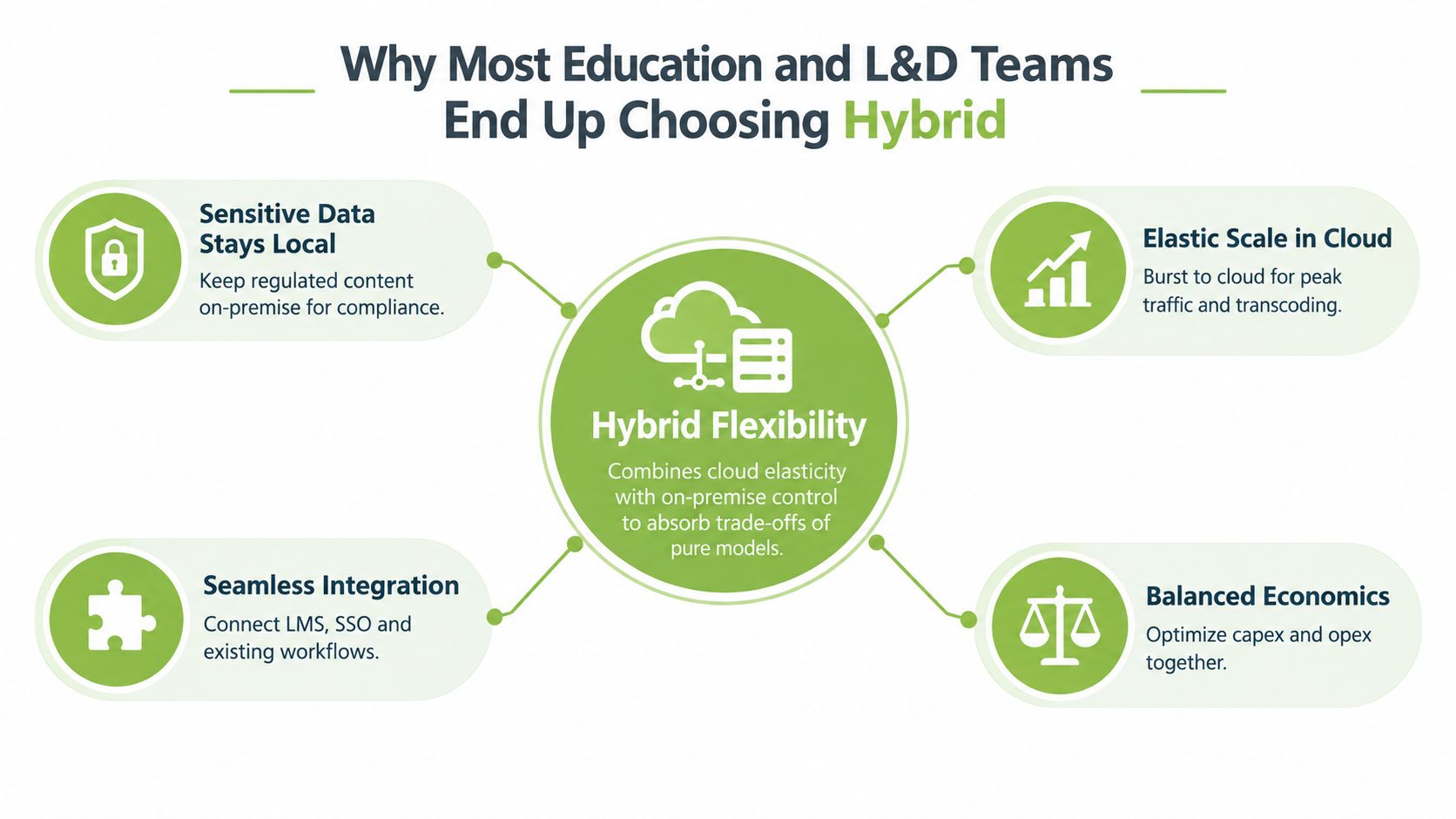
A sensible split might keep sensitive learner records, lecture archives, research material, and governed master files inside institutional infrastructure. The platform could then use managed cloud capacity for live-stream delivery, burst transcoding, AI captioning, or translation where policy permits. That design doesn't make every component automatically compliant. It creates a boundary that the institution can document and audit.
Design the split around data movement
The most important hybrid question is not “which workloads go to the cloud?” It is “which data is allowed to cross the boundary, for what purpose, and under whose control?”
A workable design should specify:
Source ownership: The institution retains clear ownership of original recordings and associated metadata.
Processing permissions: Only approved media and fields move to external processing.
Output handling: Captions, transcripts, and derivative files return to an identified storage location.
Identity enforcement: The same role and course permissions apply across environments.
Failure behaviour: Users know what happens if cloud processing or connectivity is unavailable.
MEDIAL-style deployment flexibility is useful as a working example because a video platform can be positioned in an institution's own infrastructure, in a managed cloud environment, or within a wider hybrid architecture. The relevant test isn't the product label. It is whether the deployment supports live streaming, browser-based editing, AI-assisted closed captions, LMS assignments, and integrations while preserving clear operational responsibility.
Hybrid has a price
Hybrid isn't a free compromise. It adds integration points, monitoring requirements, security boundaries, and support procedures. A team must decide whether the cloud or local environment owns the data plane, how failures are diagnosed, and who responds when a recording is ingested successfully but a caption job doesn't return.
Single-model choices still make sense. An organisation with predictable demand, a capable data centre, strict local processing rules, and strong infrastructure staff may choose on-premise. A distributed corporate L&D team with frequent broadcasts, limited hardware capacity, and approved cloud processing may choose cloud. Hybrid becomes valuable when the institution has both constraints at the same time.
Design principle: Keep control local where regulation and institutional value demand it. Rent elasticity where peaks make ownership wasteful.
Choosing the Right Path for Your Organisation
You can make a credible first decision tomorrow by turning the procurement discussion into a short evidence-gathering exercise. Don't start by asking which vendor has the most attractive architecture diagram. Start by recording the conditions that would make the platform fail, breach policy, or become unaffordable.
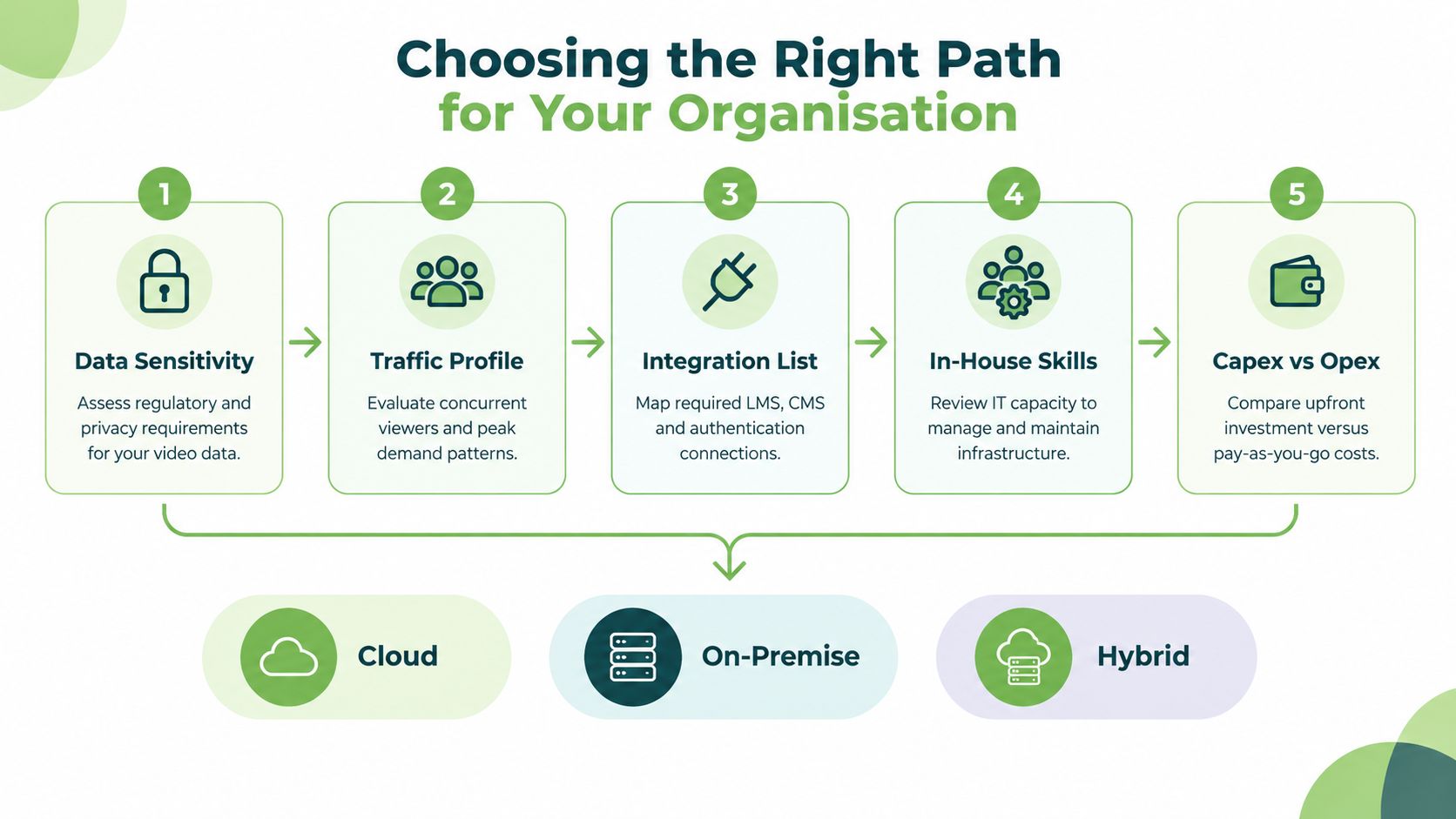
Use this procurement checklist
Data sensitivity: Classify recordings, transcripts, student submissions, research files, and employee training content. Decide what may leave the institution.
Traffic profile: Document live events, concurrent viewing patterns, ingest bursts, examination activity, and normal library playback.
Integration list: Name every LMS, SSO service, SIS, HRIS, video-conferencing tool, assignment workflow, and reporting requirement.
In-house skills: Identify who will patch, monitor, back up, secure, troubleshoot, and recover the platform.
Capex and Opex appetite: Compare infrastructure ownership with recurring service, storage, processing, and egress charges.
Compliance regime: Record GDPR obligations, residency requirements, retention rules, accessibility duties, research controls, and contractual restrictions.
The answer should emerge from the combination, not from one score.
A regulated research university handling protected health information or sensitive student data will usually start by keeping core storage and governed master content on-premise. It may still use cloud processing for approved captioning or peak delivery, but only after confirming the legal, contractual, and technical controls.
A global corporate L&D team running recurring all-hands broadcasts and serving distributed learners will often lean towards cloud. Elastic delivery, managed processing, and broad accessibility can outweigh the value of owning a local media stack, provided the organisation accepts the provider's residency, security, and exit terms.
A mixed estate should plan for hybrid rather than drift into it accidentally. Define which content stays local, which jobs can burst outward, how metadata synchronises, and who supports each boundary. The cloud pricing approach should be tested against a realistic workload model, not a quiet-month estimate.
A useful validation exercise has three parts:
Contract test: Find the clauses covering data location, subprocessors, deletion, service availability, price changes, and export.
Peak simulation: Recreate the busiest live, ingest, captioning, and playback scenario your team expects.
Regulated workflow: Follow a sensitive recording from capture through editing, captioning, sharing, retention, and deletion.
If a deployment fails any of those tests, the architecture isn't ready for approval.
The One Question to Answer Before You Sign Anything
Cloud spending doesn't disappear. It moves from capital investment in owned equipment towards operating costs for infrastructure, processing, storage, support, and external services. On-premise reverses that emphasis, but it doesn't eliminate cost. It exchanges provider dependence for hardware ownership, staff requirements, facilities, and capacity risk.
Before signing, answer one question plainly:
Do you need guaranteed control over where your video data physically lives, or do you need elastic capacity for unpredictable live-stream peaks and AI processing?
That question exposes several issues at once. A demand for physical control raises data residency, sovereignty, retention, and contractual access questions. A demand for elasticity raises usage pricing, egress, service limits, processing behaviour, and vendor lock-in questions. The answer will eliminate much of the noise in a lengthy scorecard.
Test it against a real contract clause, a peak-event simulation, and a regulated-data workflow. If the proposed deployment only works in a sales presentation, it isn't ready for institutional use.
MEDIAL supports both cloud and on-premise video deployment, with LMS integrations, live streaming, browser-based media management, and AI-assisted closed caption generation for education and corporate training workflows. Visit MEDIAL to compare deployment options, explore a trial, or arrange a personalised demonstration for your organisation.
Comments