
Video Training Online: A Practical Guide for Educators

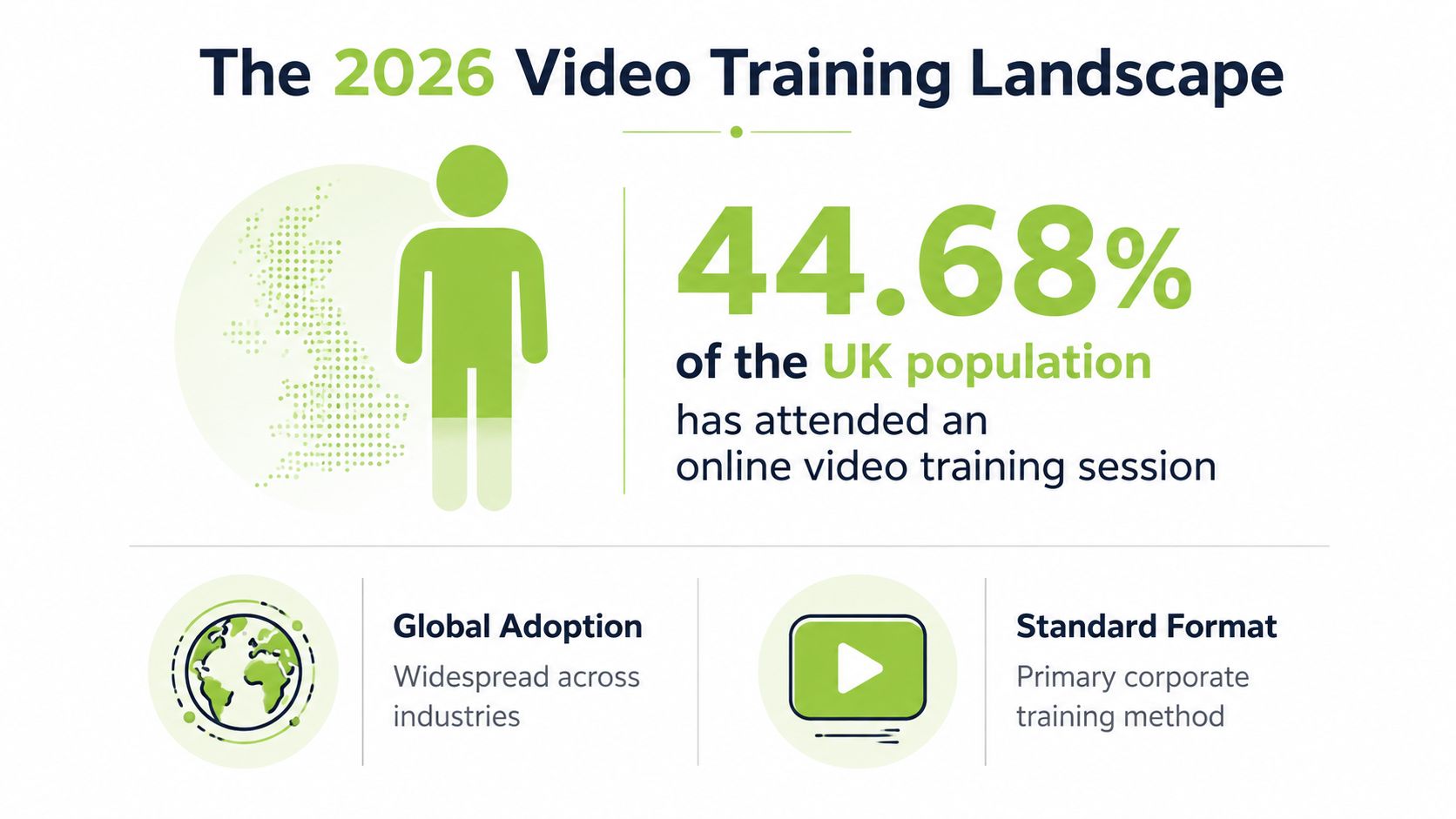
In the UK, 44.68% of people had already attended an online training course for work, so video training online isn't an experimental add-on any more, it's part of normal workplace learning Acuity Training's UK virtual learning stats. That matters because once a format becomes familiar to nearly half a workforce, the question changes from “should we use video?” to “how do we make it useful, accessible, and measurable?”
The best way to think about video-based teaching is as a delivery system, not a single format. A short recorded explanation, a live webinar, and a learner-made video assignment all serve different purposes, and they need different design choices if you want people to learn from them.
What Video Training Online Means in 2026
If you are designing learning for a UK audience, the starting point is straightforward. Video training online has become part of normal study and workplace behaviour because people already use video at work and in daily life. The same UK data set that reported 44.68% of people had attended an online training course for work also found that for adults aged 16–54, watching online videos was the preferred learning method for more than a third of respondents, which shows how closely learner expectations now match the medium Acuity Training.
That does not mean every course should turn into a video course. It means video now sits beside the other default channels educators and employers rely on, in the same way printed handouts once did. If your audience already expects to watch, pause, replay, and review content on screen, the task becomes designing the video so it supports learning rather than just delivering information.
The wider market shift helps explain why this change happened so quickly. Analysts at Ciphr reported that the eLearning industry had grown by over 900% since 2000, with the market projected to reach £238 billion by 2025 and a compound annual growth rate of over 21% between 2021 and 2027 Ciphr. The size matters, but the more useful point is that video has stopped being a side channel and now sits inside the learning infrastructure.
Practical rule: treat video like the classroom wall, the workbook, and the discussion room at once. If a lesson would struggle without one of those elements, video should probably be paired with something else.
For UK teams, that also means thinking about accessibility compliance, measurable learning outcomes, and the LMS workflow together instead of as separate checklists. A video can look polished and still fail if learners cannot access it, if outcomes are unclear, or if the platform makes tracking and reuse awkward. A good decision framework joins those three pieces early, so the format supports delivery, assessment, and compliance in the same setup rather than creating extra work later.
The Core Formats That Power Online Video Training
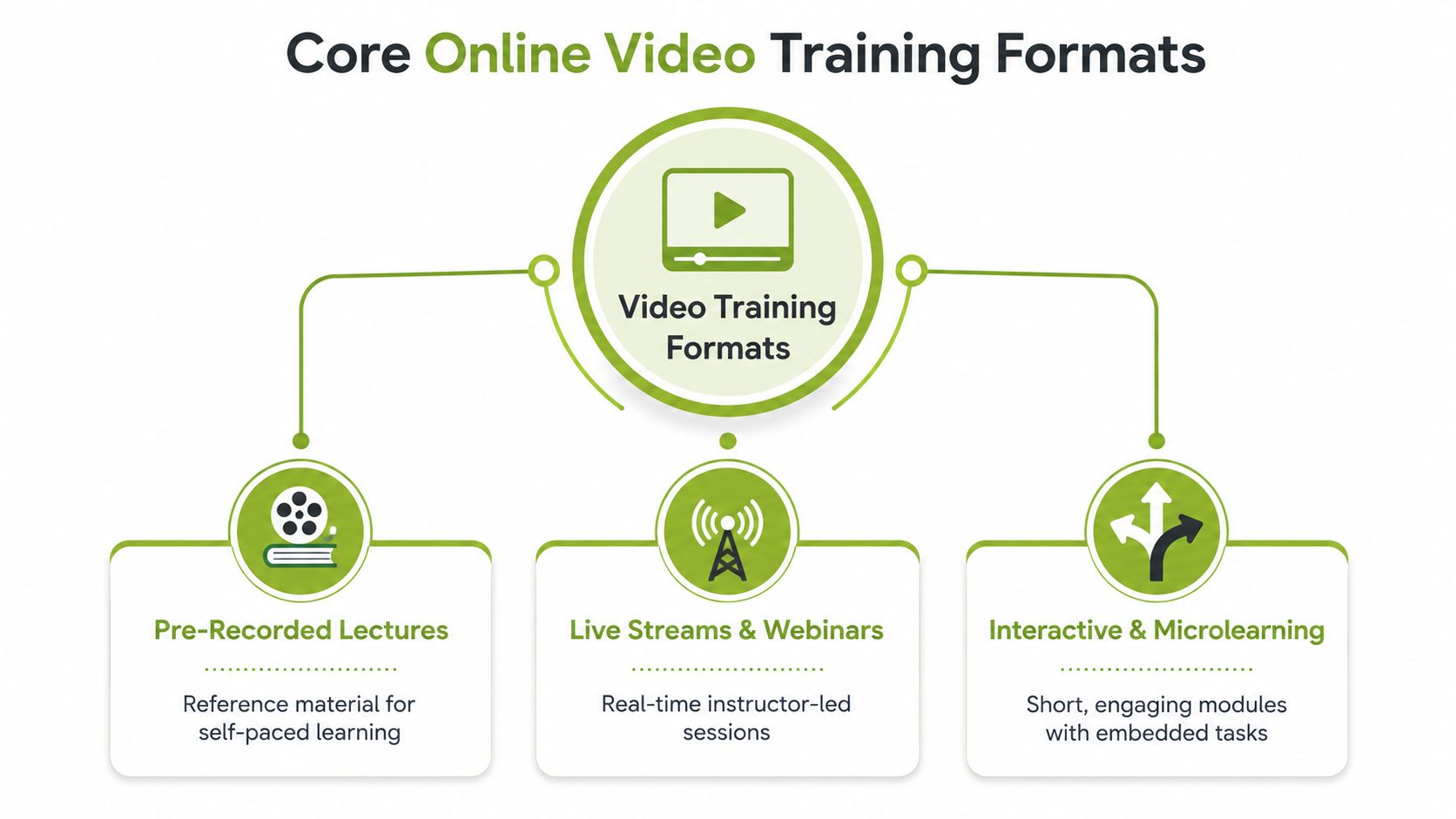
Online video training usually relies on three core formats, and each one serves a different teaching purpose. A recorded lesson works well for steady reference. A live session supports direct interaction. An interactive activity asks the learner to apply what they have just seen.
Pre-recorded content as reference material
Pre-recorded lectures are closest to a reference book. Learners can pause them, rewind them, and return to a difficult idea without needing the instructor present. That makes them a good fit for policy briefings, tool walkthroughs, software demos, and concept introductions where consistency matters more than live discussion.
A recorded format also helps when you need the same message delivered in the same way across teams, sites, or cohorts. The trade-off is that it cannot respond to confusion in the moment, so it works best when the material is stable and the learner does not need immediate back-and-forth.
Live streams as real-time teaching
Live streams and webinars work more like in-person tutorials. They fit topics that benefit from immediate questions, live demonstrations, or a sense of accountability. They are also useful when a trainer needs to read the room and adjust the pace, something an edited recording cannot do.
That live element matters because it gives learners a chance to test their understanding while the topic is still fresh. A question answered during the session can clear up a misconception before it becomes a habit. For teams balancing adult learning principles with operational delivery, live video is often the format that supports discussion, reflection, and correction at the same time.
Interactive video as the workshop layer
Interactive and microlearning formats are the workshop layer. Instead of only watching, learners answer questions, submit short responses, or complete a task tied to the video. The point is not decoration. It is guidance through action.
That approach works because the learner has to do something with the content, not just hear it. A short prompt after a demonstration, or a quick check for understanding, turns attention into practice. It also gives educators a clearer signal about whether the message landed, which helps when training needs to support both learning outcomes and LMS tracking.
A useful course rarely lives in one format only. A short recorded introduction, a live Q&A, and a learner activity usually do more work together than any one of them does alone.
That is also why platforms matter. Some systems are built around hosting, some around live delivery, and some, such as MEDIAL, sit across live streaming and on-demand delivery so educators can match format to teaching moment. For UK teams, the decision framework connects accessibility compliance, measurable learning outcomes, and LMS-native workflows in one setup, so the format supports delivery, assessment, and reuse without creating extra work later.
Pedagogy Behind Effective Training Videos
A long video does not become a good lesson just because it was recorded clearly. Learners process video better when the lesson is brief, goal-focused, and built so the visuals and narration support each other. If the voice repeats what is already on the slide, the learner hears the same message twice without gaining any clearer understanding.
Why short and targeted beats long and diffuse
A 45-minute lecture dump asks the learner to carry too many ideas in working memory. A focused six-minute clip does something else. It gives one objective, one set of examples, and one clear action afterwards. That fits better when the learner needs to remember a procedure, separate similar concepts, or prepare for a task.
Short video also helps the instructor control attention. When the content stays narrow, it is easier to decide what must be explained, what can be shown, and what can be left for practice. It works like a well-labeled drawer, learners spend less time searching and more time using what is inside.
How signalling reduces confusion
Signalling means helping the learner notice what matters. In video terms, that can be a highlighted term, a chapter marker, a title card, or a visual cue that says “this is the rule, this is the example”. The point is guidance, not decoration. When attention is directed deliberately, viewers are less likely to miss the part that carries the learning value.
That matters even more in training videos, where the learner may be watching on a small screen, in a noisy room, or while trying to compare the video with another task. Clear cues reduce the amount of guesswork. They also make the lesson easier to revisit later, because the learner can find the important moment again without replaying the whole clip.
How to embed active learning
The same research recommends embedding video in active learning through guiding questions, interactive elements, or follow-up homework. See the research on effective educational videos for the underlying pattern. That is the difference between “watch this” and “watch this, then do this”. A short clip on assessment criteria works far better when the learner answers two prompts or applies the idea to a case.
Adult learning design follows the same logic. The adult learning principles guide is useful here because it keeps the focus on what the learner does with the material, not just what the instructor says. A video becomes part of instruction when it prompts recall, judgment, or a small decision, the same way a lab demo becomes useful when someone has to repeat the step, not merely observe it.
Useful test: if the learner could skip the video and still complete the course activity, the video is probably too detached from the learning design.
A useful comparison is simple. A 45-minute talk that tries to cover everything gives you evidence that someone sat through a recording. A six-minute explanation followed by a worksheet or quiz gives you evidence of understanding, or at least evidence of where the learner still needs help. If you want a related workflow example, the repurpose video content guide shows how to turn one piece of content into a format that supports action rather than passive viewing.
Real Benefits for Educators and Corporate Trainers
A university lecturer and a corporate L&D manager often want the same outcome for very different audiences. They want learners to arrive ready to use the session well. The tools change, the setting changes, and the delivery model changes, but the practical gains of video show up clearly once you look at real teaching and training work.
A lecturer who flips a module can record the core explanation once, then use class time for discussion, problem-solving, or feedback. The video handles the first pass at explanation, while the live session handles the harder work of checking understanding and correcting mistakes. A trainer onboarding new hires can use the same approach. New staff can review a process video on demand instead of waiting for the next live induction session, which helps them prepare before they are expected to act.
Consistency is the next gain. Once the explanation is recorded, every learner hears the same baseline message, which matters for policy, compliance, and software training. It also makes review easier, because learners can return to the exact segment they need instead of asking someone to repeat the whole session.
Video also gives learners more flexibility. It works across time zones, across different schedules, and across mixed confidence levels. Some learners want live interaction. Others need to pause, replay, and check a step again before moving on. Video lets both groups work through the same material without forcing everyone into one pace.
If you are reworking material you already have, use a repurpose video content guide to decide what belongs in a shorter teaching asset. That matters if your starting point is a slide deck, webinar, or internal demo that already contains usable explanation but needs tighter structure.
A good rule in both higher education and corporate learning is to reuse the explanation, not the confusion. If a course topic already exists in another format, start by cutting it into smaller teaching moments before you record anything new.
Assignment workflows matter just as much as the video itself. Learners can answer in video, but also create video, which gives educators richer evidence of understanding. MEDIAL fits that kind of workflow because it supports video-based tasks inside the learning environment rather than forcing people to jump between tools. That helps preserve the link between accessibility, measurable learning outcomes, and the LMS workflow that staff already use.
Measuring Impact With the Right KPIs
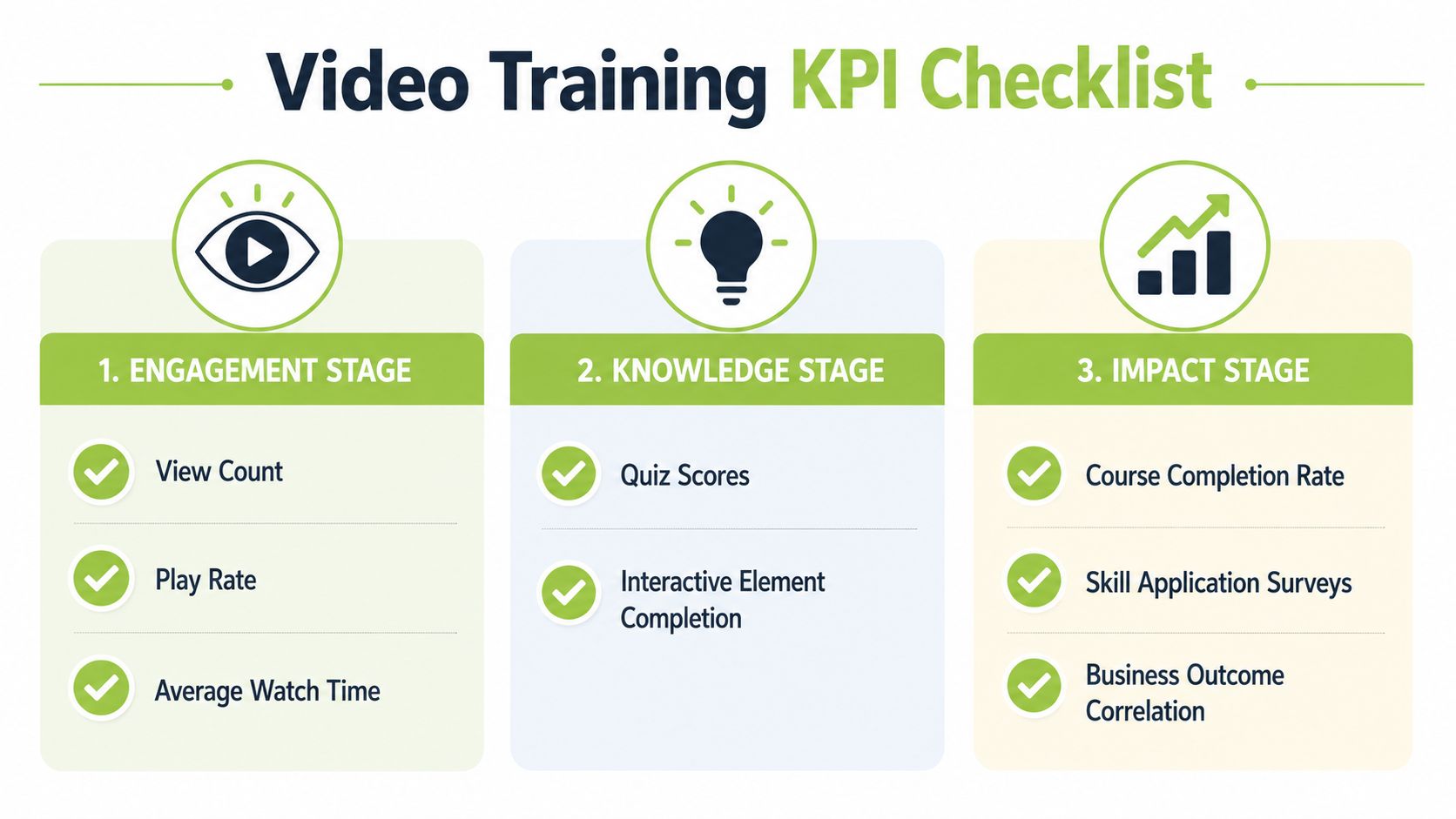
A lot of video training reporting stops at views, and that's where the measurement story goes off the rails. A view tells you someone opened the video. It doesn't tell you whether they understood it, applied it, or retained anything useful. For UK teams that care about governance as much as engagement, the better approach is to separate engagement, knowledge, and impact.
Start with engagement metrics
Completion rate and watch time tell you whether the structure holds attention. They're useful early signals, especially if learners are dropping off at the same point every time. If that happens, the issue may be pacing, length, or a confusing segment.
Add knowledge checks next
In-video quiz items, short reflection prompts, and interactive checkpoints show whether the learner picked up the idea at the moment it was taught. That's a much better signal than passive watching alone. It also gives you a chance to spot misconceptions before they harden.
Measure transfer, not just activity
The test is whether learners use what they saw. For that, you need assignment scores, practical submissions, or follow-up surveys that ask how the training changed performance. That's where measurement becomes governance, because you're no longer tracking clicks, you're documenting learning value.
The move toward short modular video fits this model well. Kaltura's training guidance notes that performance analysis is becoming part of training strategy, while many public discussions still focus too much on production polish instead of how to evaluate outcomes Kaltura blog. That distinction matters if you need to justify a course, improve it, or explain why one format is retained and another isn't.
Keep privacy in mind as well. Learner interaction data shouldn't be treated as endless free insight. UK organisations need to decide what they measure, how long they retain it, and who can see it. If your analytics can't be defended as useful, proportionate, and policy-aligned, they're probably collecting more than they need.
Integrating Video Training With Your LMS
The cleanest video workflow is the one that doesn't make learners leave the platform they already use. That's why LMS-native integration matters. When video sits inside Moodle, Canvas, Blackboard, or D2L Brightspace, the course keeps its own structure, and the video becomes part of the lesson instead of a separate destination.
The practical gain is simple. Grade passback stays connected, single sign-on stays intact, and learner activity doesn't get scattered across different systems. If you've ever had to reconcile a video platform report with an LMS gradebook by hand, you already know why that matters.
What a plug-and-play workflow looks like
An instructor uploads or records video inside the connected environment, adds captions, and attaches a task or reflection activity. A learner watches, responds, and the result stays linked to the course record. That's much easier to maintain than a detached video library that nobody owns properly.
Where editing and captions fit
In-browser editing helps when a trainer needs to trim an intro, remove a mistake, or tighten a recording before it goes live. AI-assisted captions are useful too, but only if they're reviewed like any other draft output. The point is to reduce friction, not to skip quality control.
Choosing deployment style
Cloud deployment suits teams that want speed and lighter local administration. On-premises deployment fits institutions with stricter policy requirements, larger governance teams, or data residency concerns. The right choice depends less on fashion and more on who is responsible for risk, storage, and long-term support.
For a deeper systems view, this learning management system integration guide is relevant when you're deciding how much of the workflow should live inside the LMS versus outside it. If you're assessing secure delivery as part of that stack, the related secure video streaming guidance is useful too.
Security, Scalability, and Accessibility Considerations
Accessibility, bandwidth, and security are often discussed separately, but in practice they're part of the same design choice. A training video that looks polished but fails on captions, buffering, or access control still fails the learner. In the UK, that matters because accessibility expectations are shaped by WCAG 2.2-based standards, especially in public-sector and higher-education settings W3C WAI foundations course.
Build accessibility in from the start
Captioning and transcripts should be designed into the workflow, not added as a patch after upload. That's because the learners who need them most, including deaf and hard-of-hearing staff, neurodivergent learners, and people studying in low-bandwidth or sound-off contexts, need the content to work on first access. Accessibility is not just a compliance box, it's part of whether the lesson can be used at all.
Match the technical baseline to real playback conditions
For online training video delivery, education-sector guidance points to 1080p H.264 MP4 at about 5 Mbps target bitrate and 6 Mbps max, plus 44.1 kHz / 192 kbps audio, because that format is broadly browser-compatible and reduces playback failure Open edX video specifications. That baseline matters because a beautiful recording still fails if the learner can't decode it cleanly.
Plan for the learner's machine, not just yours
Wellcome Connecting Science recommends at least 8 GB RAM, an i5 processor, 100 GB free disk space, and 8 Mbps download speed for streaming video Wellcome Connecting Science IT specs. That tells you the bottleneck is often the viewer's environment, not just the creator's setup, especially when live conferencing and screen sharing happen together.
If the course only works on a strong office machine and a perfect connection, it isn't really inclusive delivery. It's a best-case demo.
Security sits beside those issues because institutions need control over who can view, edit, download, and retain the asset. When video is part of a formal training programme, the platform choice should support policy, not fight it. That's where deployment and accessibility start to look like the same decision from different angles.
Bringing It All Together With MEDIAL
If you're deciding where to start, use one practical checklist. Pick the right format for the lesson, keep the video brief and goal-led, measure more than views, keep the workflow inside the LMS, and build captions and delivery controls in from day one. That sequence is usually enough to turn a vague video idea into something a team can run.
A platform like MEDIAL sits in that workflow as one option for live streaming, in-browser editing, AI-assisted captions, LMS integration, and video assignments inside Moodle, Canvas, Blackboard, and D2L Brightspace. It also supports Zoom and Microsoft Teams integrations, which helps if your teaching or training already lives across more than one environment.
The next move doesn't need to be a full rollout. Test one module, one class, or one onboarding unit and see where the friction shows up. If you want to map the platform to your own course structure, visit MEDIAL and start with a trial or a personalised demo.
Comments