
Video on demand: Transform Training with a Flexible LMS
- MEDIAL
- Feb 4
- 16 min read
Video on demand is a bit like having your favourite film streaming service, but for learning. It lets learners access training content whenever and wherever they need it. This simple shift moves control from the institution to the individual, turning education and corporate training from a rigid, scheduled event into a flexible, self-paced experience. It's all about empowering people to learn on their own terms.
What Is Video on Demand in Modern Learning?
Think of traditional training as a live TV broadcast—if you miss it, you've missed out. Video on demand (VOD) completely changes that. It transforms your learning content into a personal, 24/7 library, giving learners the power to choose what, when, and where they learn.
This learner-centric model is a huge departure from one-size-fits-all instruction. Instead of forcing everyone into the same schedule, VOD accommodates all kinds of different needs and learning styles. It’s become a real cornerstone of modern education. For instance, a new employee can review crucial onboarding procedures from home the day before they start, ensuring they walk in feeling prepared and confident.
Empowering Learners with Control and Flexibility
At its heart, VOD is all about accessibility. By pre-recording lectures, demos, and tutorials, organisations create a treasure trove of knowledge that can be accessed instantly. This opens up all sorts of practical scenarios:
Just-in-Time Training: A sales rep can quickly watch a three-minute product demo on their tablet right before a client meeting to refresh their memory on key features.
Reinforced Learning: A university student wrestling with a tricky concept can re-watch a specific lecture segment multiple times the night before an exam, pausing and rewinding as needed.
Supporting Different Paces: An experienced team member might skip introductory modules in a compliance course, while a newcomer can take their time to fully absorb the foundational material.
This kind of flexibility means learning is no longer a disruptive event. It becomes a seamless part of a person's daily workflow or study routine.
Actionable Insight: To get started, identify your most frequently repeated training session. Record it once, make it available on-demand, and you've instantly freed up your top trainer's time for more strategic work.
The Practical Application in Education and Business
In both corporate and academic worlds, the applications are massive. A multinational company can deliver consistent health and safety training to thousands of employees across different time zones without the logistical nightmare of scheduling live sessions. A university can build a rich library of guest lectures, making invaluable expertise available to students long after the event.
This approach doesn't just improve convenience; it boosts effectiveness. When learners can get information at the precise moment they need it, their ability to retain and apply that knowledge skyrockets. You can find more information about how online video platforms transform education and corporate training in our detailed guide.
Ultimately, video on demand makes learning more accessible, personalised, and genuinely impactful for everyone involved.
The Real Benefits of Using VOD for Training
So, we know what video on demand is. But what’s its real value? When you see how VOD actually works in practice, you start to see it’s not just about convenience. It’s a strategic tool that gives you tangible wins in flexibility, cost, personalisation, and consistency.
When your training isn’t chained to a specific time or place, it becomes a huge advantage, especially for global teams. VOD breaks down geographical and time-zone barriers, making sure every employee gets the same quality training, whether they’re in London, New York, or Singapore.
Unlock Unmatched Flexibility
True flexibility is about letting people learn when they’re actually ready to learn. Video on demand makes this possible by fitting into the natural rhythm of an employee's day instead of interrupting it.
Let's say a retail company is launching a new product line across Europe. Instead of trying to schedule dozens of live training sessions, the product manager just records one brilliant, detailed training video.
A store manager in Berlin can watch it before their shift starts.
A part-time employee in Madrid can tune in on their tablet during a quiet spell in the afternoon.
The entire UK team can jump in from a central portal, which means no more closing stores for group training.
This asynchronous model respects everyone’s schedule and gets the right information to the right people without the logistical nightmare of live events. For any organisation with spread-out teams, this kind of adaptability is a game-changer.
Achieve Remarkable Cost-Effectiveness and Scalability
One of the biggest draws of VOD is how much sense it makes financially. You create a training asset once, and you can reuse it again and again. That means massive savings and makes scaling up your training efforts incredibly straightforward.
Picture a software firm that needs to onboard 50 new sales reps every quarter. The old way would involve flying a top trainer to multiple offices, paying for travel, hotels, and pulling that expert away from high-value work. Instead, the company produces a top-notch video training series.
Practical Example: A one-time investment of £5,000 in a professional video series could replace an annual cost of £25,000 in travel, accommodation, and venue hire for quarterly live training sessions. That's a first-year saving of £20,000, with the video asset continuing to deliver value for years.
This single recording can train hundreds, even thousands, of new starters over several years. The initial cost is quickly absorbed by what you save on recurring travel and logistics, making VOD an exceptionally scalable solution.
Enable Truly Personalised Learning Paths
Everyone learns differently. Some people get concepts in a flash, while others need a bit more time. Video on demand is perfect for this because it puts the learner in the driver's seat.
Think about a tricky compliance training module. An employee can:
Revisit Challenging Topics: If a section on data protection laws is confusing, they can rewind and watch it as many times as they need to feel confident.
Skip Familiar Content: An experienced team member who already knows certain procedures can simply skip ahead to the new stuff.
Learn at Their Own Pace: Learners can pause to take notes or just think about a concept without feeling rushed by a group session.
Actionable Insight: Create a 'refresher' playlist of short, 2-3 minute videos covering key concepts from a longer training module. This allows experienced staff to quickly review specific topics without re-watching the entire course.
Guarantee Absolute Consistency in Messaging
Finally, when it comes to things like compliance, safety procedures, or brand identity, consistency is everything. VOD is the best tool out there for making sure every single person gets the exact same message, delivered the exact same way.
Even the most talented human instructors can have an off day, forget key points, or explain something slightly differently. A pre-recorded video cuts out that risk. When a manufacturing company rolls out a critical new safety protocol, a VOD module ensures every employee on the factory floor sees the same demonstration and hears the same warnings. This standardised delivery is vital for reducing risk and keeping the entire company aligned.
Integrating VOD Seamlessly Into Your LMS
Just dropping a video link onto your course page isn't enough. The real magic of video on demand happens when it’s properly connected with your Learning Management System (LMS), whether you’re using Canvas, Moodle, or Blackboard.
A deep integration creates a single, smooth experience for everyone. Learners shouldn't have to fiddle with separate logins or click away to another website just to watch a training video. A seamless connection means your entire video library lives right inside the LMS, feeling like a natural part of the learning environment.
Creating a Unified Learning Experience
When your video platform and LMS work as one, the line between content and assessment completely disappears. This is what transforms a simple video player into a powerful educational tool. Users can watch, engage with, and learn from video content without ever leaving the familiar interface of their course.
This single sign-on approach isn't just a nice-to-have; it's crucial for getting people on board. The less friction there is for educators and learners to find and use video, the more likely they are to make it a core part of how they teach and learn. It keeps the focus squarely on the content, not the technology. For a deeper look at setting up this kind of digital learning infrastructure, you can explore some excellent insights on learning management system integration.
Powerful Features Unlocked by Deep Integration
A solid LMS integration isn't just about convenience—it unlocks a whole host of powerful features that have a real impact on learning outcomes. It allows the two systems to talk to each other, sharing data that gives you incredible insights into how learners are getting on.
Here are a few game-changing features you get with this kind of connection:
In-Video Quizzing with Grade Passback: Imagine embedding quiz questions directly into a video. When a student answers, their score is automatically passed back to the LMS gradebook. This alone can save instructors hours of tedious, manual data entry.
Detailed Engagement Analytics: You can track exactly who has watched a video and, more importantly, how much of it they watched. Did they re-watch certain sections? This data, visible within the LMS, helps educators spot where students might be struggling or where the content isn't quite clear.
Video Assignments and Submissions: Instructors can set assignments that require students to record and submit their own video responses, all within the LMS. It’s perfect for things like language practice, presentation skills, or demonstrating a hands-on skill.
The shift to on-demand content is undeniable. In the UK, the video-on-demand market has skyrocketed, with household penetration jumping from just 20% in 2015 to over 68% by 2024. That's a 240% increase, showing that people are now completely comfortable accessing content on their own schedule—a habit that carries over into their expectations for learning.
A Practical Scenario in Action
To really see how this works, let's walk through a common teaching scenario. An instructor wants to assess their students' ability to deliver a sales pitch.
Instead of asking for a written report, the instructor creates a "Video Assignment" directly inside their Moodle course. This action seamlessly leverages the integrated video platform to set up a submission portal right there on the assignment page.
Students simply use their webcams to record their pitch and submit it with a click. The instructor can then watch each submission, provide time-stamped feedback (like, "Great point at 1:32, but maybe clarify your pricing here"), and assign a grade. The whole workflow—from creating the task to giving feedback—happens within one, cohesive system. You can explore more strategies for mastering Learning Management System integration in our detailed guide.
Must-Have Features of an Educational VOD Platform
Choosing a video platform for education is a world away from picking a streaming service for films. A standard video player just shows content; a proper educational VOD platform is an active learning tool. The right features can turn passive viewing into something engaging, accessible, and measurable.
Not all video solutions are built for learning, and the difference is in the details. It comes down to features designed to boost comprehension, track progress, and protect your valuable content. Let’s look at what separates a basic media player from a powerful educational asset.
Driving Engagement with Interactive Tools
Let's be honest, a static video can be a pretty passive experience. But it doesn't have to be. The best educational platforms build interactivity right into the video player, turning learners from viewers into active participants. This is crucial for keeping their attention and making sure key concepts actually stick.
In-video quizzing is a perfect example. Picture a corporate compliance video. Instead of just hoping your team is paying attention, you can drop multiple-choice questions in at key moments. This forces them to engage with the material and gives them instant feedback, reinforcing the learning on the spot.
This shows how a video platform can connect seamlessly with an LMS to manage courses and user enrolment.
The integration shown here lets an administrator manage video content and user access directly from their familiar LMS environment, taking the technical headache away from educators.
Ensuring Access for Everyone
Accessibility isn’t just about ticking a compliance box; it's fundamental to good teaching. Any platform built for education must have solid tools to make sure everyone can access the material, no matter their ability. For any modern learning environment, this is non-negotiable.
Key accessibility features include:
AI-Powered Captioning: Manually transcribing videos is slow and costs a fortune. A platform with built-in AI can generate accurate captions in minutes. This is a game-changer for deaf or hard-of-hearing learners, and it improves comprehension for everyone else, too. In fact, studies show that 80% of viewers who use captions are not deaf or hard of hearing—they just use them as a learning aid.
Audio Descriptions: For visually impaired learners, audio descriptions narrate the important visual elements on screen, ensuring they don't miss out on vital context.
WCAG Compliance: The platform itself should follow the Web Content Accessibility Guidelines (WCAG). This ensures the player controls and interface are usable for people with a wide range of disabilities.
Actionable Insight: After uploading a video, run the AI captioning tool immediately. Then, spend just five minutes reviewing and correcting the auto-generated text. This small time investment makes your content instantly more accessible and usable for every single learner.
Protecting Your Intellectual Property
Your educational content is a valuable asset. Whether it’s a bespoke training course or a series of expert lectures, you need total control over who sees it. A consumer-grade platform like YouTube just doesn't offer the security needed for sensitive educational material.
A professional video on demand platform gives you the security controls you need to protect your intellectual property. This starts with secure, permission-based access, often linked directly to your LMS roles. In plain English, this means only enrolled students or specific employee groups can view certain videos.
On top of that, features like domain restriction stop your videos from being embedded on unauthorised websites. For highly sensitive content, some platforms even offer Digital Rights Management (DRM) to prevent illegal downloading and sharing, giving you complete peace of mind.
Measuring What Matters with Robust Analytics
How do you know if your training is actually working? Without data, you’re just guessing. A top-tier VOD platform provides detailed analytics that give you real, actionable insights into how learners are engaging.
Instead of just tracking simple view counts, analytics for education should show you:
Completion Rates: See exactly who finished a required video and who dropped off halfway through.
Viewer Engagement Graphs: Pinpoint which parts of a video are most engaging (or confusing) by seeing where people re-watch or skip ahead.
Quiz Performance: Track scores from in-video quizzes to spot knowledge gaps across a group of learners.
This data is invaluable. For a corporate trainer, it might reveal that a specific part of a safety video is constantly being skipped, flagging that the content needs a rethink. For a university lecturer, it could show that students are re-watching an explanation of a complex formula, signalling that the topic needs more attention in the next live session.
Putting VOD Into Practice From Recording to Assessment
Theory is one thing, but seeing video on demand in action is where its real power shines through. To make this tangible, let's walk through the entire lifecycle of educational video content, following two high-impact, real-world scenarios. These examples show how a modern VOD platform handles all the technical heavy lifting, freeing you up to focus on what you do best: teaching.
We'll map out two common workflows: the 'Flipped Classroom' model and the 'Video Assignment' for assessing practical skills.
The Flipped Classroom Workflow in Action
The flipped classroom is a fantastic model where students watch lecture content on their own time, which opens up precious class time for hands-on, interactive activities. A solid VOD platform makes this process incredibly simple.
Here’s how it typically unfolds:
Record and Upload: An instructor records their lecture—perhaps with a simple desktop recorder or even straight from Zoom. The recording is then automatically uploaded to the VOD platform, often without needing any extra steps.
Edit and Refine: Forget complicated video editing software. The instructor can use simple in-browser tools to trim the start and end of the recording. This gets rid of any dead air or fumbling at the beginning, leaving a polished final video.
Add Captions for Accessibility: With a single click, AI-powered captioning can generate a surprisingly accurate transcript and synchronised captions. The instructor just needs to give them a quick review and edit for perfection, making the video accessible for every learner.
Publish to the LMS: Finally, the instructor embeds the finished video directly into their LMS course page. Students can now watch the lecture on-demand before class, arriving ready to engage in the practical session.
This entire workflow turns what could be a technical headache into a few straightforward steps, making the flipped classroom a realistic option for any educator.
Assessing Skills with the Video Assignment Workflow
Written exams are great for testing knowledge, but they fall short when it comes to assessing practical skills like public speaking, a sales pitch, or a clinical demonstration. This is where video assignments come in, offering a dynamic way to evaluate performance.
Let's break down how this works from start to finish:
Instructor Creates the Task: Inside the LMS, an instructor sets up a new assignment and chooses "video submission" as the required format. They can add instructions and attach a grading rubric right there in the task.
Student Records and Submits: The student opens the assignment and uses their webcam to record their response, whether it’s a short presentation or a demonstration of a physical skill. They can review their recording and submit it with a click, all without ever leaving the LMS.
Instructor Provides Time-Stamped Feedback: The instructor watches each video submission within the LMS. As they watch, they can leave precise, time-stamped comments right on the video's timeline. For instance, at 01:15, they might add a note saying, "Excellent point, but try to slow your speaking pace here."
Grade and Complete: After leaving feedback, the instructor assigns a grade, which syncs automatically with the LMS gradebook.
Practical Example: A nursing school uses this exact workflow to assess students' patient communication skills. Students record themselves explaining a diagnosis to a 'patient' (a family member or peer). Instructors can then provide highly specific feedback on tone, clarity, and empathy, tied to exact moments in the video.
This approach goes far beyond simple right-or-wrong answers. It creates an opportunity for nuanced, contextual feedback that helps learners see exactly where they can improve, making for a much richer assessment experience.
The process flow below highlights the core pillars of a modern VOD platform that make these workflows possible—focusing on accessibility, engagement, and security.
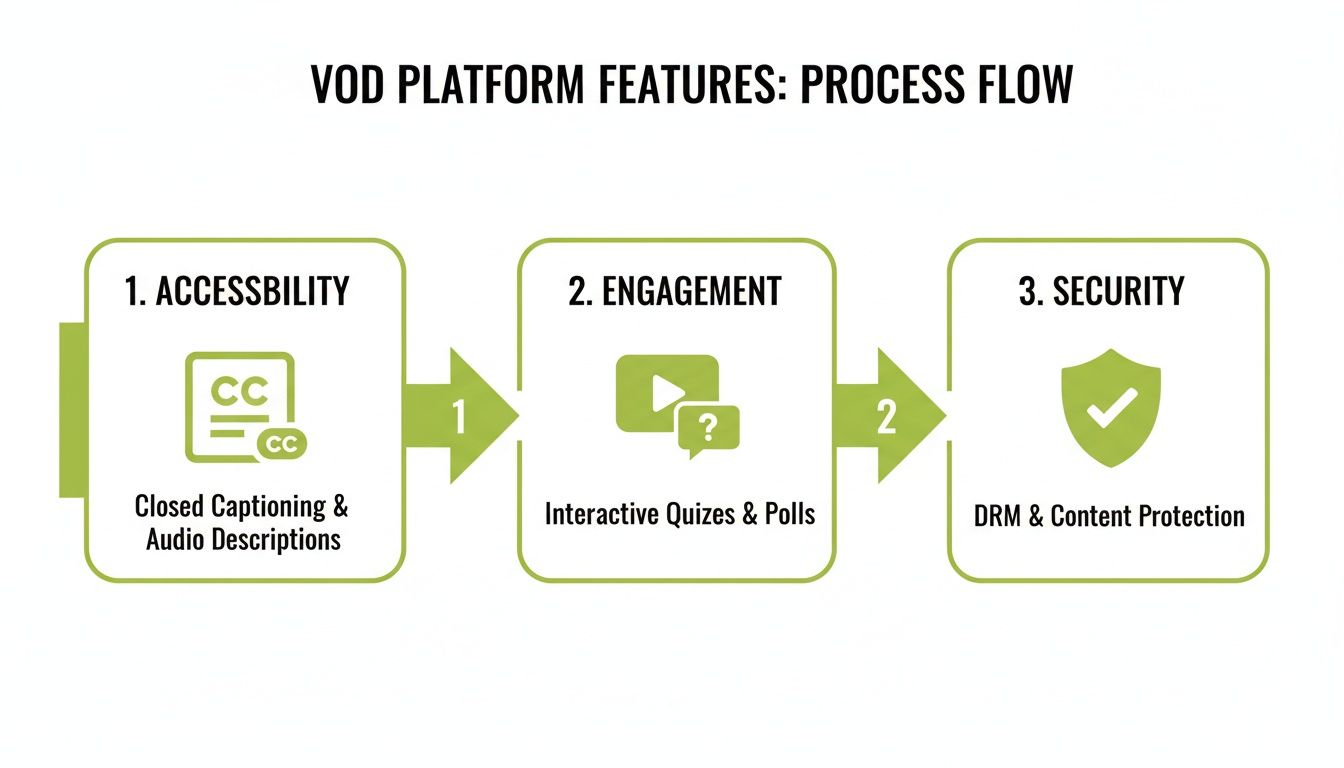
As you can see, features like automatic captioning and in-video quizzing aren't just nice-to-haves; they are essential parts of a secure and effective learning cycle. For a deeper dive into this assessment method, check out our article on why video assignment submissions are the future of student assessment.
Your Questions Answered: Getting Started with Video on Demand
Stepping into the world of video on demand can feel a bit daunting, especially if you're setting it up for the first time. We get it. We hear a lot of the same questions from organisations just like yours, so we’ve gathered them all here to give you clear, straightforward answers.
Think of this as your guide to sorting out the final details. We’ll help you understand the key differences and practical realities of bringing a professional VOD platform into your organisation.
How Is a VOD Platform Different From Using YouTube for Training?
This is probably the most common question we hear, and it’s a crucial one. While YouTube is a brilliant tool for public content and getting your brand out there, it just isn’t built for the focused, secure environment needed for proper training and education.
Imagine you've asked your team to complete an important compliance module. Halfway through, they're hit with an ad for a takeaway or a distracting "recommended for you" video pops up. A dedicated VOD platform creates a walled garden for learning – a secure, branded, and completely ad-free space where your learners can concentrate on the material without any interruptions.
But it goes deeper than just the viewing experience. Here’s where a professional platform really pulls ahead:
Rock-Solid Security: Your training videos are valuable intellectual property. A dedicated platform locks this content down with permission-based access, making sure only enrolled students or specific employees can ever see it.
Seamless LMS Integration: Professional VOD platforms are designed to talk to your Learning Management System (LMS). This unlocks powerful tools like automatically sending quiz scores back to the gradebook and tracking detailed engagement analytics right inside the course.
Accessibility That Works: Proper educational VOD platforms come with built-in tools like AI-powered captioning and audio descriptions. This isn't an afterthought; it’s there to help you meet essential standards like the Web Content Accessibility Guidelines (WCAG) and make sure your content works for everyone.
Ultimately, a dedicated platform means you own the entire experience—the content, the user data, and the learning journey. That’s something a public platform like YouTube simply can’t promise.
What Are the Technical Needs for Implementing VOD?
Getting started with a modern, cloud-based VOD solution is a lot simpler than most people think. All the heavy lifting—like server maintenance, storage, and making sure your videos play smoothly for users anywhere in the world—is handled by the platform provider.
For your users, whether they're students or staff, it couldn't be easier. All they need is a decent internet connection and a standard web browser on their computer, tablet, or phone. There’s no complicated software for them to install or keep updated.
On your side, the main technical focus is on integration. Your IT team will want to make sure the VOD platform can connect securely with your existing systems, especially your LMS.
This connection is usually handled using an industry standard like Learning Tools Interoperability (LTI), which acts as a secure bridge between the two systems. Any good VOD provider will work hand-in-hand with your technical team to make the setup process smooth, secure, and painless.
How Do You Measure the ROI of a VOD Platform?
Measuring the return on investment (ROI) for a VOD platform is about more than just crunching numbers; it’s about seeing the impact. You need to look at both the hard cash you save and the less tangible improvements that push your organisation forward.
On the quantitative side, the maths is often pretty direct and compelling. You can measure:
Cost Savings: Tally up everything you've saved on travel, hotels, venue hire, and instructor fees that you would have spent on face-to-face training sessions.
Efficiency Gains: Think about the time saved. Instructors no longer have to repeat the same introductory sessions, and employees can learn at their own pace, often much more quickly.
The qualitative benefits are just as powerful. You should be looking at:
Learner Engagement: Dive into the platform’s analytics. Are people watching videos all the way through? How are they scoring on in-video quizzes? Higher completion rates and better scores are clear signs that the learning is sticking.
Performance Improvements: For a business, this could be seeing new hires get up to speed faster or watching sales figures climb after product training. For a university, it might mean better student results and higher satisfaction scores.
Actionable Insight: Before you launch, benchmark a key metric (e.g., "time to competency" for new hires). After three months of using VOD for onboarding, measure it again. The reduction in time is a powerful and concrete ROI metric you can present to stakeholders.
Can We Turn Live Streams Into On-Demand Content?
Absolutely. In fact, this is one of the biggest strengths of a complete video platform. It lets you squeeze every drop of value out of a live event by turning it into a learning asset that you can use again and again.
The whole process is designed to be effortless. While you're running a live stream—whether it’s a guest lecture, a product launch, or an all-hands meeting—the system is automatically recording it in the background. No need to mess around with separate recording software.
As soon as the live event ends, the recording is automatically processed and dropped into your video library. From there, you have total control:
Trim and Tidy: Use simple, in-browser tools to chop off any awkward silence from the beginning or end.
Make it Accessible: Generate accurate captions with a single click to ensure the content is usable for everyone.
Publish and Share: Add the polished recording to your VOD library or embed it straight into a course page in your LMS.
This workflow essentially doubles the value of your live events. It guarantees that anyone who couldn't make it, or anyone who just wants a refresher, gets the exact same valuable information on their own schedule.
Ready to see how a dedicated video platform can elevate your training and education programmes? MEDIAL offers a secure, accessible, and deeply integrated solution designed for modern learning. Explore how our AI-powered features can simplify your workflows and boost learner engagement. Schedule a demo today to learn more.