
What is Webcasting? Explained + Tips for Live Streaming

Ever heard of webcasting? It's basically the internet's answer to a live TV broadcast, built for sending a message from one person to many.
Think of it as a way to stream your content from a single source to hundreds, or even thousands, of viewers at once. For example, if you're a company CEO delivering a quarterly earnings report, a webcast ensures every employee, from the office in Tokyo to the one in Berlin, receives the exact same message simultaneously. They can watch and listen, but they can't broadcast back.
Understanding Webcasting In Simple Terms
At its heart, webcasting takes the classic one-way communication of TV or radio and brings it online. Imagine a CEO giving a quarterly update to their entire global team or a university streaming a graduation ceremony for families who can't be there in person.
In both cases, one presenter is delivering a message to a large, mostly passive audience. That’s webcasting in a nutshell.
It's completely different from a two-way video conference call on Zoom or Teams where everyone can see and hear each other. A webcast is all about scale and control. The audience is there to consume the content, just like watching a live event on TV. This is what makes it perfect for mass communication. An actionable insight here is to choose a webcast over a video conference when your primary goal is message control and you have more than 50 attendees.
The Four Essential Ingredients Of a Webcast
Every single webcast, no matter how big or small, needs four key components to work together. Getting a handle on these pieces helps pull back the curtain on the whole process.
Source: This is where it all begins—your camera for the video and your microphone for the audio. A practical tip: for a professional look, use a dedicated webcam like a Logitech C920 over your laptop's built-in camera, and a USB microphone like a Blue Yeti for clear audio.
Encoder: The encoder is like a translator. It takes the raw audio and video and converts it into a digital format that can be streamed smoothly over the internet. Free software like OBS (Open Broadcaster Software) is a great starting point for encoding.
Distribution Network: Think of this as the highway that carries your stream to your audience. To really get the process of delivering video online, you can check out a comprehensive guide to video distribution. A solid network is crucial for a stable, high-quality stream for everyone.
Player: This is simply the app or webpage where your audience tunes in. It decodes the digital stream back into video and audio on their device.
The diagram below gives you a nice visual of how webcasting can branch out into different delivery methods and include various features.
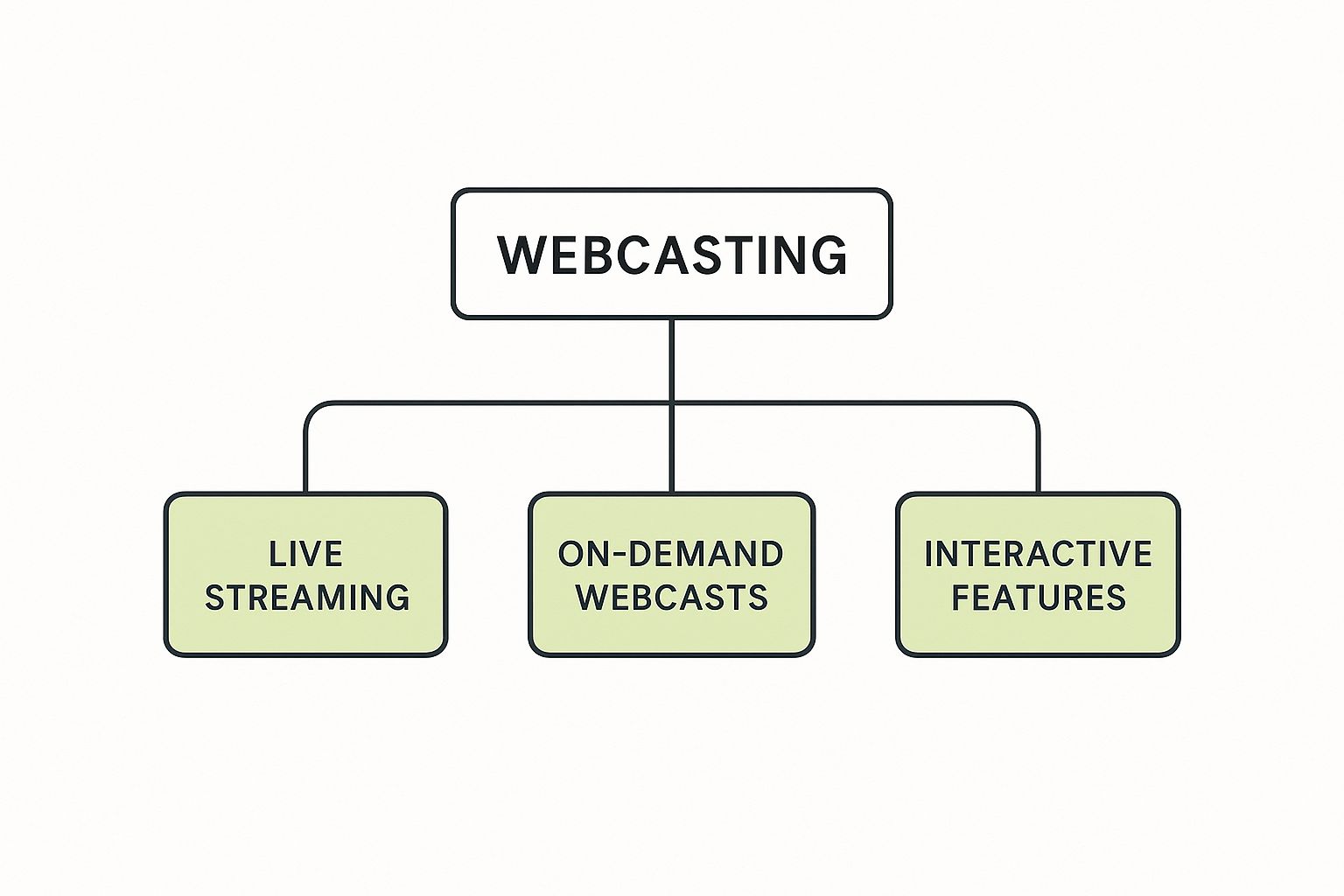
As you can see, webcasting isn't just one thing. It's a broad term that covers both live events and pre-recorded content, often beefed up with tools to get viewers involved. While the core idea is one-way, modern platforms are adding interactive layers to keep people from zoning out.
A key takeaway is that webcasting is defined by its one-to-many architecture. It solves the challenge of delivering a consistent, high-quality video message to a large and geographically dispersed audience simultaneously.
This structure makes webcasting an incredibly powerful tool for any organization needing to communicate at scale without the chaos of a massive, open video call. For schools and businesses looking to get started, dedicated live streaming solutions provide the professional tools needed for a reliable broadcast.
The Journey of Webcasting: From Niche to Mainstream
To really get a feel for what webcasting is today, it helps to rewind the clock a bit. The technology didn't just pop up out of nowhere; it stumbled, crawled, and eventually sprinted from clunky, experimental broadcasts into the seamless experiences we now take for granted. This journey is a great story of how a persistent need for live, digital connection pushed technology to its limits and beyond.
Let's head back to the mid-1990s. The internet was a very different beast—a far cry from the always-on utility it is today. The early pioneers of webcasting were up against some serious technical hurdles. We're talking sluggish dial-up connections that made video almost unwatchable and servers that would buckle under the pressure of just a handful of viewers. Still, the idea was just too good to let go.
These early attempts were messy but essential. They proved it could be done. For instance, one of the very first live video webcasts happened on November 4, 1994, when images were streamed from a venue in the Netherlands. Just a few days later, a college radio station at the University of North Carolina became the first to broadcast its signal online, hinting at the future of audio-only streams. You can dive deeper into these early milestones in the history of webcasting on Wikipedia.
Overcoming the First Big Hurdles
The biggest roadblock for early webcasting was infrastructure. Plain and simple. Imagine trying to stream a live concert over a connection that could barely load a simple webpage. The result was often a pixelated, buffering disaster that crashed more often than not. These limitations kept webcasting in a niche corner of the internet, accessible only to tech enthusiasts with a lot of patience.
Despite the glitches, people wanted more. Landmark events, like the first big online concerts, pushed the primitive 90s internet to its breaking point. Every failed stream and overloaded server was a lesson learned, sparking innovation in a few key areas:
Smarter Compression: Engineers figured out clever ways to shrink video files without making them look like complete mush. This led to codecs like H.264, which is still widely used today for balancing quality and file size.
More Bandwidth: The slow but steady rollout of broadband was the single biggest game-changer, making webcasting realistic for a much larger audience. The difference was like going from a single-lane dirt road to a multi-lane highway.
Stronger Servers: Networks got beefier, built to handle thousands of simultaneous connections instead of just a few dozen. This evolution is what allows a platform like YouTube to serve millions of concurrent live streams today.
This entire evolution was driven by one powerful idea: people wanted to share and experience live events together, no matter where they were. The technology just needed to catch up with the ambition.
Ultimately, solving these core technical problems is what took webcasting from a quirky experiment and turned it into an essential tool for businesses, educators, and creators all over the world.
Why Modern Webcasting Is a Game Changer
Sure, we can talk about the technical side of webcasting, but where it really shines is in the real-world problems it solves. It's become an essential tool for any organization that needs to communicate with a massive audience, effortlessly breaking down the geographical and financial walls that used to hold them back.
The most obvious win is its unlimited global reach. Picture a university graduation. With webcasting, families scattered across different continents can tune in and watch their loved ones walk across the stage in real-time. A local ceremony instantly becomes a shared global experience.
It’s also incredibly cost-effective. Imagine a large company needing to train 1,000 employees on a new piece of software. Instead of shelling out for flights, hotels, and conference rooms, they can host a single, high-quality webcast. Everyone gets the same consistent training, while the company slashes logistical costs and minimizes employee downtime.
Engaging Audiences Beyond the Live Event
One of the best things about modern webcasting is that the live event is just the beginning. The content’s journey doesn’t end when the broadcast does.
Thanks to on-demand access, the value sticks around long after the live stream is over. The recorded webcast can be archived, making it available for anyone who couldn't make it or for attendees who want a refresher. What was a one-time event is now a durable resource that keeps on giving. An actionable tip is to create a "highlights" reel or short summary video from the full recording to share on social media, driving more traffic back to the on-demand version.
On top of that, today's platforms are built to pull viewers in and keep them there.
There's a common misconception that webcasting is a passive, lean-back experience like watching old-school TV. The reality is that interactive tools are now at the heart of the experience, turning viewers from spectators into active participants.
These tools are specifically designed to grab and hold attention, making the whole thing feel more personal and genuinely engaging.
Key Interactive and Analytical Features
To keep your audience from zoning out, webcasting platforms come loaded with tools that create a two-way street, even when you're broadcasting to thousands.
Live Q&A Sessions: This gives viewers a direct line to the presenter. They can submit questions as they think of them, making them feel seen and heard. Actionable Insight: Have a moderator manage the questions behind the scenes, selecting the most relevant ones to present to the speaker. This avoids awkward pauses and keeps the session focused.
Polls and Surveys: Presenters can launch quick polls to check for understanding, gauge opinions, or just get immediate feedback. Practical Example: During a marketing webcast, you could poll the audience, "Which of these new features are you most excited about?" This provides instant market research.
This data is gold. It tells you exactly what’s working with your audience, helping you sharpen your content and make your next webcast even better. No more guesswork—just a clear picture of what made your event a success.
How Webcasting Is Used in Business and Education
Webcasting isn't some abstract tech concept; it's a practical tool that solves a very real communication problem for all kinds of organizations. Think of it as the perfect solution for getting a consistent message out to a huge, scattered audience without the chaos of a two-way meeting.
Its one-to-many broadcast model is what makes it so powerful. From corporate headquarters to university lecture halls, webcasting offers a reliable and scalable way to connect with people, wherever they happen to be. Let's dig into a few real-world examples of how it's being used.
Powering Corporate Communication and Growth
In business, clear and consistent communication is everything. Webcasting gives companies a way to speak with one unified voice, making sure every employee, partner, and customer gets the exact same information straight from the source. This is a game-changer for businesses with a global footprint.
Here are a few common ways companies put it to work:
Global All-Hands Meetings: A CEO can host a quarterly town hall from the main office and stream it live to thousands of employees across different countries. An event like this builds a sense of connection and transparency that a simple email could never achieve.
Product Launches: Instead of dropping a fortune flying journalists and partners to a physical event, a marketing team can unveil a new product with a polished webcast. A practical example is Apple's keynote events, which are masterful webcasts that generate global buzz.
Scalable Employee Training: Imagine needing to roll out mandatory compliance training to the entire company. A single webcast series can do the job. Plus, the sessions can be recorded and saved for new hires, ensuring everyone gets the same instruction.
By centralizing these key communications, businesses use webcasting to get rid of mixed messages and make sure everyone is on the same page. That kind of controlled messaging is critical for keeping the brand strong and operations running smoothly.
Looking for specific examples? Exploring different webinar content ideas is a great place to start, as webinars are one of the most popular and direct applications of webcasting technology in a business setting.
Expanding Access and Learning in Education
The education world has also fully embraced webcasting to make learning more accessible and dynamic. Schools can now share their best educators and resources far beyond the physical campus, opening up opportunities for students all over the globe.
Picture a university hosting a guest lecture from a world-renowned expert. With webcasting, thousands of students across multiple campuses—and even at other universities—can tune in live. This brings voices into the classroom that would otherwise be completely out of reach.
Here’s how educational institutions are using the tech:
Multi-Campus Lectures: A professor can teach a specialized course from one campus and broadcast it live to students in satellite locations, keeping the curriculum consistent for everyone. This is a practical solution for universities with multiple branches.
Virtual Open Days: Prospective students and their parents can tour a campus, meet faculty, and sit in on info sessions through a live webcast, removing the geographic barriers that often get in the way of recruitment.
Continuing Professional Development: Universities can offer certification courses and workshops to professionals anywhere, creating new revenue streams and extending the reach of their brand. For example, a medical school could offer a webcast series on new surgical techniques to doctors worldwide.
Whether it’s for business or education, webcasting is the go-to solution for delivering high-impact content at scale. It turns logistical headaches into streamlined, engaging events.
The Technology Behind a Flawless Webcast
Ever wondered how a live event reaches thousands of people across the globe without stuttering or buffering? The smooth webcast experience you see today is built on decades of progress, moving from a niche experiment to a super-reliable communication tool.
The biggest game-changer was the massive upgrade in internet infrastructure. The explosion of broadband in the 2000s finally gave webcasting the bandwidth it needed to breathe, paving the way for platforms like YouTube to prove that streaming video to the masses was actually possible.
Around the same time, we saw a crucial shift away from clunky, plugin-based tech like Flash. The move to HTML5 between 2011 and 2016 was a huge leap forward, making video a native part of the web. This meant webcasts could play directly in any modern browser on any device—no extra software required. You can dig into the full timeline of online video technology to see just how these changes unfolded.
The Role of the Content Delivery Network
While faster internet and better players are vital, another piece of the puzzle works tirelessly behind the scenes: the Content Delivery Network (CDN). A CDN is the secret ingredient for delivering a stable, high-quality stream to a global audience.
Think of a CDN as a worldwide relay team for your video. Instead of every single viewer trying to connect to one distant server, a CDN cleverly places copies of your stream on servers all around the globe.
So, when a viewer in London tunes in, they connect to a local server in the UK. A viewer in Tokyo connects to one in Japan. This drastically cuts down the distance your data has to travel, which means less buffering and a much smoother experience for everyone.
A CDN essentially decentralizes the delivery process. It's the difference between everyone in a city driving to one central supermarket versus having a local branch in every neighborhood. It prevents traffic jams and ensures everyone gets what they need quickly.
This global network is what allows a webcast to scale from a few dozen viewers to tens of thousands without the whole system collapsing under the load.
Encoding and Streaming Protocols
Before your video even hits the CDN, it has to be prepped for its journey across the internet. This is the job of an encoder, which can be a piece of software or a dedicated hardware device.
The encoder compresses your raw video and audio into a streamable format. It’s a delicate balancing act—the goal is to shrink the file size enough for smooth streaming without wrecking the visual quality. The final piece is the streaming protocol, which is just the set of rules that governs how all that data gets sent and received.
These technological pillars—robust internet, universal players, smart CDNs, and efficient encoding—all work together to make modern webcasting possible. Understanding them is key to appreciating just how far this tech has come. For anyone looking to manage their own streams, our guide on live streaming with OBS offers some practical first steps.
Taming Your Webcast Workflow With MEDIAL
Knowing what webcasting is and understanding the tech behind it is one thing. Putting it all into practice without getting tangled in a web of technical headaches is another challenge entirely. A great webcast hinges on a smooth workflow—from the initial schedule right through to post-event analysis—and a dedicated platform is the secret to managing it all.
This is exactly where a solution like MEDIAL steps in. Think of it as a central command center for your entire webcasting strategy. It handles all the logistical heavy lifting, freeing you up to focus on what really matters: delivering fantastic content. Instead of juggling separate tools for scheduling, streaming, and storing your videos, a single, unified platform pulls everything under one roof.
For any organization, but especially in education and corporate training, bringing everything together like this is a massive win. It keeps everything secure, simplifies access for everyone involved, and maintains a consistent, professional brand experience across all your video content.
A Real-World University Scenario
Let's paint a picture. Imagine a university hosting a huge, campus-wide virtual open day. The plan is to stream a welcome address from the president, followed by live Q&A sessions with department heads. Afterward, all that great content needs to be available on-demand for prospective students who couldn't make it live.
If you tried to pull this off with a patchwork of different tools, it would be a logistical nightmare. The IT team would be scrambling to configure encoders, set up unique streaming keys for every single session, and then manually collect, convert, and upload the recordings to a completely different video portal. It sounds exhausting just describing it.
With an integrated platform like MEDIAL, the whole process becomes remarkably simple:
Effortless Scheduling: The event coordinator schedules the entire open day as one event inside the MEDIAL platform, which plugs right into their Learning Management System (LMS). Unique streaming links are generated automatically. No fuss.
Automated Recording: As each session goes live, MEDIAL is already recording it in the background. There's no "record" button to remember or anxiety about capturing the stream locally. It just works.
Instant On-Demand Access: The moment the live event wraps up, the recordings are processed and pop up in a secure, branded video portal. Prospective students can jump in and catch up on anything they missed, whenever they want.
This kind of organized approach turns a complex, multi-part event into a totally manageable project. The platform handles the technical backend, which means your staff can concentrate on engaging with the audience and delivering a killer presentation.
From Live Stream To Lasting Resource
One of the biggest perks of using a dedicated webcasting platform is how it extends the life of your content. A live event is great in the moment, but an on-demand recording becomes a durable asset—something that can serve your organization for months or even years to come. MEDIAL makes this transition seamless.
Better yet, a powerful platform gives you the tools to make those recordings even more valuable. For instance, AI-powered captioning can be automatically added to the recordings, making the content accessible to a much wider audience and boosting its searchability. Diving into the specific tools that make this possible shows just how much a robust system can do. To see what this looks like in practice, you can explore a detailed breakdown of MEDIAL’s advanced live streaming features.
Gaining Actionable Insights
Finally, a truly successful webcasting strategy is built on data. After the university’s virtual open day, administrators can log into MEDIAL and pull up detailed analytics. They can see which sessions had the highest attendance, how long viewers actually stuck around, and which on-demand videos were re-watched the most. This kind of information is gold for planning future events and figuring out what content really connects with their audience.
By bringing scheduling, streaming, recording, and analytics together in one place, a platform like MEDIAL provides the structure you need to run a professional webcasting strategy with total confidence.
Ready to take control of your webcasting workflow? Discover how MEDIAL can simplify your live events and build a secure video library for your organization. Schedule a demo today at https://medial.com.
Comments