
What Is Learning Management System Explained

You've probably seen the problem already. A lecturer uploads slides to one system, shares a recording by email, collects assignments somewhere else, and keeps attendance in a spreadsheet. Students search through messages for the latest file while tutors try to work out who submitted what, when feedback was given, and which learners need help.
A learning management system, usually shortened to LMS, brings those activities into a structured digital environment. It gives an institution a place to organise course materials, communication, activities, assessments, feedback, learner identity and records. The important point is that an LMS is not merely an online filing cabinet. It connects the parts of a learning journey so students can access the right resource, complete the right task and receive the right response.
The Central Hub of Modern Digital Learning
An LMS is the central digital space where an institution delivers and manages learning. In UK higher education, the term virtual learning environment, or VLE, is also widely used. The underlying purpose is similar: provide an organised environment for course content, assessment, communication and learning activities.
A student might sign in to find a weekly module page containing a reading, a recorded explanation, a live-session link, a discussion prompt and a formative quiz. The lecturer can publish instructions once, set a deadline, review submissions and return feedback in the same environment. That continuity reduces the number of places students must check and gives staff a clearer view of the learning pathway.
The need for this central layer has grown as teaching has become more blended. The 2024 UCISA Digital Education Survey reported that active blended learning was used in some form across 95% of institutions. The same survey placed the virtual learning environment among the most widely used course tools, alongside text-matching systems and electronic assessment and marking.
More than a document repository
The difference between a file store and an LMS lies in the relationships between activities. A file store can hold a presentation. An LMS can place that presentation inside a module, connect it to a learning outcome, attach a discussion, record completion and lead into an assessment.
Video makes this distinction especially clear. Students may need a recording of a live lecture, a short pre-recorded explanation, captions, a transcript or a video task of their own. The LMS provides the learning context, while connected media services can handle the demanding work of recording, processing, streaming and managing those assets.
Evidence from the UK's 2022/23 Jisc Digital Experience Insights survey reflects this embedded role. 89% of surveyed higher-education students received at least some online teaching, and 81% rated the quality of their online learning environment as good, excellent, or the best imaginable. Students did not just download documents. Their environment supported online teaching as part of a wider course experience.
Practical rule: Choose an LMS for the learning journey it can support, not for the number of buttons visible in its feature list.
Core Architecture and Essential Capabilities
An LMS works by connecting several layers. At the front, learners and staff use accounts with defined permissions. Behind that interface, the platform organises content, delivers activities, stores assessment records and produces reports.
The architecture matters because a weakness in one layer affects the whole experience. If identity management is unreliable, students may not reach their courses. If navigation is inconsistent, resources become difficult to find. If assessment records aren't connected to the right learner and module, feedback and reporting become harder to trust.
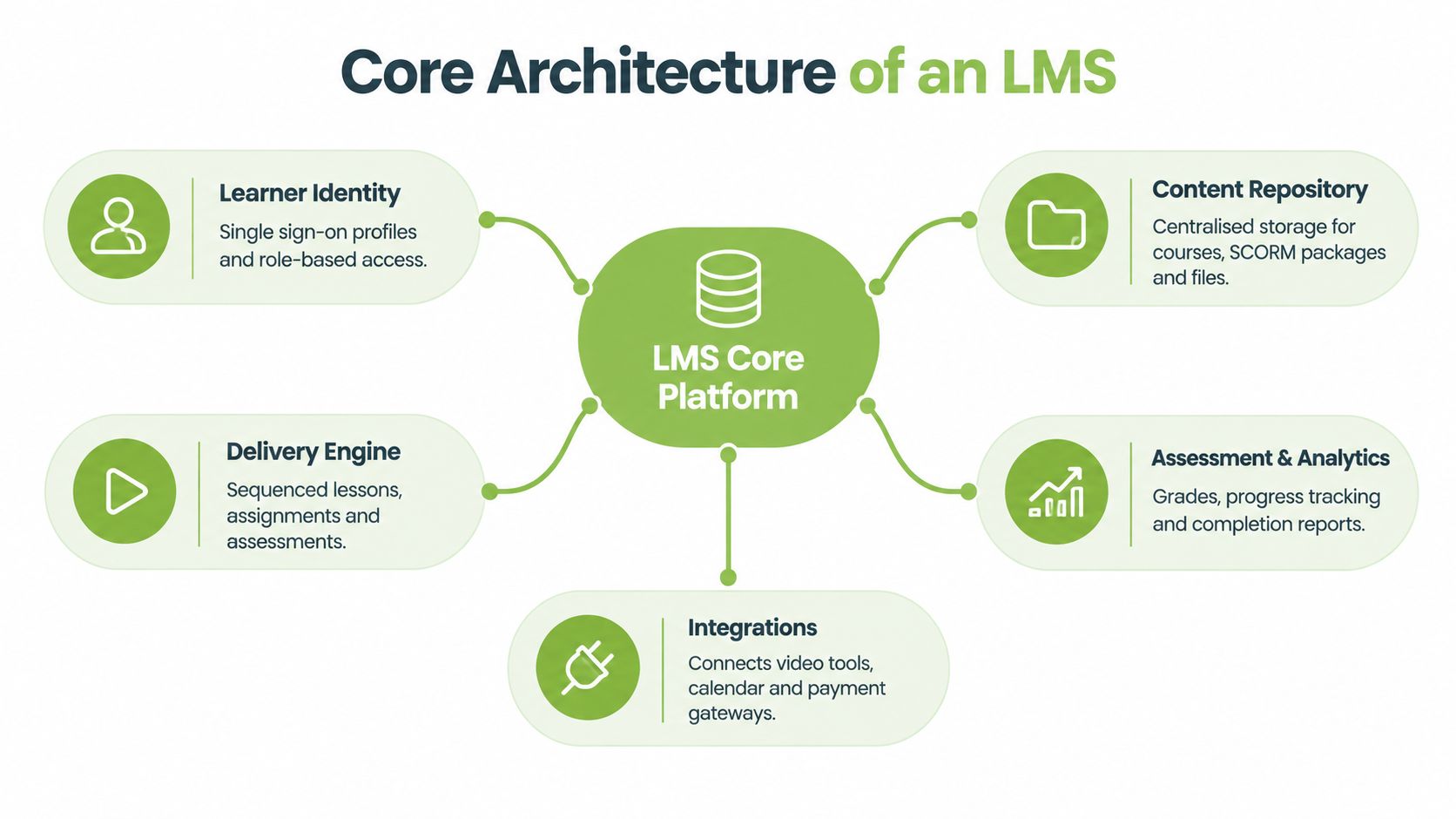
How the layers work together
Learner identity: Single sign-on and role-based access determine what a student, tutor, administrator or external assessor can see and do.
Content management: The platform organises readings, presentations, links, recordings, interactive packages and downloadable files within courses or modules.
Learning delivery: Instructors sequence activities so learners know what to do first, what to practise and what evidence to submit.
Assessment and feedback: Quizzes, assignments, marking workflows and feedback connect performance to the learner's record.
Analytics and integrations: Reports show activity and completion, while connections to video, calendars, student systems and other tools extend the LMS.
A good course structure makes the next action obvious. For example, a weekly topic might begin with an explanation, continue with a worked example, ask students to complete a low-stakes knowledge check and finish with a discussion or assignment. That sequence is more useful than placing every resource in one undifferentiated folder.
The learning management system features guide can help teams compare these capabilities in more detail. The comparison should always return to teaching outcomes: can learners find materials, practise a skill, submit evidence and understand the feedback they receive?
Designing for real learners
The 2024/25 Jisc student survey covered 15,398 students and found that 86% rated their digital learning environment above average. It also presents the LMS as a system of record connecting users, modules, activities, deadlines and participation data.
That record is useful only when the underlying course design is clear. Use consistent module names, label deadlines at activity level, map resources to outcomes and configure formative checks before high-stakes assessment. Staff should also review the experience on a phone, with a keyboard and under limited connectivity.
For learners who need additional support, platform selection should include more than a statement about accessibility compliance. Practical guidance on online school technology for SEN learners is useful when evaluating navigation, assistive technology support and the accessibility of digital activities.
Evaluating Platforms for Contemporary Education
A platform may include quizzes, discussion boards and a gradebook while still producing weak learning experiences. Selection should begin with the teaching model, the people using the system and the evidence the institution must govern.
Start with a realistic learner journey. A student might read a short resource, attend or watch a session, practise a skill, submit work and receive feedback. Ask each supplier to demonstrate that sequence with authentic materials, including a captioned video, an accessible document, a group activity and an assessment that returns feedback.
Five questions for selection teams
Can the platform support active learning? Check sequencing, discussion, peer activity, formative checks and feedback, rather than content upload alone.
Can it accommodate different media? Test video, audio, interactive materials, live teaching and downloadable alternatives.
Can staff govern access and records? Review roles, permissions, audit trails, retention settings and reporting.
Can it connect to existing services? Examine identity management, student records, calendars, assessment tools, video platforms and accessibility services.
Can learners use it independently? Ask students and disabled users to test navigation, submissions, captions, keyboard access and mobile layouts.
As noted in the UCISA survey above, support for blended learning deserves attention. Lecture notes and supplementary resources still have a place, yet effective blended teaching asks learners to work with those materials through discussion, practice, collaboration or assessment. The LMS should make that progression visible, rather than reducing online study to passive reading.
Platform Category | Typical Strength | Best-Fit Teaching Context |
|---|---|---|
Established VLE platforms | Mature integrations and institutional familiarity | Institution-wide course delivery, assessment and administration |
Newer commercial LMS entrants | Flexible interfaces and scalable delivery | Blended learning programmes seeking different workflow options |
Open or self-managed platforms | Local control and customisation | Adaptable course environments with internal technical capacity |
Specialist learning platforms | Focused tools for a defined audience or requirement | Certification, professional learning or sector-specific delivery |
Use the table as a decision aid, not a ranking. Established systems may fit institutions that depend on existing integrations, while newer platforms may offer different approaches to user experience and workflow design. Open systems require a realistic assessment of internal technical capacity. Specialist platforms deserve close review where completion records, assessment evidence and certification must follow a defined process. The plain-language resource online medical certification explained provides context for examining those requirements.
AI governance belongs in the initial evaluation. Ask where learners disclose permitted AI assistance, how staff review AI-generated feedback or captions, which activity is recorded and how the institution distinguishes legitimate support from misconduct. A suitable LMS should connect these decisions to permissions, records and review procedures, so governance remains part of everyday teaching rather than an afterthought.
Transforming Engagement Through Video Integration
Text and files remain valuable, but they don't explain every concept well. Demonstrations, performances, clinical procedures, laboratory methods, presentations and reflective responses often work better when learners can see and hear the subject.

Native LMS video features can be adequate for a small recording, but institutions often encounter practical limits. Large files may be difficult to upload, editing may require another application, live sessions may sit outside the course workflow and student video submissions may arrive through inconsistent channels. Each extra step creates work for staff and confusion for learners.
A dedicated video integration addresses that gap by keeping media connected to the LMS while providing tools designed for media workflows. MEDIAL, for example, integrates with Moodle, Canvas, Blackboard and D2L Brightspace. It supports in-browser recording and editing, secure media management, live streaming, video assignments and AI-assisted closed-caption generation.
From watching to making
The strongest use of video isn't just placing a lecture recording beside a slide deck. It gives students a way to demonstrate understanding. A trainee can record a role-play, a language learner can submit spoken work, a design student can explain a prototype and a lecturer can respond with targeted video feedback.
A useful workflow might look like this:
Prepare: The tutor provides a short explanation and a clear success criterion.
Practise: Students respond to a prompt or annotate an example.
Create: Each student records a submission inside the connected learning environment.
Review: The tutor assesses the work using a rubric and returns written or recorded feedback.
Reflect: Students review comments and identify a next step.
This approach makes the learning process more visible. It can also reduce the pressure on students who communicate more effectively through speech, demonstration or visual explanation, provided the activity offers appropriate alternatives.
For an example of how on-demand media can fit into a course workflow, see learning on demand. The key selection question is whether a video service supports the instructional task without forcing staff and students to manage separate accounts, downloads and submission routes.
A short visual explanation can help teams assess the role of integrated video:
Accessibility and control belong in the same conversation
Automatic captions can save time, but staff still need to check names, technical terms and subject-specific language. Provide transcripts where useful, describe important visual information and make sure students can access media with keyboard controls. Institutions should also control who can view, download or share recordings, especially when a session includes student contributions.
Video therefore isn't an ornamental add-on. It can support explanation, participation, assessment and feedback, but only when the integration preserves the LMS context and the institution retains appropriate control over the media.
Real World Applications Across Different Sectors
A university lecturer and a corporate trainer may use the same LMS architecture for different purposes. The lecturer organises modules around a term or programme, while the trainer builds a role-based pathway that employees complete during onboarding or compliance training.
Consider a higher-education module on environmental policy. The lecturer publishes weekly readings, embeds a recorded seminar, schedules a live discussion and asks students to compare two policy approaches. Students submit an analysis through the LMS, receive rubric-based feedback and return to the discussion after reviewing comments. The platform connects the resources and records, but the educational value comes from the sequence of explanation, participation, submission and reflection.
A corporate team might configure a different journey:
Onboarding: New staff receive role-specific policies, introductions and essential systems training.
Practice: They complete scenario-based activities and answer knowledge checks.
Verification: A manager or subject expert reviews evidence of competence.
Renewal: The LMS assigns refresher learning when an internal requirement changes.
Reporting: Training administrators review completion and follow up with people who need support.
Same foundation, different priorities
In higher education, discussion, formative feedback, lecture capture and academic assessment may take priority. The platform needs to help students make their way through a complex course and give educators enough information to intervene when someone falls behind.
In a corporate setting, managers may care more about enrolment rules, completion evidence, certification status and separation between employee groups. A sales organisation could use an LMS for product training and ask employees to submit a recorded customer conversation. A safety team might combine a demonstration video with a scenario assessment and a supervisor review.
The system shouldn't dictate the pedagogy. A completion tick doesn't prove that a learner can apply a skill, and a high quiz score doesn't necessarily show durable understanding. Configure assessments around the evidence the learning goal requires, then use analytics to identify where a human conversation is needed.
A good implementation also gives learners a clear route when they get stuck. Add contact details, explain feedback timelines, label required activities and avoid hiding essential instructions inside an image or recording. These small choices often determine whether the platform feels like a supportive learning environment or an administrative barrier.
Navigating Accessibility and Data Compliance
An LMS can be technically available while remaining difficult to use. Students may face unreliable connectivity, unsuitable devices, inaccessible documents, poor captions or interfaces that don't work with assistive technologies. Accessibility is therefore a design responsibility, not a checkbox applied after launch.
The 2024/25 Jisc survey found that 60% of students reported Wi-Fi connectivity problems either on or off campus, while 37% lacked access to a suitable device at some point during their studies. An institution should respond with responsive pages, resumable downloads or streaming, accessible file formats, low-bandwidth alternatives and clear activity-level deadlines.
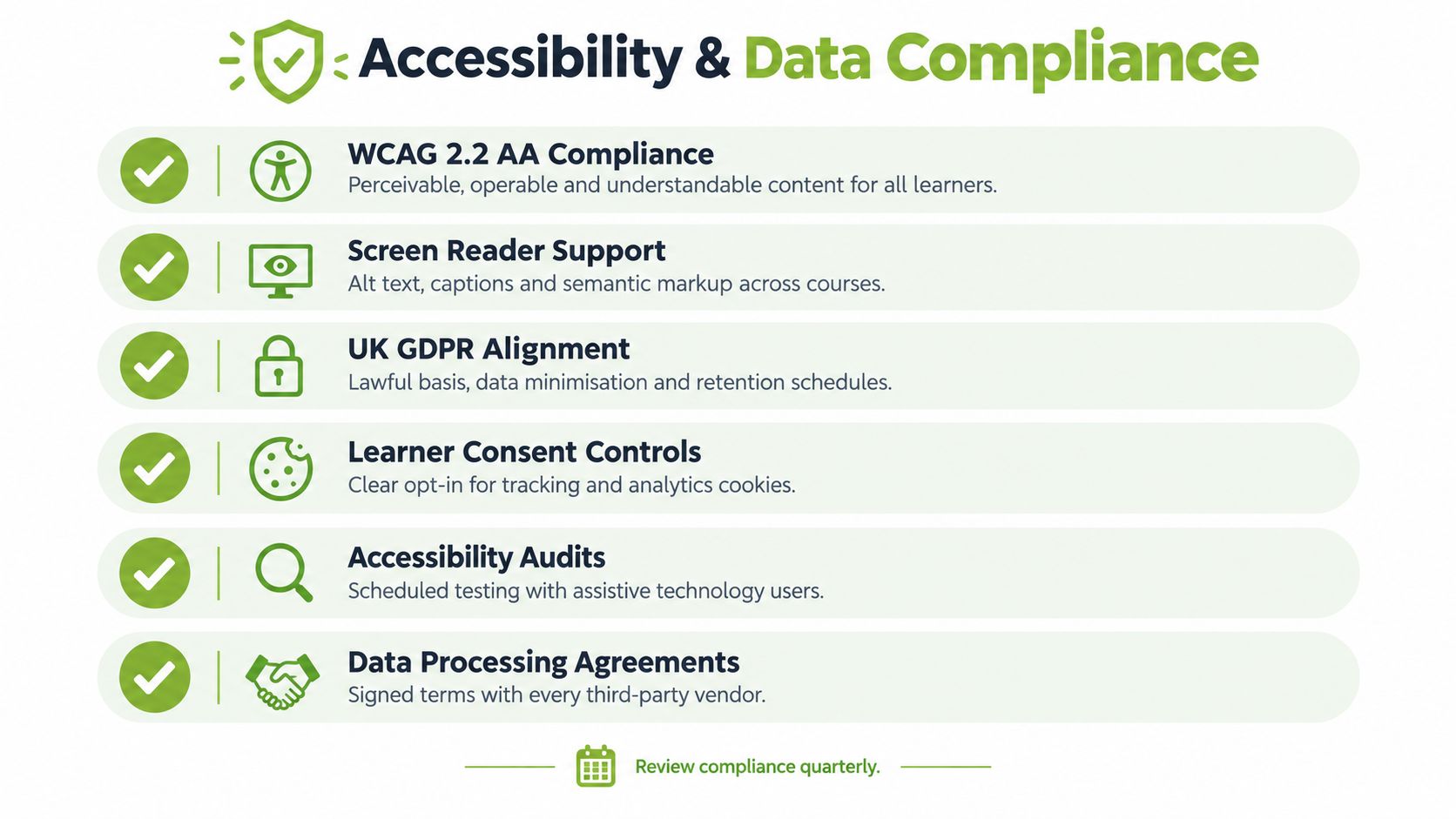
Inclusion must be usable
A platform may advertise captions and screen-reader support, but teacher-created content can still block access. Check heading structure, colour contrast, link labels, alternative text, keyboard navigation, focus order, captions and transcripts. Ask disabled learners to test real courses, not just a vendor demonstration.
Offer alternatives when a task's format creates an unnecessary barrier. A student might demonstrate the same understanding through an accessible document, audio explanation or live conversation, depending on the outcome being assessed. Automated captions should be reviewed because errors can change meaning and place correction work on the learner.
Data protection requires the same practical attention. UK schools and colleges must comply with the UK GDPR and the Data Protection Act 2018. Government procurement guidance recommends privacy by design and by default, collecting only the data needed for the educational purpose, documenting a lawful basis and completing a Data Protection Impact Assessment when processing is likely to create high risk.
Configure privacy before collecting data
Before enabling detailed analytics or video assignments, decide what the institution needs to collect and why. A submission may require a student identifier and a file, not an unnecessary profile history. A recording notice should explain its purpose, audience, retention period and the route for raising concerns.
The government safeguarding guidance warns providers to share personal data carefully and give data subjects sufficient information about data captured during lesson recordings, particularly when cameras are switched on. Use role-based permissions, disable public sharing by default and check exported files for unrelated names or contact details.
A practical security review should cover authentication, encryption, audit logging, supplier contracts, overseas transfers, retention, deletion and procedures for access or correction requests. For a focused operational checklist, see how to ensure data security.
If under-18 learners use the service, administrators should also assess whether the Children's code guidance for education technologies applies. Document processor responsibilities, protect settings by default and explain tracking, recordings, analytics, sharing and retention in language learners and families can understand.
Building Your Future Proof Learning Ecosystem
The next LMS decision won't be only about hosting content. It will be about governing how people learn, create, collaborate, submit evidence and use automated tools.
The 2026 HEPI/Kortext survey of 1,054 UK undergraduates found that 95% had used generative AI in at least one way. That reality creates a need for clear assessment design and visible policy enforcement. An LMS can support that work by recording stages of a process, publishing acceptable-use guidance, collecting declarations and preserving feedback or revision history. It can't replace academic judgement.
A practical selection checklist
Before committing to a platform or major integration, ask:
Learning design: Can staff build structured pathways with practice, feedback and authentic assessment?
Media: Can teachers and students record, edit, stream and review video without fragmented workflows?
Accessibility: Can every learner move through, participate, submit and receive feedback independently?
Governance: Can administrators manage permissions, retention, audit trails and data-subject requests?
AI policy: Can the institution explain permitted use and support process-based assessment?
Integration: Can the LMS connect reliably with identity, student, calendar, assessment and media systems?
Operational support: Can staff receive training, and can learners get help when access or connectivity fails?
A future-proof ecosystem is not necessarily the platform with the longest feature list. It's the environment that makes good teaching easier, gives learners dependable access, protects personal information and leaves room for new forms of assessment and media.
MEDIAL connects video recording, editing, streaming, captions and video assignments with LMS environments including Moodle, Canvas, Blackboard and D2L Brightspace. Visit MEDIAL to explore how an integrated video workflow could support your institution's teaching, accessibility and governance goals.
Comments