
OpenID Connect vs SAML A Guide for Modern LMS Integration

When you're trying to integrate a video platform into your Learning Management System (LMS), choosing between OpenID Connect (OIDC) and SAML often boils down to a simple trade-off: modernity versus maturity. For today's cloud-based and mobile-first learning environments, OIDC is almost always the better choice. For well-established, on-premises enterprise systems, SAML remains a robust and proven standard. This single distinction is key to figuring out which protocol will best serve platforms like Moodle, Canvas, Blackboard, or D2L Brightspace.
Choosing Your SSO Protocol A Quick Comparison
At its heart, Single Sign-On (SSO) is what allows a student or instructor to log in once to their main portal—like your LMS—and then seamlessly access other integrated tools, such as a video library, without having to log in again. Both OIDC and SAML are open standards that make this happen, but they get there in fundamentally different ways.
The protocol you choose will have a real impact on your system architecture, the user experience, and your overall security posture. For example, a university with a long-standing, on-premises Moodle installation might already be heavily invested in a SAML-based federation. An actionable insight here is that trying to switch would require a significant overhaul of their core identity system (like ADFS). On the other hand, a corporate training programme using a cloud-hosted Canvas instance with a dedicated mobile app will find OIDC’s lightweight, API-friendly nature a much better fit, enabling faster logins for remote employees.
To get the full picture, it helps to understand where these protocols sit within the larger discipline of Identity Access Management. They are the foundational technologies that make modern, secure access possible.
OIDC vs SAML Key Differences at a Glance
So, how do you decide? Let's break down the core technical and practical differences between OpenID Connect and SAML to make the choice a bit clearer.
Attribute | OpenID Connect (OIDC) | SAML 2.0 |
|---|---|---|
Technology | Built on the OAuth 2.0 framework | An independent, older protocol |
Data Format | JSON Web Tokens (JWTs) | Security Assertion Markup Language (XML) |
Mobile Friendliness | Excellent. JWTs are lightweight and perfect for mobile and single-page apps. | Limited. XML is quite verbose and can be slow to parse on mobile devices. |
Primary Use Case | Consumer-facing apps, native mobile apps, modern web services, and APIs. | Enterprise SSO, federated identity for large organisations (e.g., universities). |
Security Tokens | ID Token (authentication), Access Token (authorisation) | SAML Assertion (authentication and authorisation combined) |
Complexity | Generally simpler to implement, thanks to its modern, API-first design. | More complex, involving rigid XML schemas and digital signatures. |
As you can see, the right choice really depends on your specific needs. If you're building for the future with mobile access and modern APIs in mind, OIDC is the clear winner. If you're working within an established enterprise ecosystem that has relied on federated identity for years, SAML is still a perfectly viable and secure option.
Understanding SAML: The Enterprise Standard
Security Assertion Markup Language, or SAML, has been the bedrock of Single Sign-On (SSO) in large enterprises and educational institutions for years. It was built to handle complex authentication between different organisations, providing a mature and highly structured way to verify who a user is. Think of it as a digital passport that lets someone authenticated in one system access another without ever needing to log in again.
The whole system works because of a trusted relationship between two parties: the Identity Provider (IdP) and the Service Provider (SP). The IdP is the system that holds and verifies a user's identity—like a university's main login portal (e.g., Shibboleth or ADFS). The SP is the application they want to get into, such as a MEDIAL video library embedded in an LMS.
This trust isn't assumed; it's established beforehand by swapping configuration files called metadata. This initial handshake ensures the SP will only accept identity information from a recognised IdP, keeping things secure.
The SAML Authentication Flow in Action
Let's walk through a real-world example. A university professor needs to access a lecture recording stored in MEDIAL, right from their Moodle course page.
Request Access: The professor clicks the link to the video library inside Moodle. Moodle, acting as the SP, sees the user isn't authenticated for that resource.
Generate a SAML Request: Moodle builds an XML-based SAML request—a formal message asking for authentication—and sends the professor’s browser over to the university's central IdP.
Authenticate the User: The IdP's login page pops up. The professor is probably already logged into the university network, so the IdP just confirms their existing session. If not, they'd type in their credentials here.
Create a SAML Assertion: Once authenticated, the IdP creates a digitally signed SAML assertion. This is an XML file containing key details like the user’s email, their role ('professor'), and proof they were successfully authenticated.
Return to the Service Provider: The IdP sends this assertion back to the professor's browser, which then passes it along to Moodle (the SP).
Grant Access: Moodle checks the digital signature on the assertion to make sure it's legitimate. Once confirmed, it grants the professor access to the MEDIAL video library.
Notice that the professor’s actual password was never shared with Moodle or MEDIAL. The secure, signed assertion from a trusted source is all that’s needed.
Why SAML Still Dominates in Education and Enterprise
SAML's long-standing popularity, especially in education, isn't an accident. Its robust, XML-based structure is perfect for creating federations, where lots of different organisations agree to trust one central IdP. A practical example is a university consortium where students from one institution can access library resources at another using their home university credentials.
In the UK higher education sector, SAML has long been the cornerstone of federated identity management, powering seamless single sign-on across university learning management systems like Moodle and Canvas.
The data backs this up. SAML 2.0 is behind a staggering 92% of all identity assertions exchanged within the UK's academic federations, which handle over 18 million users from more than 1,800 organisations. This just goes to show how deeply it's woven into the fabric of higher learning. You can dive deeper into insights on SAML and federated identity to learn more.
Its rigid structure and formal trust model also make SAML a solid choice for any environment with strict data compliance rules. For administrators managing older systems or working within large federations, SAML remains a reliable, battle-tested way to secure integrated tools.
Exploring OpenID Connect For Modern Authentication
While SAML set the stage for enterprise SSO, OpenID Connect (OIDC) is the modern answer to the demands of today’s web. It's not a brand-new invention from scratch; instead, it's a clever identity layer built directly on top of the OAuth 2.0 authorisation framework. Understanding this relationship is the key to grasping its power.
Think of it this way: OAuth 2.0 was designed to let applications ask for permission to use resources on your behalf—like an app wanting to access your Google Calendar. OIDC takes this a step further by adding a critical layer of identity verification. It doesn't just ask, "Can this app access your data?" but also confirms, "Who exactly are you?"
This is all handled using lightweight data packets called JSON Web Tokens (JWTs). Unlike the bulky XML used in SAML, JWTs are compact and easy for web browsers, mobile apps, and servers to process. This makes the entire authentication process faster and much less demanding on resources.
The Role of ID Tokens and Access Tokens
One of the smartest things OIDC does is separate authentication from authorisation using two different kinds of tokens. This is a core difference when you compare OpenID Connect vs SAML, and it’s a massive advantage for modern application security.
ID Token: This JWT is pure proof of identity. It contains bits of information (called claims) about the user, like their name, email, and when they last logged in. The application on the receiving end uses this token to confirm who the user is and start their session.
Access Token: This is the key that unlocks a protected resource, like an API. It tells the resource server that whoever holds the token has been authorised to access the API and perform certain actions. For example, it might grant permission to read course data but not to modify it.
This two-token system creates incredible flexibility. An application can use the ID Token to establish a user session, then use the Access Token to securely fetch more user data from a protected API, all without ever seeing the user's password.
An OIDC Flow in a Mobile Learning Scenario
Let's make this real. Imagine a corporate employee, Sarah, using her smartphone to join a live training session hosted on a cloud-based Canvas instance.
Access Request: Sarah opens the Canvas mobile app and taps the link for her training video, which is managed by a platform like MEDIAL. The Canvas app, acting as the OIDC client, knows she needs to be authenticated.
Authentication Redirect: The app sends her to the company's central Identity Provider (IdP), like Auth0 or Azure AD. Since she’s probably already signed into her corporate account on her phone, the IdP instantly recognises her.
Token Issuance: The IdP generates an ID Token to verify Sarah's identity and an Access Token that gives the Canvas app permission to get her profile info. It sends both tokens back to the Canvas app.
Identity Verification: The Canvas app checks the ID Token's signature, confirming it came from the trusted IdP. It logs Sarah in and creates her session.
API Authorisation: To show her name and role in the training, the Canvas app calls a user profile API. It includes the Access Token in the request as proof of authorisation. The API validates the token and sends back Sarah’s details.
With OIDC, authentication is clean and completely separate from authorisation. The app verifies the user with one token and then uses another to securely talk to backend services—a perfect model for distributed, cloud-native systems.
This API-first design is exactly why OIDC shines where SAML often falls short. It was built for a world of mobile apps, single-page web applications, and microservices that need a fluid, efficient way to handle identity. For any organisation wanting to deliver a smooth user experience across multiple devices, OIDC offers a much more agile and developer-friendly way forward.
Technical Differences and Security Implications
To really get to grips with the OIDC vs SAML debate, we need to look under the bonnet at their core technical architecture. The biggest difference, and one that has a knock-on effect on everything else, is their data format. This single choice dramatically impacts performance, security, and complexity, especially when you're trying to integrate with a modern Learning Management System (LMS).
SAML runs on Security Assertion Markup Language, which is an XML-based format. If you've ever worked with XML, you'll know it's incredibly verbose. A simple piece of user information gets wrapped in layers upon layers of descriptive tags, making the final security assertion quite chunky. This isn't just an aesthetic issue; that bulkiness directly hits performance, as parsing these large XML documents chews up processing power and bandwidth.
OpenID Connect, on the other hand, uses JSON Web Tokens (JWTs). JWTs are a modern, lightweight way to securely send information as a compact JSON object. Because they're so much smaller than their SAML equivalents, they're faster to send and far easier to parse. This is a massive advantage for mobile apps and single-page web applications where every millisecond of latency counts.
Data Format and Performance Impact
This difference in data formats isn't just a technical curiosity—it has very real consequences for your users.
SAML XML: The sheer size and complex structure of XML assertions gobble up network bandwidth and demand more CPU cycles to process on both ends. Imagine a student on a patchy mobile connection trying to access a video in their Canvas app. The delay caused by processing a bulky SAML assertion can be genuinely noticeable.
OIDC JWT: JWTs were built for speed. Their compact size cuts down network traffic, and parsing JSON is a native, highly optimised function in almost every modern programming language and web browser. The result? Faster authentication and a much snappier, more responsive user experience.
For any organisation that prioritises mobile learning or relies on modern, JavaScript-heavy LMS interfaces, the performance boost from JWTs is a compelling reason to lean towards OIDC. That reduced latency can be the difference between a smooth user journey and a frustrating one.
Contrasting Security Models
Let's be clear: both protocols are secure when you implement them correctly. However, they go about it in very different ways. SAML’s security is rooted in the complex world of the XML ecosystem, whereas OIDC benefits from the more streamlined approach it inherits from OAuth 2.0.
SAML depends heavily on XML Signatures (XML-DSig) to guarantee the integrity and authenticity of an assertion. This involves a complicated process of standardising the XML document before applying digital signatures. It's incredibly secure, but it's also notoriously difficult to get right, which can open the door to vulnerabilities if it's misconfigured. An actionable insight: when troubleshooting SAML, signature validation errors are a common culprit, so always start your checks there.
OIDC uses JSON Web Signature (JWS) and JSON Web Encryption (JWE). These standards were specifically designed for securing JWTs and are generally much simpler for developers to handle. A JWS token is digitally signed, proving it hasn't been tampered with, and that's usually all you need for authentication. This simpler security model lowers the risk of implementation mistakes. For a deeper dive into security in educational contexts, you can find out more about securing video content in Moodle in our related guide.
Session Management and Statelessness
Another crucial technical split is how each protocol handles sessions. This is particularly important for scalable, cloud-based services like a modern LMS or a video platform like MEDIAL.
SAML was born in an era of traditional web applications, where a server-side session is created and maintained for the user. The Service Provider (SP) checks the SAML assertion once, then creates a local session cookie to keep the user logged in. This model works, but it can be a headache to scale in distributed, load-balanced environments.
OIDC is a natural fit for stateless architectures. The JWTs (specifically the ID Token and Access Token) are self-contained and carry all the necessary information. The client—be it a mobile app or a single-page application—can just hold onto these tokens and send them with each request to a protected API. The server can validate the token on its own without needing to check a central session store. This stateless approach is a cornerstone of modern, scalable cloud services, leading to a more resilient and simpler architecture.
Putting SSO into Practice in Your LMS
Knowing the theory behind OpenID Connect and SAML is one thing, but getting it working smoothly inside your Learning Management System (LMS) is another challenge entirely. This section breaks down the practical steps for setting up SSO in platforms like Moodle, Canvas, or Blackboard, helping you sidestep some common tripwires.
Whether you lean towards the established, enterprise-grade SAML or the modern, API-centric OIDC, a successful rollout comes down to meticulous configuration. You need a solid grasp of how information is exchanged between your systems.
Configuring a SAML 2.0 Integration
Think of a SAML setup as a carefully choreographed dance between your Identity Provider (IdP) and your LMS, which takes on the role of the Service Provider (SP). The whole relationship is built on a "circle of trust," which all starts with exchanging metadata.
Here's a hands-on checklist to guide you through a SAML setup:
Metadata Exchange: This is your foundation. Your IdP (like Azure AD or ADFS) and your SP (your LMS) need to swap XML metadata files. This isn't just a formality; this file contains everything from entity IDs and endpoint URLs to the public keys for the X.509 certificates that sign the assertions.
Attribute Statement Configuration: This is where you connect the dots. You have to map the user attributes from your IdP to the corresponding fields your LMS is looking for. For instance, you might need to map the IdP’s attribute to the field in Moodle. Get this wrong, and users could log in to find their accounts are half-empty or missing crucial details.
Certificate Management: SAML assertions rely on digital signatures to prove they haven't been tampered with. You have to make sure the certificate from your IdP is correctly uploaded to your LMS. A word of warning: these certificates expire. An actionable insight is to set calendar reminders 30 days before expiry to give your team enough time to rotate them without causing a service outage.
Clock Synchronisation: One of the most frustrating SAML errors is the dreaded "message expired" or "not yet valid" failure. This is almost always caused by clock drift—a tiny time difference between the IdP and SP servers. SAML assertions are only valid for a very short window, so make sure both systems are synchronised to a reliable Network Time Protocol (NTP) source.
A successful SAML setup is all about precision. A simple mistake in an attribute map or a slight clock discrepancy can grind the whole authentication process to a halt. Double-check everything before you go live.
Setting Up an OIDC Integration
Implementing OIDC feels much more like setting up a modern web app than a legacy enterprise service. The entire process revolves around registering your LMS as an "application" with your OIDC provider.
Follow these steps for a secure OIDC implementation:
Application Registration: Your first step is to register your LMS as a new application inside your OIDC provider (like Google, Okta, or Auth0). This will give you a unique Client ID and a Client Secret. The Client ID is public, but the Client Secret is gold—protect it at all costs, as it’s what your application uses to prove its identity.
Define Scopes: Scopes are where you define what permissions your application is asking for. At a bare minimum, you'll need the scope, which is the trigger for the OIDC flow and requests an ID Token. You'll almost certainly also ask for (for basic info like their name) and (for their email address).
Configure Redirect URIs: This is a crucial security measure. The Redirect URI (sometimes called a callback URL) is the exact endpoint in your LMS where the OIDC provider will send the user back after they've logged in. You must register this specific URI in your provider's settings. This whitelisting approach prevents attackers from intercepting the authentication code and hijacking a user's session.
For those getting ready for an SSO project, our guide on using Single Sign-On with MEDIAL offers more context and some specific things to think about when integrating a video platform.
Ultimately, this practical guidance should give your IT teams the know-how to avoid common setup headaches. By carefully managing metadata and certificates for SAML, or client secrets and redirect URIs for OIDC, you can build a secure and seamless SSO bridge between your core learning platform and other essential tools.
How to Choose The Right Protocol For Your Organisation
Deciding between OpenID Connect and SAML isn't about crowning a champion; it's about finding the right fit for your world. The best protocol is the one that clicks with your existing tech, your users, and where you're headed. This choice has real, long-term effects on how your systems scale, how your users feel, and how much work your IT team has on its plate.
To make this decision less abstract, let’s walk through two very different, practical scenarios. They perfectly illustrate where each protocol truly shines.
Scenario One: The Established University
Picture a large university. Their IT environment has been built up over years and is primarily on-premises. They rely on Microsoft's Active Directory Federation Services (ADFS) as their identity hub and have a massive Moodle instance that has served thousands of students for a decade.
Existing Infrastructure: Deeply invested in ADFS and on-site servers.
User Base: Mostly desktop users logging in from the campus network.
Technical Skills: The IT team knows SAML integrations inside and out.
For this university, SAML is the clear and stable choice. It plugs right into ADFS and offers the heavy-duty, enterprise-level security needed for a sprawling educational federation. Trying to switch to OIDC would mean a massive, costly overhaul of their core identity systems for very little immediate benefit. An actionable insight: leverage existing SAML expertise to ensure a smooth integration rather than retraining the team for a new protocol.
Scenario Two: The Modern Corporate Trainer
Now, let's imagine a fast-moving company using a cloud-based LMS like Canvas for its corporate training. Their team is remote, accessing learning materials and video assignments on smartphones and tablets through a dedicated mobile app.
Existing Infrastructure: Cloud-first, using an identity provider like Okta or Azure AD.
User Base: Mobile-first, needing quick, frictionless access from anywhere, on any device.
API Needs: The LMS has to talk to a dozen other cloud services through APIs.
In this case, OpenID Connect is the obvious frontrunner. Its lean JWTs are built for mobile performance, and its API-friendly nature makes connecting to other modern cloud tools a breeze. The heavier XML structure of SAML would just add needless lag and complexity for their mobile users. An actionable insight: choose OIDC to improve the mobile user experience, which can directly impact training completion rates for a remote workforce.
This decision tree helps visualise that core choice—your LMS and user environment really drive the decision.
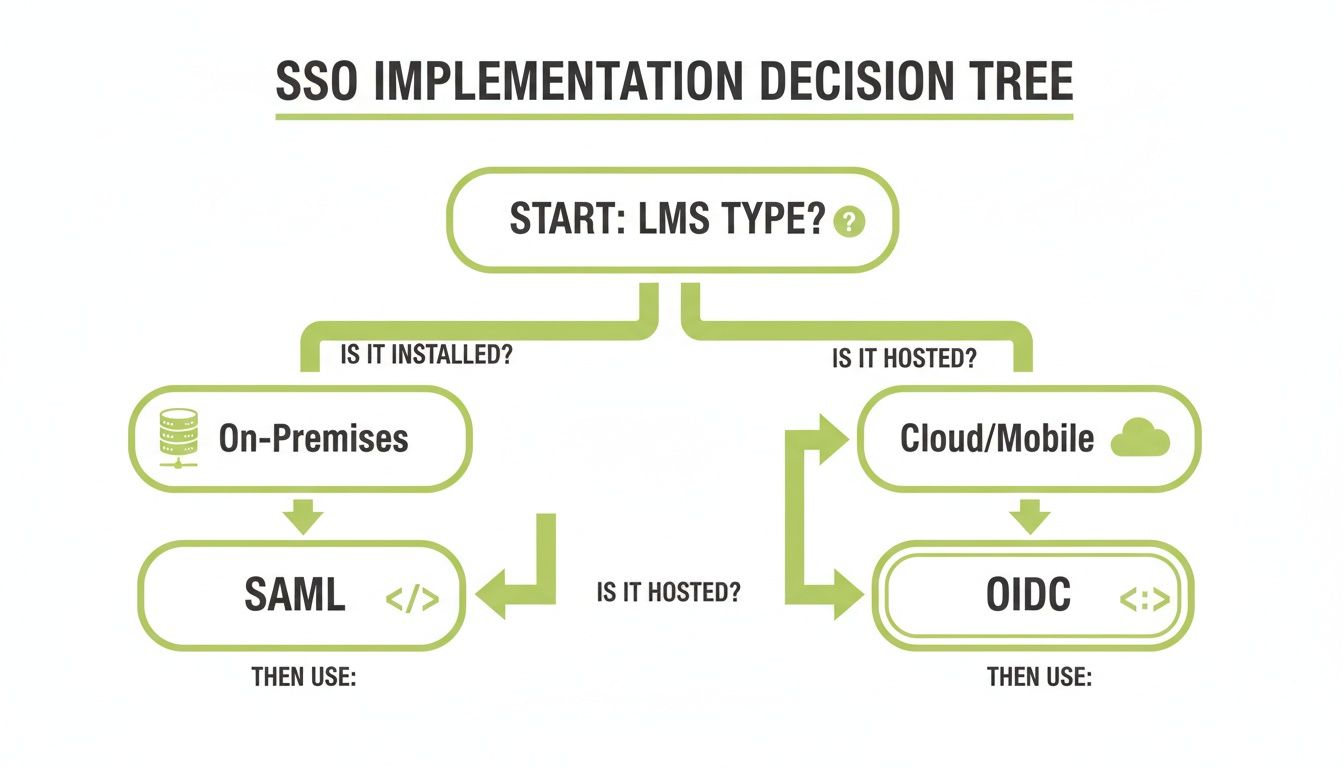
The graphic makes it clear: on-premises systems just work well with SAML's proven track record, while cloud and mobile setups get the most out of OIDC's modern flexibility. When you're weighing your options, think about how the protocol fits into your wider strategy for designing software architecture, as it will absolutely impact how your systems connect and grow.
For more hands-on advice on bringing systems like these together, check out our guide on mastering Learning Management System integration. Once you analyse your own situation, you’ll be able to confidently pick the protocol that actually supports your organisation's goals.
Got Questions About OIDC and SAML?
Choosing between OpenID Connect and SAML often brings up a few practical questions. You're probably wondering about security, what the future holds, and how each one handles specific situations. Getting these answers sorted is crucial before you lock in an integration plan for your LMS.
Let’s dive into some of the most common queries we hear.
Can I Migrate From SAML to OIDC Later?
Absolutely. Moving from SAML to OIDC is a well-trodden path for many organisations. While it's not a simple flip of a switch, it's a manageable project with a clear process.
The migration involves setting up a new OIDC application in your identity provider, tweaking the configuration in your LMS and other connected services, and making sure all the user attributes are mapped correctly. A practical tip is to run both protocols in parallel for a pilot group of users. This allows you to test the new OIDC connection and iron out any kinks without disrupting everyone at once.
Is One Protocol More Secure Than the Other?
Fundamentally, no. When implemented correctly, both SAML and OIDC are secure standards. They just approach security differently, and each has its own tripwires if you're not careful with the setup.
That said, SAML’s complex XML structure can sometimes hide subtle configuration mistakes that are a nightmare to track down. Many developers find OIDC’s JSON-based approach much more straightforward to lock down, particularly for modern web and mobile apps.
The biggest security risk isn't the protocol itself, but a flawed implementation. OIDC's relative simplicity can often reduce the chances of human error during setup.
Which Protocol Works Better for Mobile App SSO?
For native mobile apps, OIDC is the undisputed winner. There's really no contest here. It was built for the API-driven world we live in today.
Its reliance on lightweight JSON Web Tokens (JWTs) makes it far more efficient for mobile devices, which have to deal with flaky network connections. A practical example is a student accessing their LMS app on a train with spotty Wi-Fi. An OIDC login flow will complete much faster and use less data than a clunky SAML exchange, leading to less frustration and a better learning experience. For any mobile-first learning strategy, it's the obvious choice.
For a video platform that supports both modern and established SSO protocols, ensuring seamless and secure integration with your LMS, explore what MEDIAL has to offer. Find out more at https://medial.com.
Comments