
Role Based Access in LMS Platforms: A Practical Guide

A temporary lecturer joins halfway through term. An external examiner needs to review assessment recordings. A corporate trainer moves from one client project to another. In each case, someone has to decide what that person can see, upload, edit, download, or administer, often while classes are already running.
If those permissions are assigned manually to individual accounts, small oversights create persistent access. A safer approach is role based access, where the platform connects permissions to an approved role and limits that role to the right course, department, project, or session. That model is practical, but it isn't complete on its own. UK guidance increasingly expects least privilege, regular reviews, prompt removal, and more context-aware decisions where a fixed job role doesn't tell the whole story.
The New Lecturer Who Could See Everything
It's Tuesday morning in a UK university learning team. Dr Patel has joined as a temporary lecturer to cover a module from week five, so IT gives her an account and asks the learning technologist to arrange access before the next seminar.
She signs in and discovers that she can open every course area, view student records across the institution, browse the full video library, and reach recordings created for the medical school next door. Nobody intended to give her that reach. The problem is that permissions were attached directly to her account, and the person configuring access had to remember every boundary manually.

Why individual grants become invisible doors
Individual permission changes look manageable when a team is small. They become fragile when lecturers arrive late, cover colleagues on parental leave, teach across departments, or leave before the end of a teaching cycle. A forgotten exception can remain active after a contract ends, particularly when the LMS, video platform, HR system, and identity provider don't share the same lifecycle information.
The UK National Cyber Security Centre describes access control through permissions assigned to a human or machine identity, with roles grouping fine-grained permissions across resources. It also recommends periodic reviews and technical removal when access is no longer needed, including when someone changes role or leaves the organisation. The NCSC guidance on secure user management provides the foundation for this approach.
Practical rule: If a person's access depends on someone remembering every exception, the organisation has built a process that will eventually fail.
With a Lecturer role, Dr Patel can be assigned to the relevant module rather than granted broad access as an individual. The role can allow her to view and upload teaching media, manage activities in that course, and support learners without exposing unrelated departments' recordings. When HR closes the contract and the identity feed removes her assignment, the access path can close cleanly.
That's the value of role based access in everyday education. It handles churn, not just security diagrams. The same principle applies to shared cover, contractors, guest speakers, and staff whose responsibilities change during the academic year.
What Role Based Access Control Actually Means
Start with a library. The user is the borrower. The role is the membership card. The permission is the lending right, such as borrowing books or using a study room. The session is a single visit, during which the borrower uses the rights relevant to that visit.
In technical terms, Role Based Access Control, or RBAC, assigns permissions to named roles and assigns users to those roles. A Lecturer role might include uploading a recording, editing captions, grading a video assignment, and viewing course analytics. A Student role might allow playback, submission, and access to personal feedback, but not course-wide downloads or administrative settings.
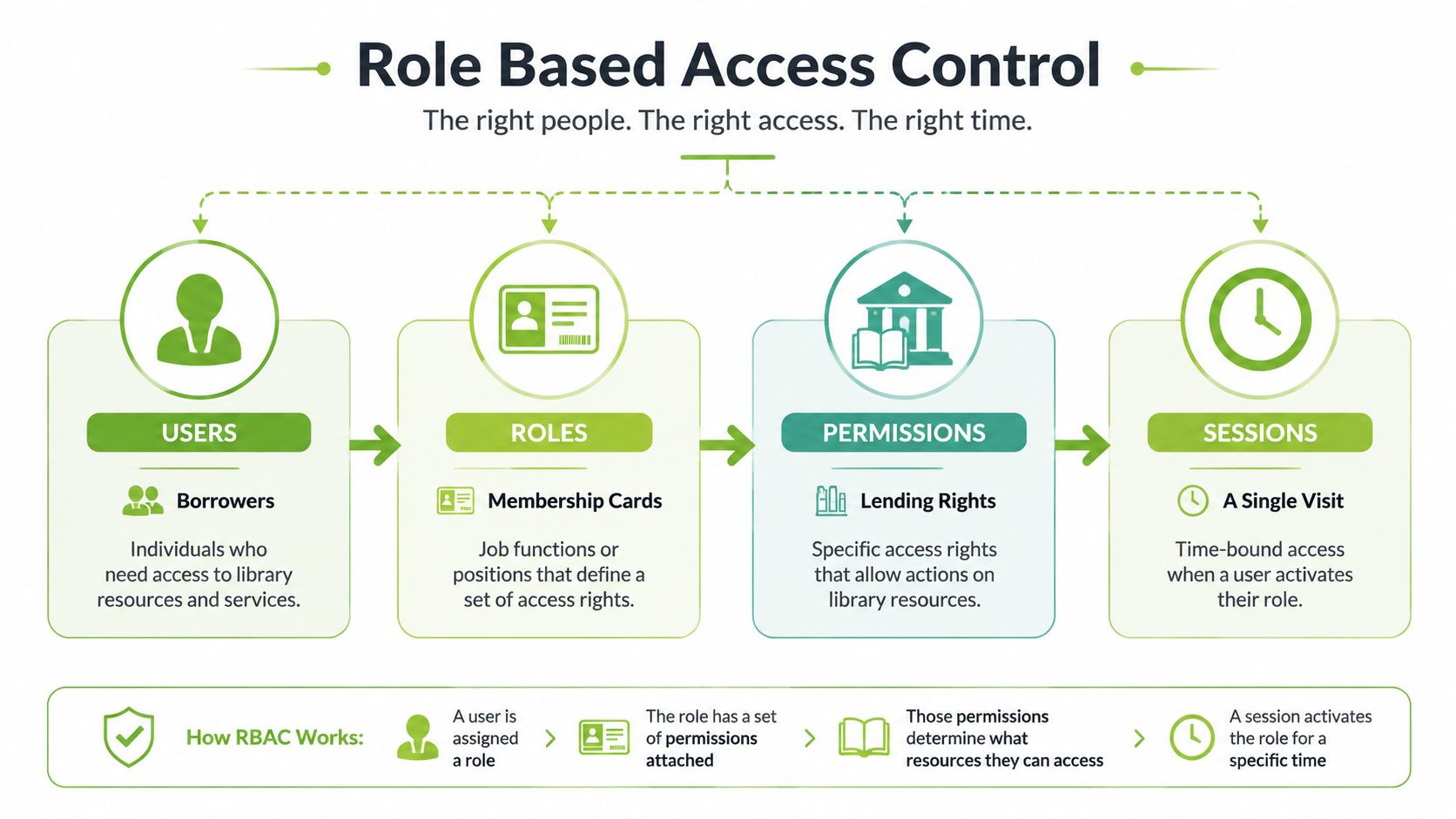
The four building blocks
Users are people or services that need to interact with the platform. They should have distinct identities rather than relying on shared logins, so the system can associate actions with the right account.
Roles bundle permissions into a recognisable responsibility, such as Student, Teaching Assistant, Lecturer, or Platform Administrator. A user can have more than one role, but the organisation should assign only the roles needed for the person's duties.
Permissions describe an action on a resource. Examples include viewing a recording, downloading a transcript, uploading a video, editing captions, exporting analytics, or downloading learner data. A role is useful only when its permissions are specific enough to reflect the work.
Sessions provide context. A user may be a Teaching Assistant for normal course work but select an Instructor session role to moderate a particular live class. NHS England's national RBAC model illustrates this distinction operationally. Its database maps roles to activities using role codes and activity codes, while APIs verify the user's role profile and selected session role before granting access. The selected role determines which data and functions the session exposes. Details are available in the NHS England national RBAC developer guidance.
In an LMS and video integration, course membership can drive the platform role. A Lecturer enrolled on a Moodle course can receive teaching permissions for that course, while a Student receives learner permissions. The exact implementation varies, so test the mapping instead of assuming that a role name in the LMS automatically means the same thing in every connected service.
A short visual explanation can help staff understand the model before configuration begins:
Teams rolling out AI tools also face the same adoption problem, where people need clear responsibilities, safe defaults, and practical training. For a related perspective, see CloudOrbis Inc.’s guide to adoption tactics for Microsoft Copilot.
RBAC Compared With ABAC and ACL Models
RBAC isn't the only way to decide access. Three models often appear together in platform discussions, but they answer different questions.
An Access Control List, or ACL, attaches a list of users and actions to a specific resource. For example, a course leader could give three named external examiners access to one assessment recording. ACLs are straightforward for isolated exceptions, but they become difficult to maintain when hundreds of videos, courses, and users require similar decisions.
RBAC moves the decision to the role layer. Instead of adding the same permission to many people one by one, an administrator defines the Reviewer role and assigns it to the relevant users. The platform can then apply the role to a course, media category, or departmental space. This is a natural fit for recurring LMS relationships, such as lecturer, student, teaching assistant, and administrator.
Attribute-Based Access Control, or ABAC, evaluates attributes against policy rules. Attributes might include department, project affiliation, location, contract status, data classification, or time of access. ABAC can answer a question that RBAC handles poorly: “May this person access this dataset from this context for this task right now?”
RBAC vs ABAC vs ACL at a glance
Model | Decision basis | Best fit in LMS/video platforms |
|---|---|---|
RBAC | Assigned role and its permissions | Course membership, standard teaching duties, learner access, and platform administration |
ABAC | User, resource, action, and environmental attributes | Research datasets, sensitive projects, temporary access, location-based rules, and time-limited conditions |
ACL | Named users or groups attached to one resource | A single shared recording, exceptional review access, or a small one-off audience |
The UK Information Commissioner's Office recommends role-based access profiles but also says organisations should assess each role's need, restrict privileged access, and use security classifications for sensitive information. Its access control guidance makes the practical limitation clear: a job title alone doesn't prove that a person needs every permission associated with it.
The Government Digital Service notes that departments are moving from RBAC towards ABAC in some circumstances, using factors such as location, project affiliation, and time. For universities, that matters when a researcher is also a lecturer, a contractor needs temporary access, or a care-related dataset must remain separate from ordinary teaching content.
Design principle: Use RBAC for the stable structure, then add resource scoping, expiry, approval, and attributes where the context changes.
Mapping Roles Inside an LMS and Video Platform
A useful role map starts with work rather than job titles. Ask what each person must do in a real course or training workflow, then separate course-scoped permissions from global platform powers.
A platform administrator may need to configure integrations, manage categories, review audit records, and support users across the service. That doesn't mean the administrator should routinely edit teaching content or download learner data. Separating operational administration from content work reduces the chance that one compromised account can change records and conceal the activity.
Persona | Course management | Video & transcript access | Analytics & data export | Notes |
|---|---|---|---|---|
Platform administrator | Configure global settings and integrations, not routine course editing | Manage categories and support access; restrict routine content changes | Limited to approved operational reports, with audit access separated where possible | Global role, tightly assigned and reviewed |
Senior instructor | Create and manage assigned courses, activities, and assessment workflows | Upload, edit, caption, moderate, and manage assigned course media | View course analytics; export only what the teaching task requires | Course-scoped role is preferable |
Teaching assistant | Support activities and learner queries within assigned courses | View and upload where required; caption editing only if explicitly needed | View limited teaching reports; no broad learner-data export by default | Temporary session elevation may support live moderation |
Enrolled student | Participate in assigned activities and submit work | View permitted media and upload assignment responses | View personal progress, not class-wide learner data | Access follows enrolment and course scope |
External reviewer | No course administration | View selected assessment recordings; download disabled unless approved | No learner-data download; provide only the review evidence required | Use a time-limited, resource-scoped assignment |
Keep powerful permissions apart
Don't combine audit-log access with unrestricted content editing unless there's a strong, documented reason. A person who can alter content and investigate the record of that alteration creates a difficult accountability problem.
Similarly, learner-data download, caption editing, live moderation, and global category administration should be treated as separate decisions. A teaching assistant may need to moderate a live session without needing access to every recording in the department.
MEDIAL-style environments can implement group access controls for media categories, with levels such as None, View, View and Upload, and View, Upload and Administer. Before changing those settings, use the MEDIAL permission settings guide to check how the platform's categories and group permissions correspond to your LMS structure.
A session role adds another safeguard. NHS England's operational model shows why a person can hold multiple roles while the selected role for a session controls the active data and functions. In practice, a teaching assistant could receive temporary instructor capability for one live session, then return to the normal assistant role without gaining permanent course-wide rights.
Configuration Checklist for Secure Role Based Access
A secure configuration begins before anyone creates a role in the LMS. UK Government security guidance places least privilege at the centre of identity and access control. Users and service accounts should receive the minimum access required for their duties, privileged activity should be reviewed, and rights should be removed when they're no longer needed. The Government Security Policy Handbook sets out that operating principle.
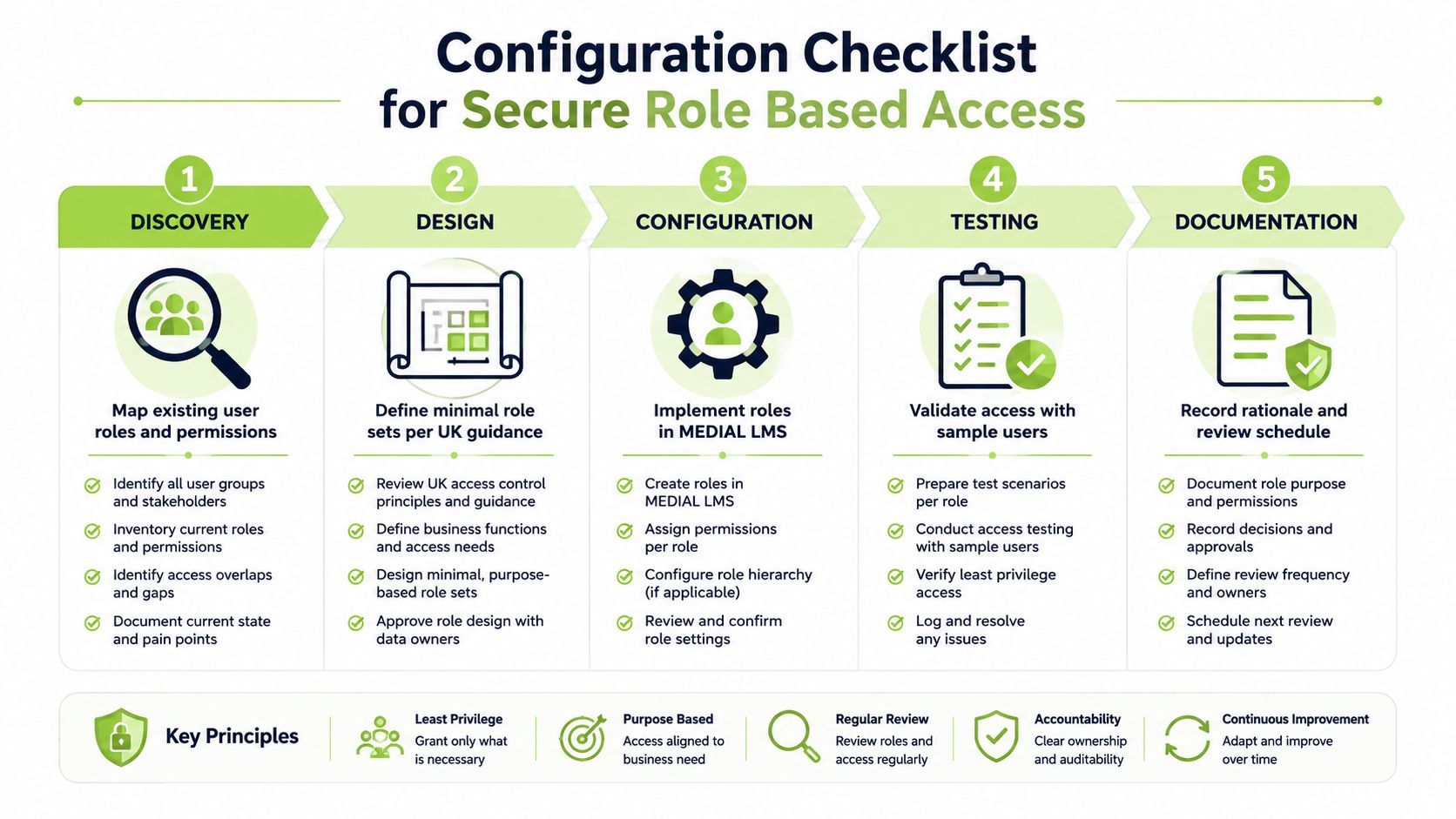
Discovery
Map current access: Export users, groups, roles, course memberships, media categories, and service accounts from the LMS and video platform.
Identify authorities: Record whether each assignment comes from the LMS, HR system, identity provider, manual administration, or an API.
Record obligations: Include UK GDPR, institutional retention rules, assessment controls, research governance, and any Ofsted-aligned training-record requirements that apply to the service.
This stage often reveals duplicate roles and old accounts before they become a security incident.
Role design
Build a permission matrix: List actions such as view, upload, edit captions, moderate, export, administer, and download learner data.
Use functional names: Prefer Lecturer, Teaching Assistant, Student, Reviewer, and Platform Administrator over names tied to one department or individual.
Write explicit denials: State what a role cannot do, especially around exports, privileged settings, sensitive categories, and assessment media.
Don't create a new role every time a person needs access to one additional resource. Use course or category scope where possible, then add a controlled exception with an owner and expiry.
Technical configuration
Set default access to deny, assign users through SSO or trusted enrolment flows, and test role hierarchies with sample accounts. Guest lecturers should receive scoped access and, where supported, time-bound elevation rather than a permanent administrator-like role.
The GDS least-privilege standard recommends using the least-privilege role by default, granting just-in-time access only when needed, and limiting privileged sessions in non-development environments to no more than 30 minutes, or ending them at logout. It also calls for an audit trail and a Joiners, Movers and Leavers process. Follow the GDS least-privilege standard when defining high-privilege workflows.
Integration hardening and governance
Review API scopes, webhook secrets, and shared service accounts. Give integrations only the actions they require, avoid shared human credentials, and make sure the platform records which service or user initiated a change.
Finally, schedule access recertification. Connect role assignment to HR feeds or SCIM provisioning where available, and define who approves exceptions. Teams configuring SSO for an LMS video environment can consult MEDIAL's single sign-on guidance alongside their identity-provider documentation.
Worked Examples in Higher Education and Corporate Training
A university and a corporate training provider may use the same role names while needing very different controls. The role taxonomy gives administrators a common language, but the scope, approval path, and evidence requirements must reflect the environment.
A shared university teaching environment
A UK university connects Moodle with a MEDIAL-style video service. The base roles are Platform Administrator, Lecturer, Teaching Assistant, Student, and External Reviewer.
A temporary lecturer receives the Lecturer role for one module, with permissions to upload teaching recordings, edit captions, and view course analytics. A postgraduate researcher receives a research-scoped assignment to a shared dataset, separate from ordinary teaching access. An external examiner receives a Reviewer assignment to selected assessment recordings, with playback enabled and downloads disabled.
The university's control point is separation. The lecturer shouldn't inherit research access because they teach the module. The examiner shouldn't receive course administration because they review assessment evidence. Each assignment needs an owner, a clear end date, and a record of why access was granted.
A regulated corporate training provider
A corporate provider delivers CPD to clinicians through a connected LMS and video platform. Its role names can remain familiar, but assignments need to align with HR job codes, client accounts, and training responsibilities.
A trainer can upload and deliver approved learning content for assigned programmes. A learner can view modules and submit evidence. A compliance reviewer can inspect completion records without editing course content. An account administrator can manage client structures, but shouldn't automatically receive unrestricted access to learner records.
The provider also needs completion evidence to remain tamper-evident. That means the system should record who changed a course, altered a transcript, approved an exception, or exported a report. A role assignment from HR may establish the baseline, but a client project or regulated dataset may require additional scope and approval.
The comparison is useful because it exposes a common error. Teams often copy a university role model into corporate training, or a corporate model into higher education, without changing the default permissions. The names can stay stable. The scope, expiry rules, evidence, and Joiners, Movers and Leavers process must be adapted.
Common Mistakes and How to Troubleshoot Them
RBAC doesn't fail only because administrators choose the wrong checkbox. It fails when the organisation treats roles as permanent labels instead of controlled access decisions.
Role explosion is the first warning sign. If every department, programme, contract, and exception gets its own role, nobody can confidently explain what each role allows. Consolidate around functional roles, then apply course, category, project, or resource scope.
Orphaned accounts appear when the identity lifecycle stops at account creation. A lecturer leaves, a contractor changes project, or an examiner finishes a review, but the role remains active. Tie assignments to HR feeds or SCIM provisioning where possible, and make a named owner responsible for manual exceptions.
Misconfigured session roles create another route to excess privilege. If users automatically activate their highest role, the session model provides little protection. Require deliberate elevation, use just-in-time prompts, limit the duration, and record the event in an audit log.
Inherited permissions can also surprise teams. Group nesting, wildcard course categories, and shared service accounts may grant access far beyond the intended resource. In logs, look for repeated denied video-download attempts clustered around one role, unexpected access to unrelated categories, or changes made by a service identity that no team member recognises.
Symptom | Likely Root Cause | First Fix |
|---|---|---|
User can see unrelated courses | Role scope or group inheritance is too broad | Inspect course-category rules and remove wildcard assignments |
User can view but cannot upload | Permission is missing from the active role | Check the permission matrix and selected session role |
Former staff member retains access | Joiner, Mover and Leaver process didn't revoke the assignment | Disable the identity and review connected systems |
Reviewer can download assessment media | Download permission is inherited or enabled at category level | Apply an explicit denial and test with a reviewer account |
Privileged action has no clear owner | Shared service account or incomplete audit logging | Replace shared credentials and validate event attribution |
For a structured review of related controls, consult MEDIAL's data security guidance.
When an issue remains unresolved, ask four questions in order:
Is the required permission missing?
Is the user assigned to the wrong role?
Is the wrong session role active?
Is the resource scoped incorrectly?
Then preserve the relevant logs, suspend the questionable assignment if risk is ongoing, identify affected resources, document the decision, and involve your information security or data protection team where learner or research data may have been exposed.
Bringing Role Based Access Into Everyday Practice
RBAC becomes reliable when teams turn it into a routine rather than a launch project. The baseline is simple: define roles around least privilege, review access periodically, and preserve tamper-evident evidence of permission changes and privileged activity.
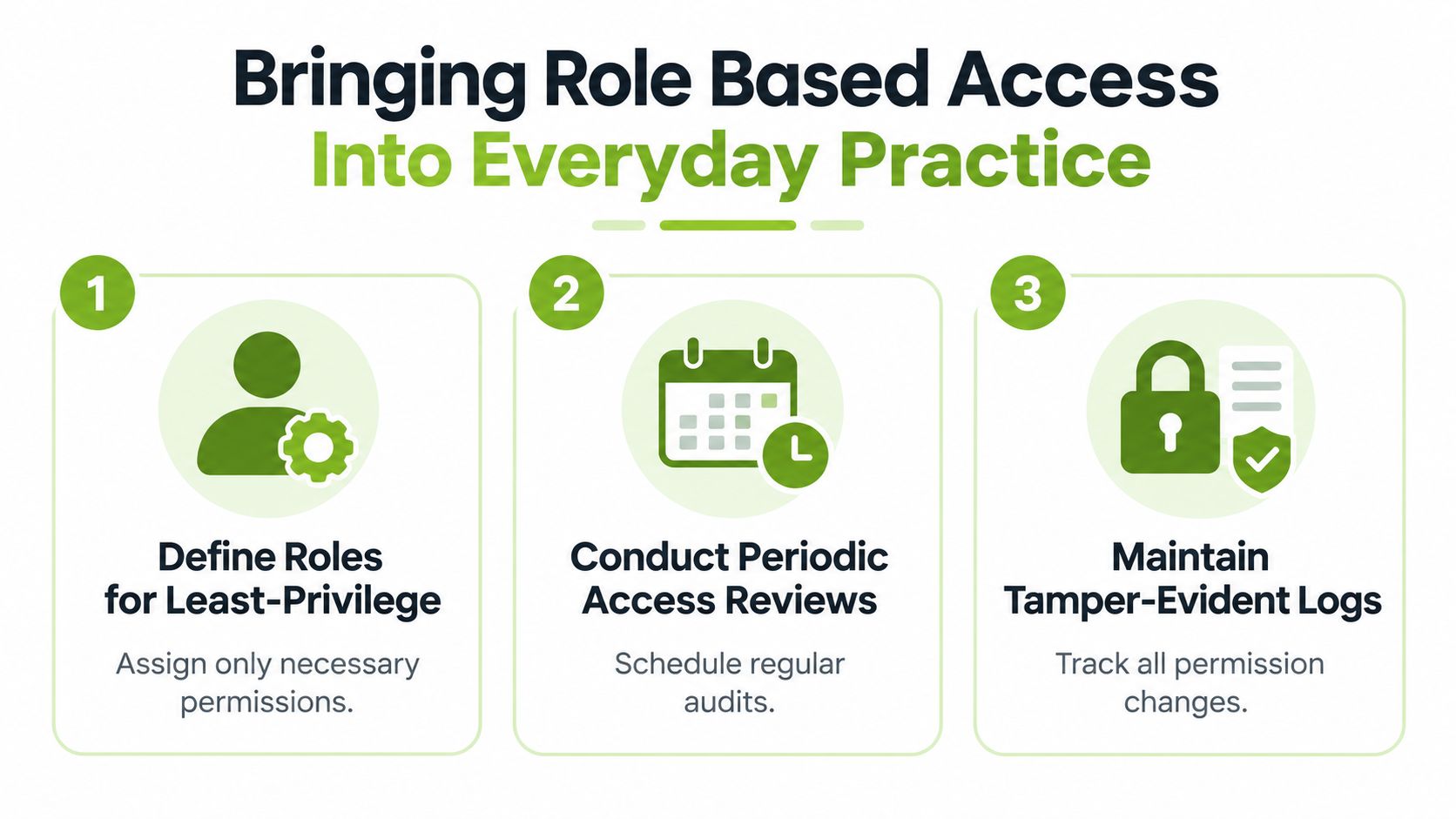
Three habits that keep the model useful
Define roles for least privilege: Give instructors the teaching permissions they need, not global administration. Keep data export, audit access, and sensitive research access separately controlled.
Conduct periodic access reviews: Recertify instructor roles quarterly, review external reviewer entitlements monthly, and revoke access immediately when HR flags a leaver.
Maintain tamper-evident logs: Record role assignments, permission changes, session elevation, exports, and administrative actions so reviewers can reconstruct what happened.
Role membership reports, last-login timestamps, and permission-difference views make these checks manageable. A review should answer who has access, why they have it, what they used, and when the assignment expires. Guidance on access control for nonprofits is also useful for smaller teams that need practical governance without a large security department.
Your next action is concrete. Export the current role list, tag every role as core, scoped, or candidate for removal, and schedule the first review meeting before the next term begins.
MEDIAL helps universities and corporate training teams connect LMS enrolments with controlled video access, while supporting media management, caption editing, live sessions, and course-based workflows. Visit MEDIAL to explore how its platform can support least-privilege role mapping and clearer access governance across your learning environment.
Comments