
Automated Transcription Services: A Practical Guide

Your lecture recordings are piling up faster than your team can caption them. A student needs access to last week's seminar, an accessibility deadline is approaching, and the video platform has produced captions that look helpful until a specialist term or regional accent changes the meaning of a sentence.
That's where automated transcription services fit. They convert speech in audio or video into text without requiring a human typist to create every line from scratch. The important question isn't whether automation is fast. It is whether the resulting text is suitable for search, study, publishing, or a regulated accessibility workflow.
UK educators and training teams need a practical way to make that decision. This guide explains how speech recognition works, how professionals measure errors, why microphones and accents matter, how UK accessibility and data-protection obligations affect procurement, and where human correction belongs in a realistic workflow.
What Automated Transcription Services Actually Do
A lecturer finishes a term with recordings stored across Zoom, Microsoft Teams, a camera system, and an LMS. The files contain valuable explanations, student questions, and demonstrations, but students can't search the spoken content and learners who need captions may face an immediate barrier.
An automated transcription service processes the audio track and produces written text. The software identifies speech, estimates where words occur, and may add punctuation, speaker labels, and timestamps. A human editor may then correct the first draft, depending on the service and the importance of the content.
The output can take several forms:
A raw transcript is a written record of spoken content. It may be useful for searching or editing, but it isn't automatically formatted for display.
Closed captions synchronise text with a video timeline and generally include relevant non-speech information, such as a significant sound or a speaker change.
Subtitles usually present dialogue as timed text. Depending on the use case, they may be designed for translation rather than accessibility.
A searchable transcript lets a learner or colleague find a word or phrase and jump to the matching point in the recording.
That distinction matters. A file can contain accurate words yet still need timing, speaker identification, formatting, or review before it works as an accessible caption track.
Practical rule: Treat automated output as a production component, not as a guarantee that the finished media is ready for every audience.
The UK media market shows how captioning has moved into routine delivery. Ofcom reported that 94.7% of responding providers offered subtitles in 2024, compared with 49% of providers in 2017, while the share of programme hours carrying subtitles on services that provided them reached 69.1% in 2024. Ofcom's 2024 access-services report shows a long-term expansion in both provider adoption and content coverage.
For a university or corporate learning team, the practical lesson is simple. Automation can help you handle a growing media library, but you still need a quality policy that says which content can use a first-pass transcript and which content needs correction before publication.
The Technology Behind Automated Transcription
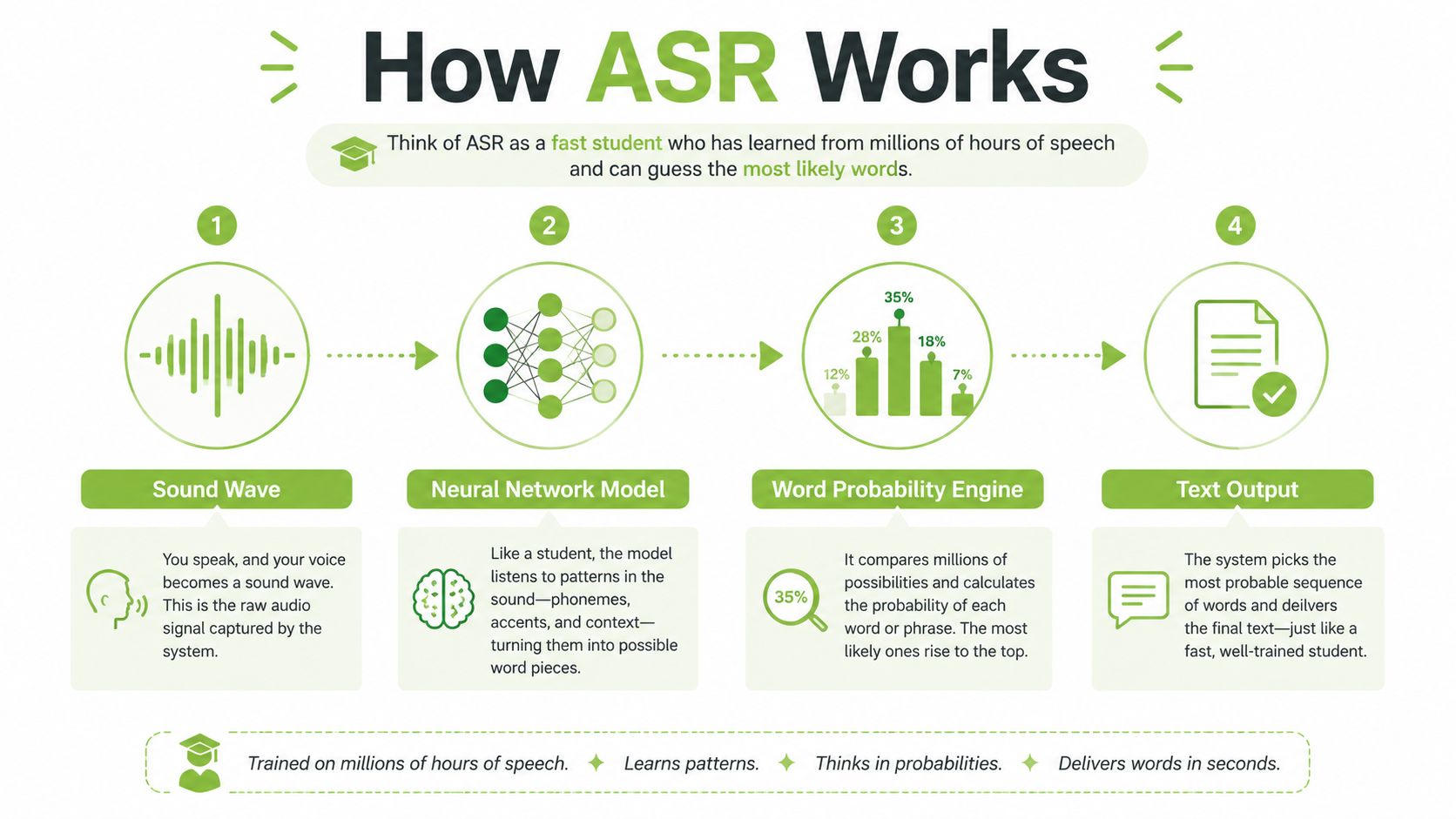
Automatic speech recognition, usually called ASR, works a little like a very fast student taking notes. The student has heard an enormous range of speech, knows that some word sequences are more likely than others, and uses the sound arriving in the room to make a rapid prediction.
The process normally follows a chain of decisions.
From sound to probable words
First, the service receives an audio signal. A close microphone, a laptop microphone, or a meeting-room recording gives the system different evidence. The software breaks the sound into small sections and analyses features associated with speech, including changing frequencies and pauses.
An acoustic or neural model then compares those features with patterns learned from speech. It isn't reading a perfect phonetic spelling. It's estimating which sounds could have produced the signal, while dealing with background noise, pronunciation differences, interruptions, and incomplete words.
The language model adds context. If the sound could represent two similar words, the system considers the surrounding sentence and chooses the sequence that seems most likely. That's why a familiar phrase may be transcribed well while a new technical term, surname, or place name is changed into an ordinary word.
The system doesn't hear meaning in the way a person does. It predicts text from sound and context, then presents the prediction as a transcript.
Turning text into a usable media asset
The first output may be plain text. A media platform can add timestamps so each phrase appears at the right point in a video, format it as an SRT or VTT caption file, and attach it to the player. It can also retain the transcript as a searchable layer, allowing users to find a concept without watching the entire recording.
Speaker detection is another separate task. In a seminar, the system may need to identify when the lecturer stops and a student begins speaking. If several people talk at once, the words and speaker assignments can both become unreliable.
The same ASR foundation can therefore support different products, from an AI caption generator for videos to a downloadable transcript for revision. The difference lies in timestamps, formatting, editing, speaker handling, and publication controls, not just in whether the service can turn speech into words.
How Accurate Is Automated Transcription Really
Marketing pages often use the word accuracy without explaining the test conditions. A more useful professional measure is word error rate, or WER. WER counts substitutions, missing words, and inserted words when a machine transcript is compared with a carefully prepared human reference. A lower WER is better.
UK-oriented meeting benchmarks report about 11–14% WER with close-microphone capture, roughly 19–25% WER with a single distant microphone, and sometimes more than 35% WER in uncontrolled room audio. The benchmark review links these differences to crosstalk, room acoustics, and overlapping speakers, rather than treating transcription quality as a fixed property of the software. The UK meeting transcription benchmark review explains why recording design has such a strong effect.
Word Error Rate by Recording Condition
Recording condition | Typical WER | What it means for captions |
|---|---|---|
Close microphone capture | 11–14% | A useful draft, but specialist terms and names still need checking |
Single distant microphone | 19–25% | More missing or substituted words, especially in discussion |
Uncontrolled room audio | Sometimes above 35% | High editorial risk for captions that students must rely on |
A WER of 15% means roughly one wrong word in every seven, although the practical impact depends on which words are wrong. A mistaken filler word may not matter. A changed negation, formula term, medication name, or assessment instruction can matter a great deal.
Accent is part of the test
Audio can be clean and still produce uneven results across speakers. In a police-interview study, Amazon Transcribe recorded 13.9% WER for Standard Southern British English in studio-quality audio and 19.2% WER for West Yorkshire English. With speech-shaped noise added, those results rose to 15.4% and 26.4%, respectively, as reported in the University of York automatic transcripts case study.
That gap is important for UK education and public-sector use. A service that performs well on one speaker may perform less well on a lecturer, student, witness, or colleague with a different regional accent.
Use recording practices that improve the input:
Place microphones close to speakers: Use a headset, lapel microphone, or individual channel where possible.
Reduce crosstalk: Ask participants to take turns, particularly during recorded discussions.
Control the room: Limit fans, projector noise, corridor sound, and reverberation.
Test typical content: Include your real accents, terminology, room layout, and speaker mix in a vendor trial.
Why Transcription Matters for Education and Training
A transcript does more than repeat a video in another format. It gives learners a way to find, revisit, read, quote, and reuse spoken information.
UK public-sector accessibility requirements created a clear operational deadline. The 2018 Digital Accessibility Regulations require pre-recorded video or audio content published by public-sector bodies from 23 September 2020 to be accessible. Guidance for UK universities states that captions and transcripts can meet the requirement when they're accurate, while live video less than 14 days old may be temporarily exempt and recordings published later still need captions and/or a transcript. The University of Glasgow's video accessibility guidance sets out that relationship between publication and accessibility.
That turns transcription into infrastructure. A university with thousands of recordings needs a repeatable process, not a last-minute manual rescue for every lecture.

What learners actually gain
A dyslexic student may understand a difficult explanation more easily by listening first, then reading the transcript while revising. A deaf or hard-of-hearing student may depend on captions to follow the lecture at all. A commuter may watch a muted training video on a phone, while another learner may search directly for the moment where a process or assessment rule was explained.
Search changes the learning experience. Instead of scrubbing through a long recording, a student can search for a term and move to the relevant timestamp. That supports revision, note checking, and independent study, particularly when a course contains demonstrations or detailed explanations that aren't fully represented in the slide deck.
For corporate learning teams, the same principle applies. A transcribed onboarding video can become part of a searchable knowledge base, while a recorded compliance briefing can be reviewed without requiring staff to replay the entire session. The value comes from making existing media easier to use, not from producing more media for its own sake.
Teams planning their process can use guidance on how to make videos accessible alongside a written review standard. The standard should identify who checks captions, when corrections are required, and how learners can report an error.
How to Evaluate an Automated Transcription Service
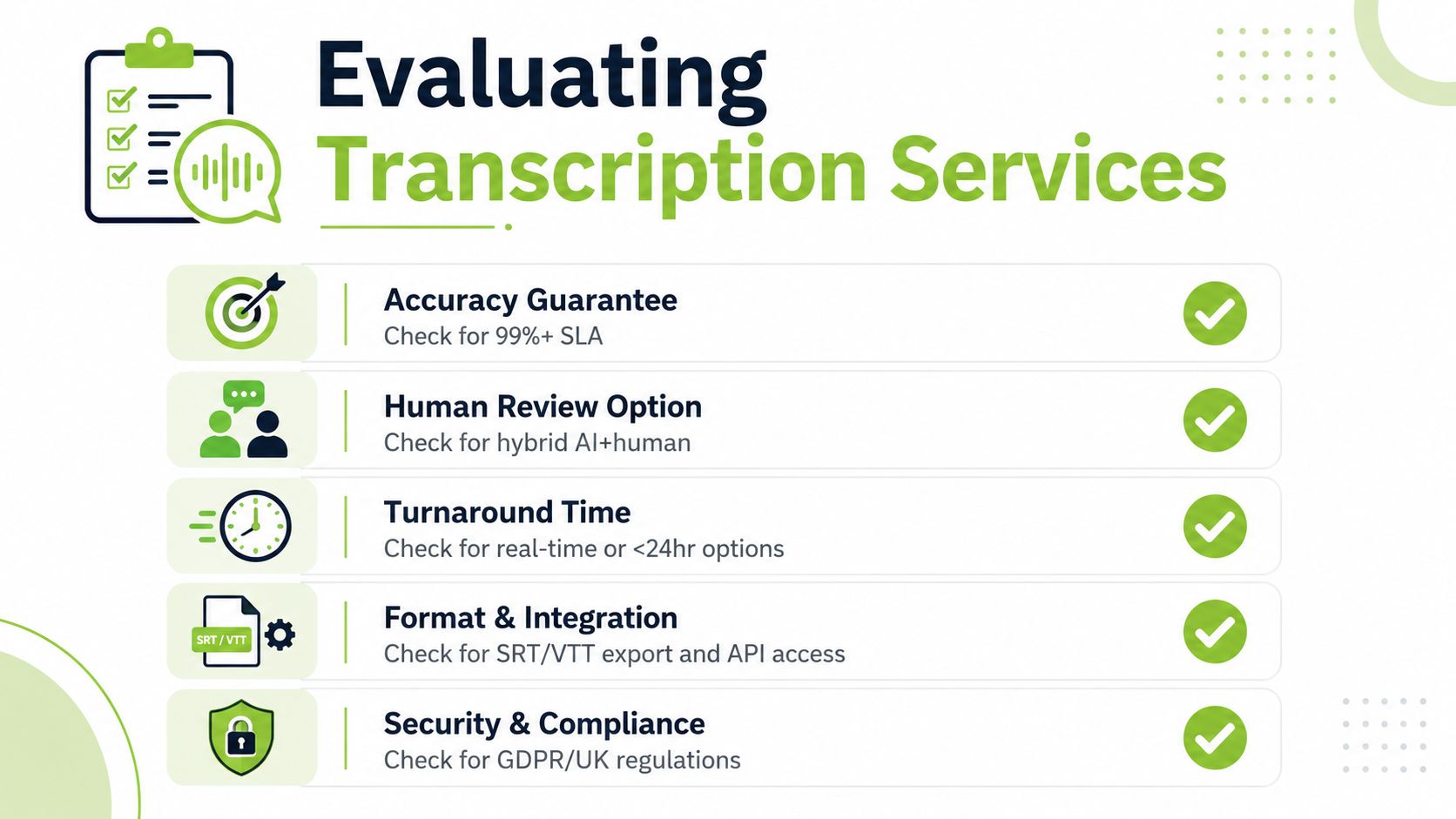
Choose a service by testing the workflow you need to operate, not by selecting the most impressive demonstration. Ask each provider to process representative recordings, including a lecture, a discussion with several speakers, and content containing specialist vocabulary.
A credible evaluation covers the entire path from upload to publication. It should include editing, export, permissions, retention, and integration with the LMS your staff already use.
Automated Transcription Evaluation Criteria
Criterion | What to look for | Why it matters |
|---|---|---|
Accuracy guarantee | A defined test method, service-level wording, and human review option | A headline claim means little without conditions or a correction route |
Human review | Browser editing, tracked changes, speaker correction, and terminology checks | High-stakes content needs a controlled way to fix errors |
Security and UK GDPR | Lawful-basis guidance, participant notices, access controls, retention and deletion settings | Audio and transcripts may contain personal data |
LMS integration | Support for Moodle, Canvas, Blackboard, or D2L Brightspace, plus reliable publishing | Fewer manual exports reduce missed updates and duplicated files |
File formats and export | Common audio and video inputs, SRT, VTT, text, and downloadable transcripts | Your captions must work across players and archives |
Turnaround | Clear processing times for recorded and live content | Speed affects whether learners receive access when they need it |
Total cost | Automatic processing, editing time, human correction, storage, and administration | The cheapest first pass may cost more if staff must repair every file |
The ICO treats AI systems that process personal data as a data-protection matter. Before recording, an institution should document its lawful basis, inform participants, and control how transcripts are stored, retained, accessed, and transferred. The ICO's AI and data protection guidance provides the relevant framework.
Procurement teams that need broader context can review how to find the right business transcription when comparing service models. For education-specific workflows, also examine video transcription services in relation to caption formats, review responsibilities, and LMS delivery.
An Example Workflow From Recording to Searchable Captions
A workable process starts before the lecturer presses record. Decide whether the session needs a draft transcript for internal search, reviewed captions for learning access, or a higher level of editorial control for regulated or sensitive content.
A four-stage operating model
Record or upload the session. A lecturer records a lecture, or a training manager uploads a file from Zoom or Microsoft Teams. The team checks that the audio is understandable and that participants received the required information about recording.
Generate a first-pass transcript. An AI-assisted platform processes the speech and creates timed captions plus transcript text. The draft gives the editor a starting point rather than a finished compliance decision.
Review terminology and names. An editor plays the recording alongside the text, corrects technical words, checks speaker changes, and fixes punctuation or timing that affects comprehension. A custom vocabulary list can help with recurring module terms, but it doesn't replace listening to the output.
Publish inside the course. The corrected captions appear with the video in Moodle or Canvas, while the transcript supports search and download. Students can locate a phrase without opening separate files or navigating between systems.
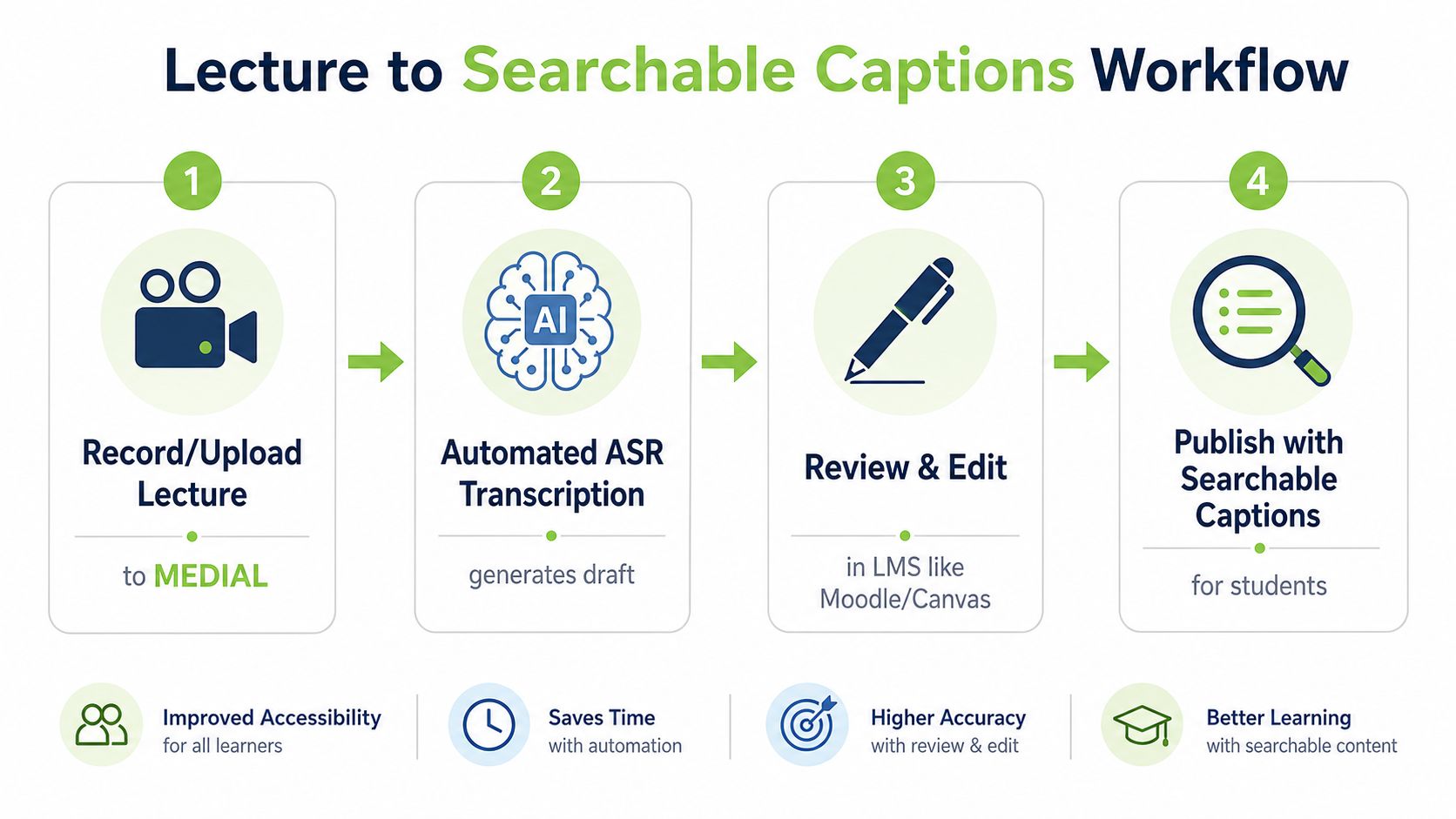
MEDIAL is one example of a platform that supports browser-based media management, AI-assisted caption generation, transcript downloads, LMS connections, and integrations with Zoom and Microsoft Teams. The useful design principle is centralisation: the person correcting the text should be able to work against the original media and publish the approved result without passing files through several disconnected tools.
The same transcript can support wider communication work after accessibility needs are met. Teams that want to turn video transcripts into blog posts should first remove spoken-language repetition, verify quotations, and obtain approval from the content owner. Repurposing is valuable only when the source transcript has been checked.
Common Pitfalls and How to Avoid Them
The most damaging assumption is that instant captions are automatically compliance-grade. UK university guidance notes that automatic captions can be around 70–80% accurate in some teaching contexts, with results varying by accent and recording quality, as described in the University of Greenwich's video captioning guidance. That may be adequate for search or informal study support, but it can be risky as the sole accessibility measure.
Use a simple fix-paired quality routine:
Publishing without review: Mark accessibility-critical recordings for human correction before release.
Ignoring regional accents: Test speakers from the communities your institution serves, then add vocabulary and review rules for recurring problem areas.
Using distant microphones: Place the microphone near the speaker or record separate channels for panel and seminar participants.
Forgetting specialist terms: Give editors a glossary of names, technical language, module codes, and place names.
Treating speed as quality: Measure corrections, missed speaker changes, and timing problems, not just processing time.
Skipping consent and information notices: Tell participants that recording and transcription will occur, explain the purpose, and apply your documented data-protection process.
Live captions deserve their own threshold. The BBC requires subtitlers to consistently achieve 97% live accuracy before they're allowed on air, and reports that live subtitling currently averages 98%, according to the BBC submission published by Ofcom. Automated outputs for teaching or corporate events should be tested against the seriousness of the use case, rather than accepted because they appeared quickly.
Frequently Asked Questions About Automated Transcription
Is automated transcription accurate enough for legal accessibility compliance?
It can be a useful first pass, but a provider's general accuracy claim does not prove that a particular recording meets an accessibility obligation. For learners who depend on captions, inspect the transcript and budget human correction where errors change meaning, obscure specialist terms, misidentify speakers, or impede comprehension. Treat the output like notes from a fast assistant, not a finished access service.
How do UK accents affect transcription results?
Regional accents can produce materially different results, even with good recording equipment. The comparison between Standard Southern British English and West Yorkshire English shows why a buyer should test representative speakers before committing. Use close microphones, reduce background noise, add recurring vocabulary, and review captions before publication. A clean sample from one lecturer cannot stand in for every course, campus, or community your institution serves.
What does recorded meeting transcription mean for GDPR and consent?
A transcript may contain names, opinions, decisions, and other personal data. Recording and transcription should therefore follow the organisation's data-protection process. Establish a lawful basis, tell participants what will happen, restrict access, set retention rules, and control transfers and deletion, following the ICO guidance on AI and data protection cited earlier.
How do automatic and human-corrected options compare in institutional purchasing?
Automatic processing suits large volumes and quick first drafts. Human-led or hybrid services provide review capacity when accuracy, turnaround, and accessibility obligations cannot be treated as interchangeable. The CHESS framework distinguishes live transcripts, captions, and higher-cost elite live captions, giving buyers a useful way to match service level to risk. UK higher-education procurement includes both approaches through the CHESS Verbit framework, while government plans for AI-generated court transcripts remain a controlled pilot with delivery from Spring 2027.
Start with real lectures, accents, room conditions, and institutional terminology. Measure the corrections required, identify content that needs human review, and document the workflow before expanding it across the media library.
MEDIAL can help education and training teams manage video, generate AI-assisted captions, edit transcripts in a browser, and publish accessible media through LMS workflows. Visit MEDIAL to explore the platform and arrange a trial or personalised demonstration for your institution.
Comments